

The simplest way to connect Regolo Core Models API to Botpress is to use Execute Code Card and call Regolo’s OpenAI-compatible API endpoints to use Core Models or any other open source model you deploy on our infrastracture.
This approach works well when we want a fast, no-deploy integration inside a single workflow, because Execute Code runs custom JavaScript inside a node and is explicitly designed for one-off logic and external API calls.
Execute Code Cards allow you to generate one-time code snippets at specific points of workflow. For reusable code snippets, use Actions.
What you get with this tutorial
- Access to all Regolo.ai Core models (chat completion)
- Zero data retention: we don’t retain your contents
- 100% Italian infrastructure, GDPR-compliant, EU AI Act-aligned
Prerequisites
1. Create your Regolo.ai API key
- Go to https://regolo.ai and create an account
- From the dashboard, generate a new API key
- Keep it handy for the next step
2. Configure the Secret in Botpress
- Open your bot in Botpress Studio
- Go to Chatbot Settings → go to Settings in the Sidebar, on the left (click on settings icon)
3. Bot Settings shown: search “Configuration Variables”
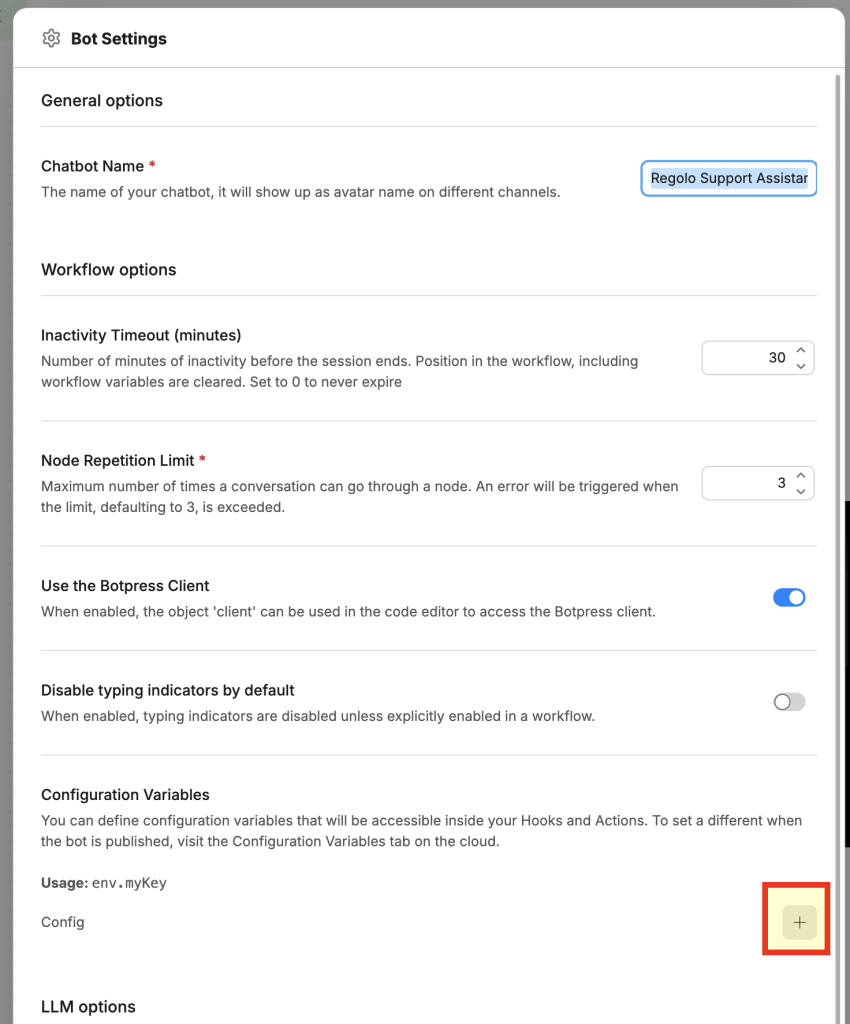
4. Choose type Secret, name: REGOLO_API_KEY
5. Paste your API key into the value field
6. Save secrets variable are never visible in logs or in the emulator
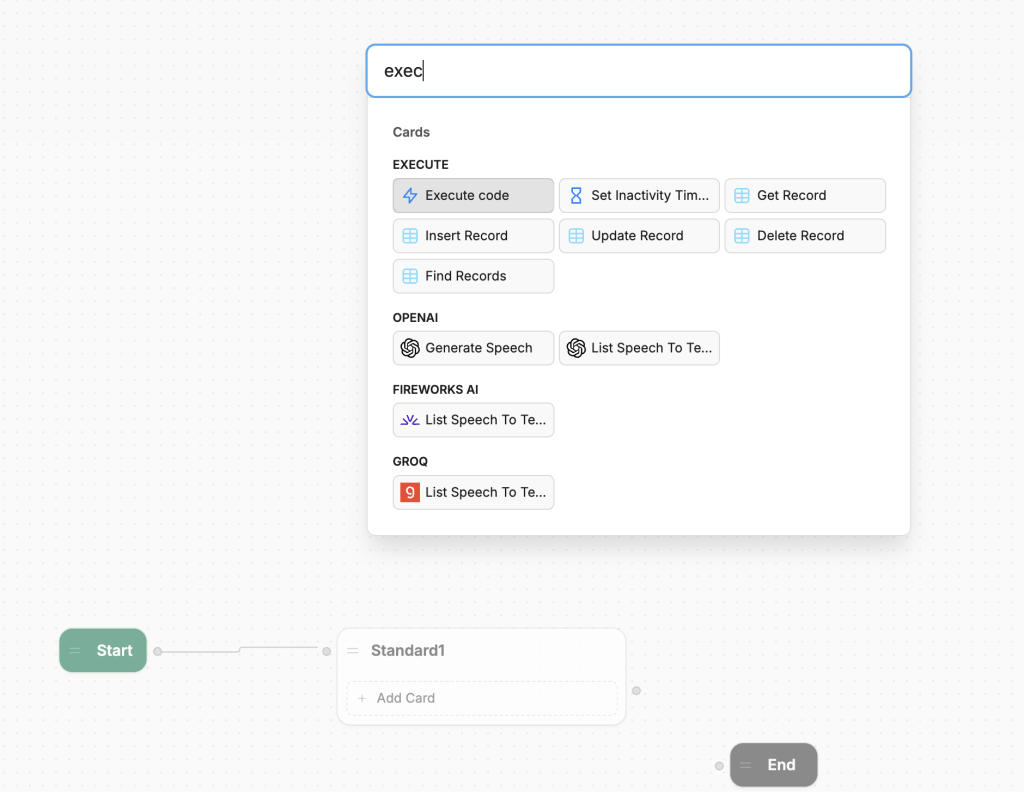
3. Add the Standard Node and type Execute Node
How to use the script
Step 1 — Add the Execute Code Card
- Open the workflow where you want to integrate Regolo.ai
- In a node, click + Add Card
- Select Execute Code
- Disable generative AI by clicking the ✨ icon in the card (it must be gray, not active)
Step 2 — Paste the script
Copy the content of regolo-execute-code.js and paste it into the card editor.
Step 3 — Choose the model
In the file, on the line:
const MODEL_ID = "Qwen/Qwen3.5-72B-Instruct";Code language: Bash (bash)Replace it with the model ID you want to use (see the list of Core Models available).
Step 4 — Customize the system prompt
Edit the systemPrompt variable to fit your use case:
const systemPrompt = `You are a technical support specialist.
You only answer questions about product X.`;Code language: Bash (bash)
Step 5 — Use the response in the workflow
After the Execute Code Card, add a Text Card and use:
{{workflow.aiResponse}}Code language: Bash (bash)Practical example: multilingual FAQ bot
Scenario: a bot that answers frequently asked questions for an e-commerce store, in Italian.
Botpress workflow
[Start] → [Capture Input] → [Execute Code: Regolo] → [Text Card: answer] → [End]Code language: Bash (bash)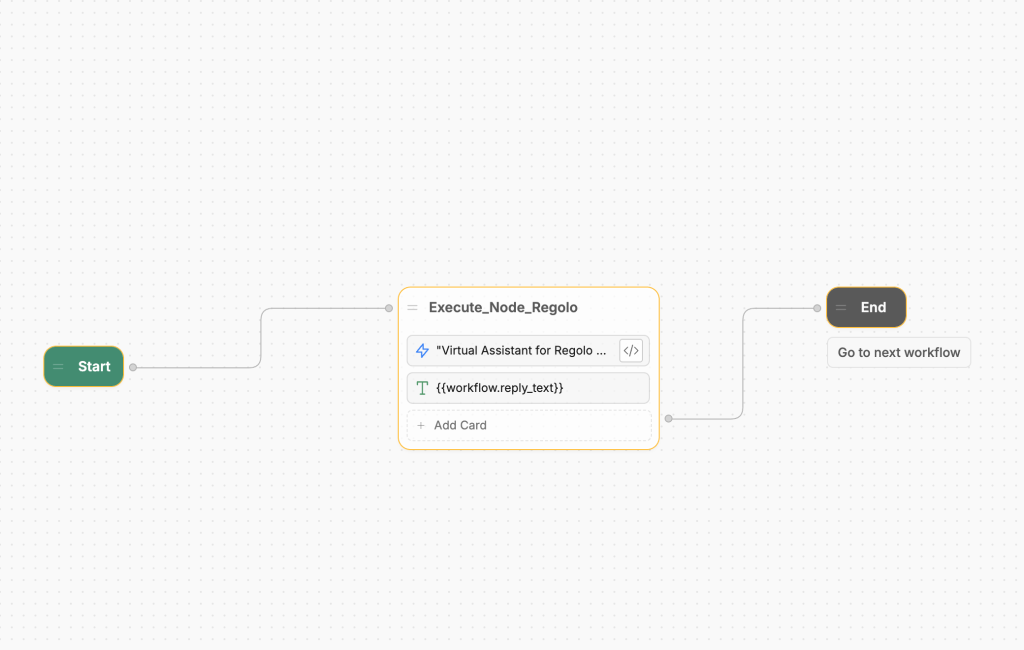
Script
const REGOLO_BASE_URL = 'https://api.regolo.ai/v1'
const MODEL_ID = 'mistral-small-4-119b'

const apiKey = workflow.ACCESS_TOKEN
const userMessage = event.preview || event.text || ''

if (!userMessage || typeof userMessage !== 'string') {
  workflow.reply_text = 'Sorry, but your question is not valid. Please try again.'
  return
}

const systemPrompt = 'You are the virtual assistant at Regolo, an LLM service provider. Please only answer questions about Regolo and its services.'

try {
  const response = await axios.post(
    REGOLO_BASE_URL + '/chat/completions',
    {
      model: MODEL_ID,
      messages: [
        { role: 'system', content: systemPrompt },
        { role: 'user', content: userMessage }
      ],
      temperature: 0.5,
      max_tokens: 512,
    },
    {
      headers: {
        Authorization: 'Bearer ' + apiKey,
        'Content-Type': 'application/json'
      }
    }
  )
  workflow.reply_text = response.data.choices[0].message.content
} catch (err) {
  const statusCode = err.response ? err.response.status : 'network'
  workflow.reply_text = 'Sorry, the Regolo API returned error ' + statusCode + '. Please check your API token.'
}Code language: JavaScript (javascript)
Text Card after the Execute Code Card
{{workflow.aiResponse}}Code language: Bash (bash)Advanced example: multi-turn conversation with history
To preserve conversation history for example in multi-step technical support, you can pass previous messages:
const REGOLO_BASE_URL = "https://api.regolo.ai/v1";
const MODEL_ID = "Qwen/Qwen3.5-72B-Instruct";
const apiKey = env.REGOLO_API_KEY;

// Retrieve history from workflow variable (starts blank)
// workflow.chatHistory deve essere di tipo Array (Object in Botpress)
const history = workflow.chatHistory || [];

// Add new user message
history.push({ role: "user", content: event.preview });

const messages = [
  { role: "system", content: "You are a helpful and precise technical assistant." },
  ...history
];

const response = await axios.post(
  `${REGOLO_BASE_URL}/chat/completions`,
  {
    model: MODEL_ID,
    messages,
    temperature: 0.7,
    max_tokens: 1024
  },
  {
    headers: {
      "Authorization": `Bearer ${apiKey}`,
      "Content-Type": "application/json"
    }
  }
);

const assistantReply = response.data.choices[0].message.content;

// Save the answer
history.push({ role: "assistant", content: assistantReply });
workflow.chatHistory = history;
workflow.aiResponse = assistantReply;Code language: JavaScript (javascript)
Error handling
It is good practice to wrap the API call in a try/catch block to handle network errors or rate limits
try {
  const response = await axios.post(/* ... */);
  workflow.aiResponse = response.data.choices[0].message.content;
} catch (error) {
  // Fallback message to user
  workflow.aiResponse = "Sorry, an error occurred. Please try again in a few seconds.";
  // Optional: Log the error code for debugging
  workflow.errorCode = error?.response?.status?.toString() || "unknown";
}Code language: JavaScript (javascript)
FAQ
Is this a native Botpress integration?
No. This is a lightweight workflow-level integration built with Execute Code, not a packaged Botpress Hub integration.
That is exactly why it is fast to adopt: there is no deploy step, no SDK packaging, and no extra integration lifecycle to manage inside Botpress Cloud.
Why use Regolo this way instead of a marketplace provider?
Because Regolo already follows the OpenAI API pattern, we can plug it into Botpress with a very small change in code and keep the request format familiar.
That makes the guide useful even for teams that already know OpenAI-style payloads and only want to switch endpoint, key, and model selection.
Where should we keep the code?
The best pattern is to keep the article lightweight and point to a GitHub repository in the Regolo organization for the latest snippets and updates.
That gives us versioned examples, easier maintenance, and a cleaner article that does not become outdated every time a model name or prompt changes.
Would you like me to turn this into a publication-ready Regolo article with meta title, slug, intro, GitHub CTA, and final copy in Markdown?
Start your free 30-day trial at regolo.ai and deploy LLMs with complete privacy by design.
👉 Talk with our Engineers or Start your 30 days free →
- Discord – Share your thoughts
- GitHub Repo – Code of blog articles ready to start
- Follow Us on X @regolo_ai
- Open discussion on our Subreddit Community
Built with ❤️ by the Regolo team. Questions? regolo.ai/contact or chat with us on Discord
Before exposing your bot to real users, make sure you understand the GDPR risks in customer support chatbots when handling PII.