
Are you tired of using outdated simulation tools that can’t handle the complexity of your projects? Do you want to unlock the full potential of multi-agent simulation without breaking the bank? Look no further than MiroFish, the next-generation swarm intelligence engine that’s taken the world by storm.
With 31k+ GitHub stars and a community of dedicated developers, MiroFish is the perfect solution for anyone looking to drop thousands of AI agents into a digital sandbox, watch them interact, and extract valuable insights. But what really sets MiroFish apart is its seamless integration with regolo.ai, the ultimate OpenAI-compatible endpoint for fast, cheap, and GDPR-compliant LLM inference.
In this comprehensive guide, we’ll walk you through every step of the process, from cloning MiroFish to running your first simulation and tuning for performance. By the end of this tutorial, you’ll have:
- MiroFish running locally (source or Docker)
- All LLM calls routed through regolo.ai’s OpenAI-compatible API
- A working simulation using a real-world seed document
- Practical tips for controlling token spend and optimizing your workflow
What you’ll build
By following this tutorial, you’ll gain hands-on experience with MiroFish and regolo.ai, and learn how to:
- Configure MiroFish to point at regolo.ai
- Run your first simulation using a real-world seed document
- Tune for performance and optimize your workflow
- Leverage regolo.ai’s pay-as-you-go pricing to control token spend
Prerequisites
Before you begin, make sure you have the following tools installed:
| Tool | Minimum version | Check |
|---|---|---|
| Node.js | 18+ | node -v |
| Python | 3.11 – 3.12 | python --version |
| uv | latest | uv --version |
| Docker (optional) | latest | docker -v |
| A regolo.ai account | — | dashboard.regolo.ai |
| Git | latest | git --version |
Step 1 — Get your regolo.ai API key
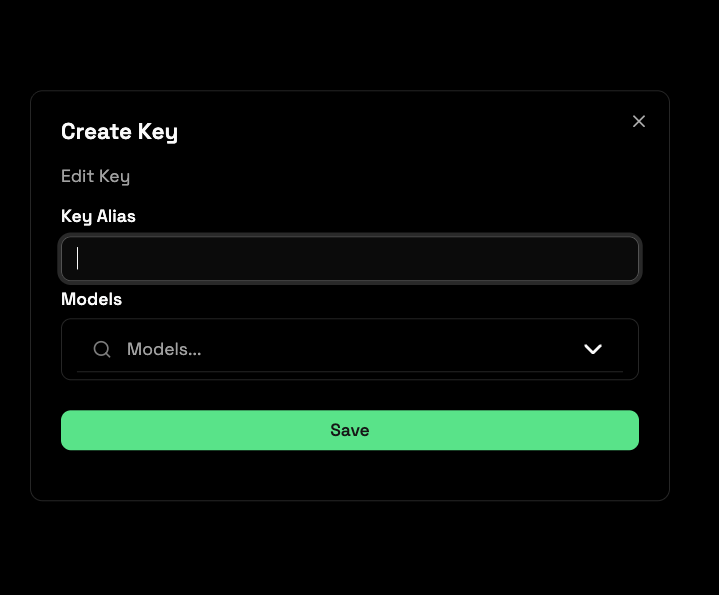
- Head to dashboard.regolo.ai and sign up or log in.
- Open API Keys → Generate New Key.
- Copy the key and keep it safe — you’ll paste it into
.envin a moment.
Your base URL for all API calls is:
https://api.regolo.ai/v1Code language: JavaScript (javascript)This endpoint is fully OpenAI SDK-compatible, so any tool that speaks openai already speaks regolo.ai.
Step 2 — Choose your model
MiroFish runs a lot of short, structured LLM calls (persona generation, memory updates, tool-calling for the ReportAgent). You want a model that:
- Has solid instruction-following for structured JSON output
- Is fast enough that hundreds of agent calls per round don’t stall the simulation
- Handles long context for GraphRAG-enriched prompts
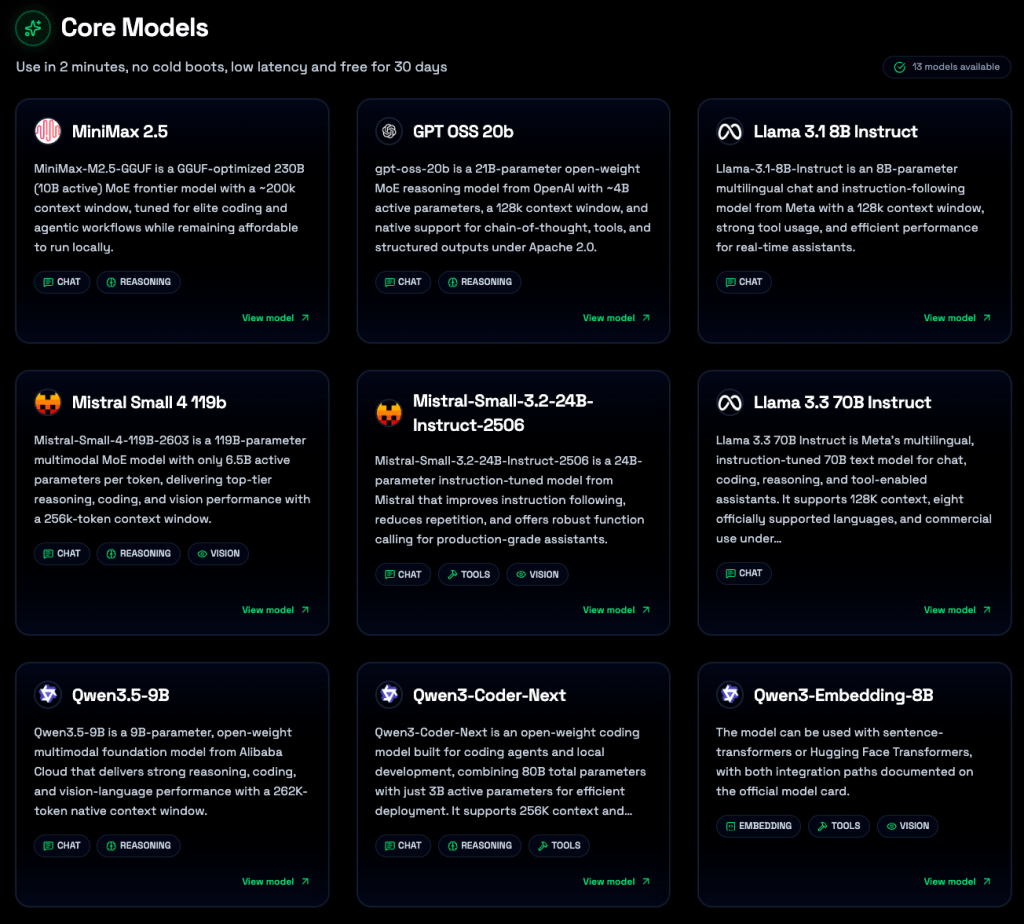
Good starting points available on regolo.ai:
| Use case | Recommended model |
|---|---|
| General simulation (dev/test) | Llama-3.1-8B-Instruct |
| Balanced quality + speed | Llama-3.3-70B-Instruct or qwen3-8b |
| Maximum reasoning quality | gpt-oss-120b or qwen3.5-122b |
Browse the full list at regolo.ai/models-library
Token budget tip: Start withLlama-3.1-8B-Instructfor your first test run. It’s fast and inexpensive to iterate on. Switch to a larger model once your simulation structure is validated.
Step 3 — Clone MiroFish
git clone https://github.com/666ghj/MiroFish.git
cd MiroFishCode language: Bash (bash)
Step 4 — Configure the environment
MiroFish reads all its runtime settings from a single .env file. A template ships with the repo:
cp .env.example .envCode language: Bash (bash)Open .env and update the LLM section to point at regolo.ai:
# ─── LLM API ───────────────────────────────────────────────────────────────
# MiroFish supports any OpenAI SDK-compatible endpoint — regolo.ai is drop-in.
LLM_API_KEY=your_regolo_api_key_here
LLM_BASE_URL=https://api.regolo.ai/v1
LLM_MODEL_NAME=Llama-3.3-70B-Instruct

# ─── Mem0 — open-source agent memory layer ─────────────────────────────────
# No external account needed. Mem0 runs locally using SQLite + Qdrant in-memory.
# It uses regolo.ai for both the LLM reasoning and the embedding model.
# https://github.com/mem0ai/mem0
MEM0_LLM_MODEL=Llama-3.3-70B-Instruct
MEM0_EMBEDDER_MODEL=Qwen3-Embedding-8BCode language: Bash (bash)
Replace your_regolo_api_key_here with the key from Step 1. For the memory layer, no additional API key is needed — Mem0 runs entirely locally and uses regolo.ai’s embedding model (Qwen3-Embedding-8B) for vector storage.
Step 5 — Install dependencies
MiroFish wraps all setup commands through npm scripts, so you don’t need to manage Python virtualenvs manually:
# Installs Node deps (root + frontend) AND Python deps (backend virtualenv)
npm run setup:allCode language: Bash (bash)
If you prefer step-by-step:
npm run setup           # Node deps only
npm run setup:backend   # Python deps only (creates .venv via uv)Code language: Bash (bash)
Expected output on success:
✔ Node dependencies installed
✔ Frontend dependencies installed
✔ Backend virtual environment created (.venv)
✔ Python dependencies installedCode language: CSS (css)
Step 6 — (Alternative) Docker deployment
If you’d rather skip local dependency management, Docker is the quickest path to a running instance:
cp .env.example .env
# Fill in LLM_API_KEY, LLM_BASE_URL, LLM_MODEL_NAME, ZEP_API_KEY as above

docker compose up -dCode language: CSS (css)
Docker Compose maps:
– Port 3000 → frontend
– Port 5001 → backend API
The image pulls from Docker Hub and reads .env from the project root automatically.
Step 7 — Start the services
# Start frontend + backend together
npm run devCode language: Bash (bash)
Or independently:
npm run backend    # http://localhost:5001
npm run frontend   # http://localhost:3000Code language: Bash (bash)
Open http://localhost:3000 in your browser. You should see the MiroFish dashboard.
Step 8 — Run your first simulation
MiroFish’s input is a seed document — any structured text that describes a real or fictional scenario: a news article, a fintech market report, a policy draft, a novel chapter. The system extracts entities, builds a knowledge graph, generates agent personas, and begins running interaction rounds.
For your first test, use a short, dense document — a 2-3 page news analysis works well.
Simulation workflow inside MiroFish
| Phase | What happens | LLM calls |
|---|---|---|
| Graph Building | Entity/relationship extraction, GraphRAG construction | Medium |
| Environment Setup | Persona generation for each agent, memory injection | High |
| Simulation | Agents interact round by round, memory updates | Very high |
| Report Generation | ReportAgent queries the simulated world with tool calls | Medium |
| Deep Interaction | You chat with any agent or the ReportAgent | On demand |
Token management in practice
Simulation round count is the primary cost lever. The MiroFish docs suggest fewer than 40 rounds for an initial run. With regolo.ai’s pay-as-you-go pricing:
- 40-round run on
Llama-3.3-70B-Instruct≈ 2–4M tokens - 40-round run on
Llama-3.1-8B-Instruct≈ same rounds, significantly lower cost
regolo.ai’s Core plan includes 20 million tokens per day — enough for several full simulation cycles during development. The Boost plan (50M tokens/day) covers production-grade, high-round simulations.
Step 9 — Verify the connection and memory layer
Before running a full simulation, verify that both regolo.ai and the Mem0 memory layer are working correctly. From the project root:
The companion starter kit ships two dedicated scripts — verify_connection.py and verify_memory.py — that run these checks automatically. See the Starter kit section below.
Quick inline test (from the MiroFish backend venv):
source backend/.venv/bin/activate

python - <<'EOF'
from openai import OpenAI
import os

client = OpenAI(
    api_key=os.environ.get("LLM_API_KEY") or "your_regolo_api_key_here",
    base_url="https://api.regolo.ai/v1",
)

response = client.chat.completions.create(
    model="Llama-3.3-70B-Instruct",
    messages=[{"role": "user", "content": "Reply with: Regolo is working."}],
    max_tokens=20,
)
print(response.choices[0].message.content)
EOF
Code language: Bash (bash)
Expected output:
Regolo is working.If you see an authentication error, double-check that LLM_API_KEY in your .env matches the key in your regolo.ai dashboard.
Why regolo.ai for MiroFish?
Multi-agent simulation isn’t just computationally expensive — it’s also data-sensitive. The seed documents you feed into MiroFish often contain proprietary research, internal reports, or personally identifiable information.
With regolo.ai you get:
- Zero data retention — your prompts and completions are never stored or used for training
- EU-based infrastructure — all inference runs on Italian data centers, GDPR-compliant by design
- No execution time limits — long-running simulations won’t be killed mid-run
- OpenAI-compatible API — swapping the base URL is the only change required; no code modifications
- Green compute — 100% carbon-free energy, relevant if your org tracks AI environmental footprint
Troubleshooting
The backend starts but simulation fails immediately
Check the backend logs (npm run backend) for the actual error. The most common cause is a missing or incorrect LLM_API_KEY. Confirm the key is active in your regolo.ai dashboard.
<think> tags appear in agent responses
This is handled by MiroFish’s backend (the fix: resolve 500 error caused by <think> tags fix in the latest release). Make sure you’re on the latest commit: git pull origin main.
Simulation is very slow
Switch to a smaller/faster model (e.g., Llama-3.1-8B-Instruct or qwen3-8b) for development runs. Reserve large models for final production simulations.
Mem0 vector store errors
Mem0 uses Qdrant in-memory by default. For persistence across restarts, configure a local Qdrant instance in mem0_config.py (included in the starter kit). Embedding errors usually mean the Qwen3-Embedding-8B model name doesn’t match — run list_models.py from the starter kit to confirm available model IDs.
Resources
- MiroFish on GitHub or MiroFish live demo
- regolo.ai models library
- Regolo Docs
- Mem0 — open-source agent memory (GitHub)
- OASIS — the simulation engine powering MiroFish
Unlock the full potential of multi-agent simulation with MiroFish and regolo.ai. Start your 30-day free trial at regolo.ai — no credit card required.