
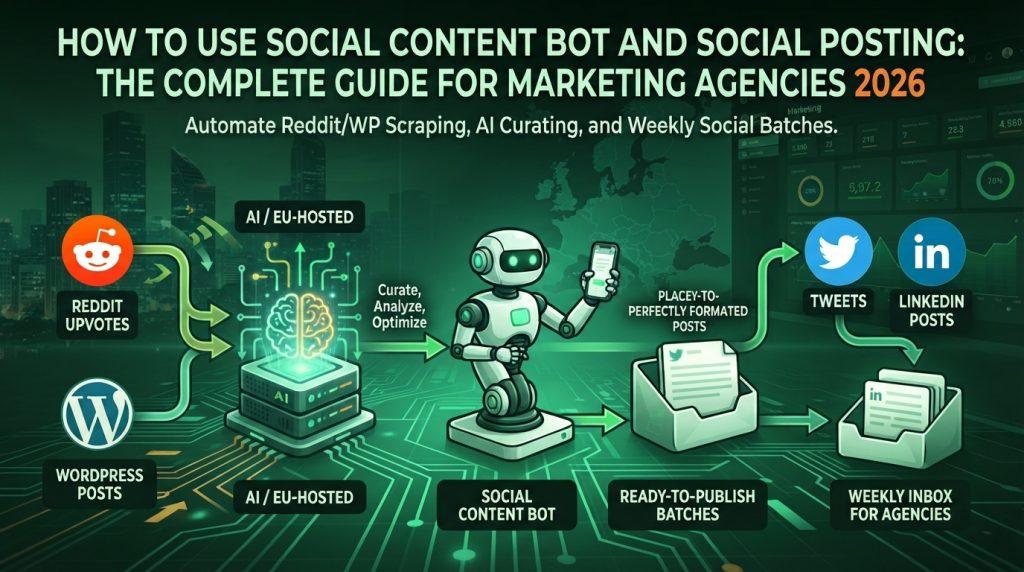
Here’s how to set up an open-source bot that scrapes your Reddit upvotes and WordPress posts, feeds them through an EU-hosted AI, and drops a batch of ready-to-publish tweets and LinkedIn posts into your inbox every week.
Table of Contents
- What Social Content Bot Actually Does
- Why Regolo
- Prerequisites
- Step 1: Get Your Regolo API Key
- Step 2: Clone and Install the Bot
- Step 3: Set Up Reddit API Access
- Step 4: Connect Your WordPress Site
- Step 5: Configure SMTP for Email Delivery
- Step 6: Wire It All Together in .env
- Step 7: First Run and Dry Run
- Choosing the Right Model for Social Content
- Customizing Prompts for Your Brand Voice
- Advanced: Multi-Client Workflows for Agencies
- Troubleshooting Common Issues
- Cost Breakdown
- FAQ
What Social Content Bot Actually Does
Social Content Bot is a Python script (github.com/Mte90/social-content-bot) that does three things in sequence:
- Scrapes — Pulls your recently upvoted Reddit posts (via the Reddit API) and your recent WordPress blog posts (via the REST API). Optionally fetches your own tweets.
- Generates — Feeds each content item to an OpenAI-compatible LLM with platform-specific prompts. Each item gets multiple variations for every social network.
- Delivers — Sends an email with the recap including the various prompts ready for copy and paste.
That’s it. No scheduling, no auto-posting. It’s a suggestion engine—review the drafts, pick the ones you like, publish manually or through your scheduler. Which, honestly, is the right workflow. You don’t want an unattended bot firing off tweets at 3 AM.
The bot runs async by default (parallel API calls), has automatic retry with exponential backoff, rotating log files, and a rich terminal UI. It’s not a toy.
Why Regolo
Three reasons, and they’re all practical:
- Data stays in Europe. Regolo’s infrastructure is 100% EU-hosted. Zero data retention by default. If you’re handling client data for European marketing agencies—and you probably are—this matters for GDPR compliance. Your client’s Reddit activity and blog content never leave the EU.
- It’s a drop-in replacement. The only config change: swap
OPENAI_API_BASEfromhttps://api.openai.com/v1tohttps://api.regolo.ai/v1. Same API format, same SDK compatibility. Social Content Bot doesn’t care who the provider is—it just POSTs to the/chat/completionsendpoint.
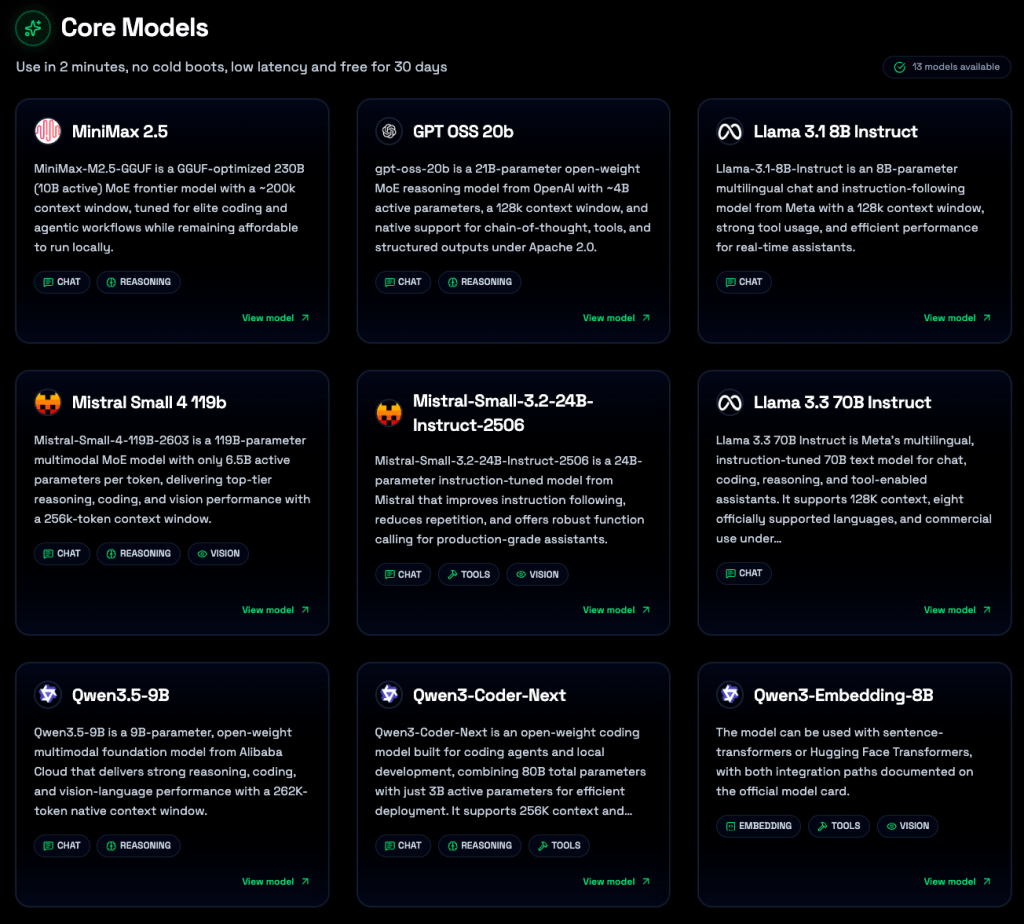
- Comparable quality at lower cost. Regolo hosts open-weight models like Llama 3.3 70B, Qwen 3.5, and GPT-OSS variants. For social media copywriting—not medical diagnosis, not legal reasoning—these models are more than adequate. And they’re cheaper.
Prerequisites
Before you start, grab these:
- Python 3.9+ — check with
python3 --version - Reddit account with API credentials (free)
- WordPress site with REST API enabled (most sites have this by default)
- Regolo.ai account — sign up at dashboard.regolo.ai
- SMTP server — Gmail works fine, or any provider with app password support
If you’re running this for multiple clients (agency setup), you’ll need separate Reddit/WordPress credentials per client but can share the same Regolo API key.
Step 1: Get Your Regolo API Key
Head to dashboard.regolo.ai, create an account, and navigate to the Virtual Keys section. Generate a new API key.
Copy it. You’ll need it in Step 6.
Regolo gives you a 30-day free trial with full access. No credit card upfront.
Step 2: Clone and Install the Bot
git clone https://github.com/Mte90/social-content-bot.git
cd social-content-bot
uv pip install -e .Code language: Bash (bash)
Or if you don’t have uv:
pip install -e .Code language: Bash (bash)Either way installs the package in editable mode, plus all dependencies. Takes about 15 seconds.
Step 3: Set Up Reddit API Access
Go to Reddit App Guide and create a new app:
- Click “Create App” or “Create Another App”
- Choose “script” as the app type
- Name it whatever you want (e.g.,
SocialContentBot) - Set the redirect URI to
http://localhost:8080(not used for script apps, but Reddit requires it) - Note your Client ID (the string under the app name, looks like
abc123xyz) and Client Secret
Important: the bot needs your Reddit username and password too—this is for accessing your upvoted posts, which is a private endpoint. Reddit will send a 2FA prompt the first time; approve it from your phone, then the bot can run unattended afterward.
Step 4: Connect Your WordPress Site
For public sites, you only need the site URL. But if you want access to draft posts or the site is private, set up an Application Password:
- Log into WordPress Admin
- Go to Users → Profile
- Scroll to Application Passwords
- Enter a name (like “Social Content Bot”) and click “Add New Application Password”
- Copy the generated password—it only shows once
Step 5: Configure SMTP for Email Delivery
Gmail app password (the thing everyone gets wrong)
Gmail doesn’t let you use your regular password for SMTP anymore, you need a 16-character App Password:
- Enable 2-Factor Authentication on your Google Account — this is mandatory, App Passwords won’t appear without it
- Go to Google Account Security
- Search for “App Passwords” and create one for “Mail”
- Copy the 16-character string (looks like
abcd efgh ijkl mnop) and paste it intoSMTP_PASSWORD— spaces don’t matter
EMAIL_FROMvsSMTP_USERNAME: these are usually the same, but they don’t have to be.SMTP_USERNAMEis what you authenticate with.EMAIL_FROMis what recipients see. If you want the email to come fromnewsletter@yourblog.combut authenticate asyou@gmail.com, set both.
Other SMTP providers
| Provider | SMTP Server | Port | Notes |
|---|---|---|---|
| Gmail | smtp.gmail.com | 587 | Requires app password + 2FA |
| Outlook / Microsoft 365 | smtp-mail.outlook.com | 587 | Regular password works for personal accounts |
| Yahoo | smtp.mail.yahoo.com | 587 | Requires app password |
| Fastmail | smtp.fastmail.com | 587 | Use your Fastmail password |
| Self-hosted / Postfix | your.domain.com | 587 | Depends on your TLS config |
What the Email Digest Looks Like
Once SMTP is configured, every run sends a styled HTML email with the generated content suggestions. The digest is not the final posts — it’s a curated preview for you or your team to review before publishing.
The email has three content sections, one per source:
- Reddit suggestions — pulled from your monitored subreddits
- WordPress suggestions — from your WordPress REST API
- LinkedIn suggestions — repurposed from your Twitter account or from WordPress
Each suggestion includes:
- The platform badge (Reddit / WordPress / LinkedIn)
- The full generated text (tweet-length for Twitter, longer for LinkedIn)
- 3–5 suggested hashtags
- A link to the source item (Reddit post URL, WordPress post URL, tweet link)
- A “Why it works” blurb explaining the angle
- A suggested image prompt (for AI image generation)
If all suggestion lists are empty (nothing met the quality threshold), the email is skipped and you’ll see a warning in the logs instead.
Dry-run mode (--dry-run) skips email sending entirely — useful for testing your setup without hitting your SMTP server.
Step 6: Wire It All Together in .env
Copy the example file and fill it in:
cp .env.example .envCode language: Bash (bash)Here’s the complete .env configured for Regolo.ai:
# === Reddit ===
REDDIT_CLIENT_ID=your_client_id_here
REDDIT_CLIENT_SECRET=your_client_secret_here
REDDIT_USER_AGENT=SocialContentBot/1.0 by YOUR_USERNAME
REDDIT_USERNAME=your_reddit_username
REDDIT_PASSWORD=your_reddit_password

# === WordPress ===
WORDPRESS_SITE_URL=https://yourblog.com
WORDPRESS_USERNAME=your_wp_username
WORDPRESS_APP_PASSWORD=your_wp_application_password

# === Regolo.ai (OpenAI-compatible) ===
OPENAI_API_KEY=your_regolo_api_key_here
OPENAI_API_BASE=https://api.regolo.ai/v1
OPENAI_MODEL=Llama-3.3-70B-Instruct

# === Email ===
SMTP_SERVER=smtp.gmail.com
SMTP_PORT=587
SMTP_USERNAME=your_email@gmail.com
SMTP_PASSWORD=your_16char_app_password
EMAIL_FROM=your_email@gmail.com
EMAIL_TO=recipient@example.com

# === Content Settings ===
REDDIT_UPVOTE_LIMIT=10
REDDIT_UPVOTE_DAYS=14
WORDPRESS_POST_LIMIT=10
WORDPRESS_DAYS=7
CONTENT_LANGUAGE=en

# === Performance ===
MAX_CONCURRENT_REQUESTS=5
REQUEST_TIMEOUT=60
RETRY_MAX_ATTEMPTS=3Code language: Bash (bash)
The two critical lines are OPENAI_API_BASE and OPENAI_MODEL. That’s where Regolo enters the picture. Everything else—the Reddit scraping, WordPress fetching, email delivery—has nothing to do with which AI provider you use.
Step 7: First Run and Dry Run
Always start with a dry run:
python main.py --dry-runCode language: CSS (css)This processes your Reddit upvotes and WordPress posts, generates social post suggestions, and prints them to the terminal. No email sent. You can review the output quality before committing.
Once you’re happy:
# Full run with email delivery
python main.py

# Only process Reddit content (skip WordPress)
python main.py --skip-wordpress

# Only process WordPress content (skip Reddit)
python main.py --skip-reddit

# Generate in Italian for a European client
python main.py --language it

# Generate 3 variations per content item instead of the default 2
python main.py --posts-per-item 3

# Save results to JSON for later analysis
python main.py --output results.json

# Fetch 20 Reddit upvotes instead of 10
python main.py --reddit-limit 20Code language: PHP (php)
Choosing the Right Model for Social Content
Not every model is equally good at short-form copywriting, here’s what I’d recommend based on the models Regolo offers:
| Model | Cost (input/output per 1M tokens) | Best For | Verdict |
|---|---|---|---|
Llama-3.3-70B-Instruct | $0.50 / $2.00 | Tweet and LinkedIn drafts | Best default choice. Solid at short-form, handles JSON output reliably. |
qwen3.5-9b | $0.15 / $0.60 | High-volume runs, simple drafts | Cheapest option. Good enough for straightforward social copy. |
gpt-oss-120b | $1.00 / $4.20 | Complex, nuanced brand voice | Overkill for most social posts, but shines if you need sophisticated tone. |
apertus-70b | $0.50 / $2.00 | Multilingual content | Strong at non-English languages. Use this for EU market clients. |
qwen3.5-122b | $0.90 / $3.60 | Long-form LinkedIn thought leadership | Best quality-to-cost ratio for longer posts. |
Start with Llama-3.3-70B-Instruct. It’s what the Regolo docs default to for good reason. Switch to qwen3.5-9b if you’re running this daily for 10+ clients and watching costs, or apertus-70b if your clients are Italian/French/German and you need natural-sounding translations.
Customizing Prompts for Your Brand Voice
The bot’s biggest strength—and the part most people overlook—is prompt customization. Social Content Bot ships with generic prompts, but you can override them entirely via environment variables.
The default Twitter prompt tells the AI to write conversational tweets with external source URLs. The default LinkedIn prompt aims for professional thought leadership. Both return JSON with content, hashtags, tone, and engagement tips.
Override them in your .env:
TWITTER_SYSTEM_PROMPT="You are a social media manager for a B2B SaaS company. Write tweets that are direct, slightly opinionated, and avoid corporate jargon. Each tweet must include the source URL. Return ONLY valid JSON: {\"posts\": [{\"content\": \"...\", \"hashtags\": [...], \"tone\": \"...\", \"engagement_tip\": \"...\"}]}"

LINKEDIN_SYSTEM_PROMPT="You are a LinkedIn content strategist for a marketing agency. Write posts that start with a provocative hook, use short paragraphs, and end with a question. Never write as if you are the author of the linked content. Return ONLY valid JSON: {\"posts\": [{\"content\": \"...\", \"hashtags\": [...], \"tone\": \"...\", \"engagement_tip\": \"...\"}]}"Code language: Bash (bash)
A few things to know about the prompt system:
- The bot sends the system prompt plus a user prompt that includes the content item’s title, URL, summary, and metadata
- The AI response must be valid JSON—the bot parses
{"posts": [...]}directly - If you set
CONTENT_LANGUAGE=it, the AI will generate in Italian. Any language code works. - The prompts are per-platform: Reddit content generates Twitter posts, WordPress content generates LinkedIn posts
For agencies managing multiple brands, the simplest approach is separate .env files per client and point to them with --env-file:
python main.py --env-file /configs/client-alpha.env --output /results/alpha.json
python main.py --env-file /configs/client-beta.env --output /results/beta.jsonCode language: Bash (bash)
Advanced: Multi-Client Workflows for Agencies
Running social-content-bot for multiple clients? Here’s the pattern that works.
Create a directory structure:
social-content-bot/
├── configs/
│   ├── client-alpha.env
│   ├── client-beta.env
│   └── client-gamma.env
├── results/
│   ├── alpha/
│   └── beta/
└── main.pyCode language: Bash (bash)
Each .env file contains that client’s Reddit credentials, WordPress URL, and SMTP settings — including the EMAIL_TO address where that client wants their digest. They can all share the same Regolo API key; the bot just needs a valid key, not a per-client one.
Then run a weekly batch:
#!/bin/bash
for client in alpha beta gamma; do
    python main.py \
        --env-file configs/${client}.env \
        --output results/${client}/$(date +%Y-%m-%d).json \
        --reddit-limit 15 \
        --posts-per-item 3
doneCode language: Bash (bash)
The JSON output is particularly useful here. You get structured data per content item—platform, suggested post content, hashtags, tone, engagement tip, and the source URL. Parse it, feed it into your scheduling tool, or send it to clients for approval.
One gotcha: if you’re processing Reddit upvotes for multiple clients, each needs its own Reddit API credentials. Reddit doesn’t allow sharing API keys across accounts. WordPress and Regolo, on the other hand, can be shared.
Cost Breakdown
Regolo offers two pricing models: Pay-as-you-go (PAYG) where you pay per token, and Subscription plans where a flat monthly fee unlocks all core chat models with no per-token charges. The right choice depends on how often you run the bot.
Token estimates per bot run
Every time the bot runs, it sends a prompt (Reddit titles + descriptions + your instructions) and receives generated post suggestions, a typical run produces:
- Input (prompt): ~6,000–8,000 tokens (Reddit content + system prompt + brand guidelines)
- Output (completion): ~8,000–12,000 tokens (3–5 platform-specific post suggestions + reasoning)
- Total per run: ~14,000–20,000 tokens (~18K average)
Scenario A: Pay-as-you-go
| Model | Input (per 1M) | Output (per 1M) | Cost per run (~18K tokens) | Monthly (12 runs) | Monthly (30 runs) |
|---|---|---|---|---|---|
qwen3.5-9b | €0.07 | €0.35 | €0.005 | €0.06 | €0.15 |
Llama-3.3-70B-Instruct | €0.60 | €2.70 | €0.049 | €0.59 | €1.47 |
gpt-oss-120b | €1.00 | €4.20 | €0.081 | €0.97 | €2.43 |
qwen3.5-122b | €1.00 | €4.20 | €0.081 | €0.97 | €2.43 |
When PAYG wins: Running the bot a few times per month. At weekly cadence (12 runs/month), even the most expensive model costs under €1/month. No subscription needed.
Scenario B: Subscription plans
| Plan | Monthly fee | Monthly capacity | Daily limit | Cost per run |
|---|---|---|---|---|
| Core | €39 | 600M tokens | 20M | €0.00 |
| Boost (popular) | €89 | 1.5B tokens | 50M | €0.00 |
| Pro | €169 | 3B tokens | 100M | €0.00 |
| Scale | €319 | 6B tokens | 200M | €0.00 |
With a subscription, every model — Llama-3.3-70B-Instruct, gpt-oss-120b, qwen3.5-122b, qwen3.5-9b, and all others — costs the same: zero per-token fees. You can freely experiment with different models per client or per content type without watching your bill.
The math for agencies:
- 1 client, weekly runs (12 runs/month, ~216K tokens): PAYG is cheaper (under €1/month vs €39 subscription). Start with PAYG.
- 3 clients, weekly runs (36 runs/month, ~648K tokens): PAYG costs ~€2–5/month. Still cheaper than Core, but you’re locked to one model.
- 3 clients, daily runs (90 runs/month, ~1.6M tokens): PAYG with Llama-3.3-70B costs ~€12/month. Core subscription at €39 gives you all models, all experimentation freedom, and no usage anxiety.
- 5+ clients, daily runs (150+ runs/month): Boost at €89/month is the sweet spot. Unlimited model access, 50M tokens/day headroom, priority support.
Bottom line: If you run the bot fewer than ~40 times per month across all clients, PAYG is cheaper. Beyond that — or if you want to swap models freely without cost implications — a subscription pays for itself in flexibility alone.
30 days Free Trial
Regolo offers a 30-day free trial with full access to all core models, no credit card required, 1M tokens/day is enough for ~55 bot runs daily. Use it to validate the setup, test different prompts, and compare model outputs before committing to any plan.
FAQ
Can I use this without Reddit or WordPress?
No. The bot needs at least one content source configured. It validates this on startup and exits if neither Reddit nor WordPress credentials are present.
Does it auto-post to social media?
No. It generates suggestions and emails them to you. The idea is review-then-publish. If you want auto-posting, pipe the JSON output into a scheduling tool via their API.
Can I use Regolo’s other models?
Any model available at api.regolo.ai/v1 works. Set OPENAI_MODEL to the exact model ID. The bot doesn’t validate model names—it just sends the request.
Is this GDPR compliant?
The bot itself runs locally—your Reddit/WordPress data stays on your machine. Regolo.ai processes requests in EU data centers with zero data retention. The SMTP delivery is the only part that sends data externally (to your email provider). For full GDPR compliance, use an EU-hosted email service.
What about Twitter/X scraping?
The bot also supports fetching your own recent tweets via browser cookies (using scweet). This is separate from the Reddit/WordPress flow. You’ll need your browser’s auth_token cookie. Don’t use your Twitter username/password—it’ll trigger account locks.
Start your free 30-day trial at regolo.ai and deploy LLMs with complete privacy by design.
👉 Talk with our Engineers or Start your 30 days free →
- Discord – Share your thoughts
- GitHub Repo – Code of blog articles ready to start
- Follow Us on X @regolo_ai
- Open discussion on our Subreddit Community
Built with ❤️ by the Regolo team. Questions? regolo.ai/contact or chat with us on Discord