
When you ask a coding agent in opencode, claude code, cursor, or codex to draw a system architecture map, it typically outputs a generic mermaid flowchart with clipped labels, tangled connectors, and zero visual hierarchy. diagram-design (59.3k github stars, mit license, created by cathryn lavery at littlemight) fixes this by giving your agent 45 editorial html + inline svg diagram templates snapped to a 4px coordinate grid, matched to your brand palette, and verified for wcag-aa contrast.
Drawing an architecture diagram and its companion knowledge base is output-heavy, and sending raw repository files makes the input side expensive too: in our measurement on october 21, 2026, a single run took 12,956 total tokens (8,544 input and 4,412 output, 34.1% output share) with local skeleton compression and 33,807 tokens (29,169 input and 4,638 output) when sending whole files. Connecting your workflow to regolo’s openai-compatible endpoint lets you extract topology with brick-complexity-pro and render thousands of 4px-grid diagrams per month with qwen3.5-122b or glm5.2 inside a flat €39.00/month regolo core pool (up to 600M tokens/month, 20M/day—about 46,000 compressed runs or 17,700 whole-file runs, at €11.70/month for the first three months) under european zero data retention.
An open-source agent skill that draws editorial architecture maps, sequence flows, database schemas, and before/after delta topologies as one self-contained HTML + inline SVG file snapped to a 4px grid, with WCAG-AA contrast and zero Mermaid boilerplate.
$npx skills add cathrynlavery/diagram-design
Works with OpenCode · Claude Code · Codex · Cursor · GitHub Copilot
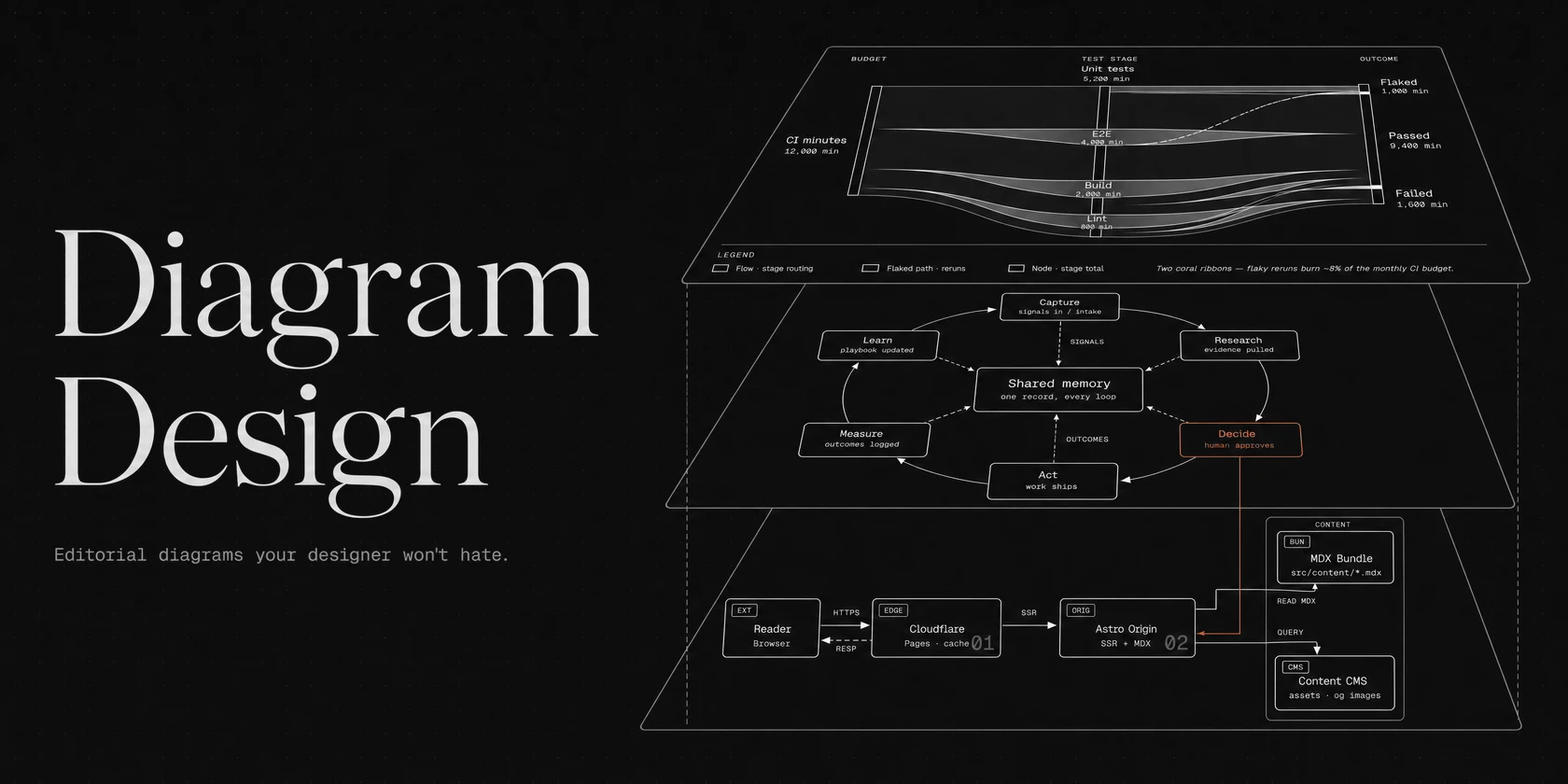
What diagram-design improves over standard mermaid and draw.io files
Standard mermaid diagrams work well for quick notes inside markdown files, but they break down as soon as you need to present an architecture proposal to a client, document subnet and permission boundaries, or show a before-and-after cloud migration. Auto-layout engines treat every node as equal, whereas diagram-design enforces an opinionated editorial specification: a 4px coordinate grid, 1px hairlines, zero drop shadows, a target density of 4/10, and a single accent color reserved for the one or two components the reader must look at first.
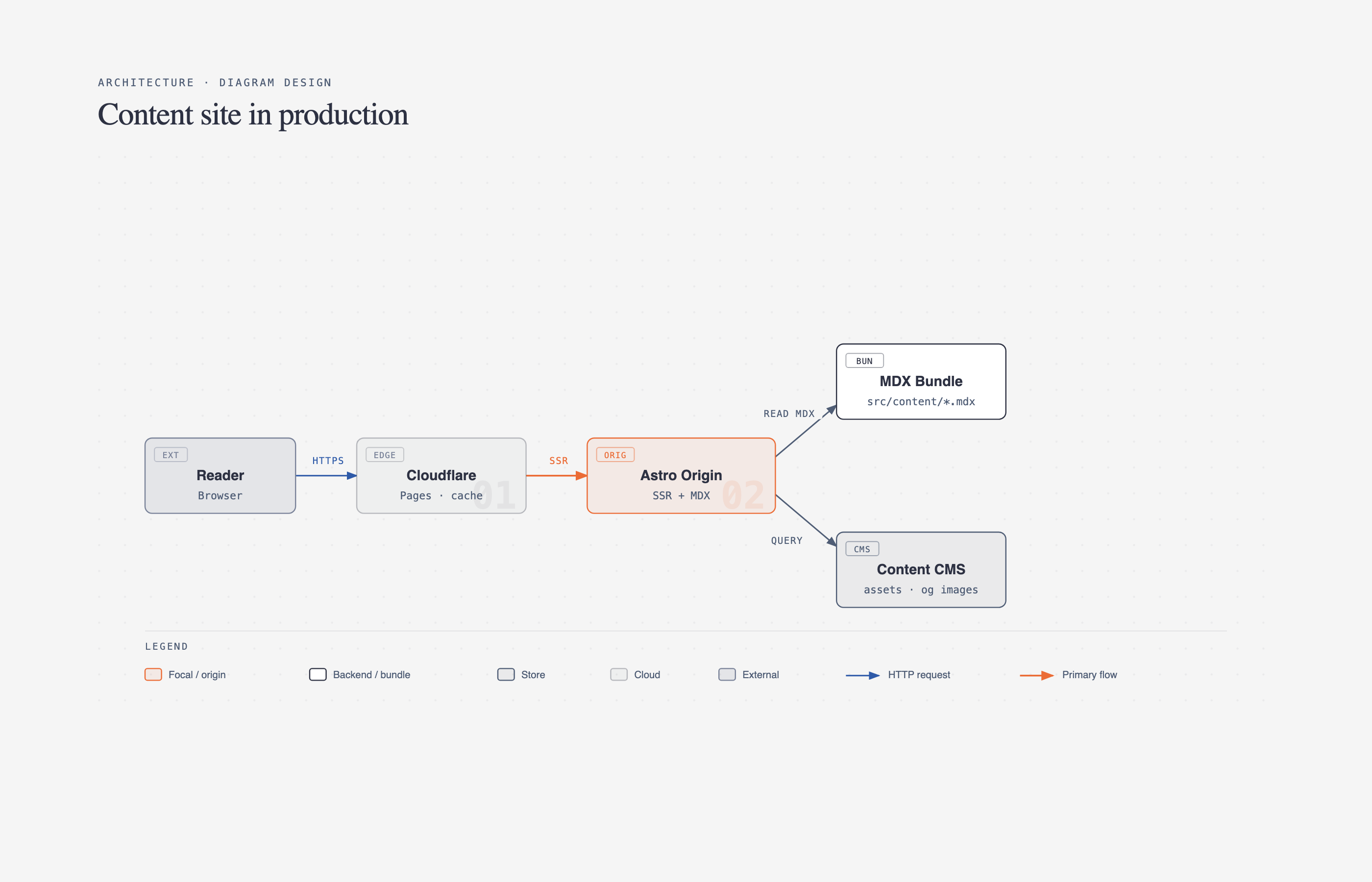
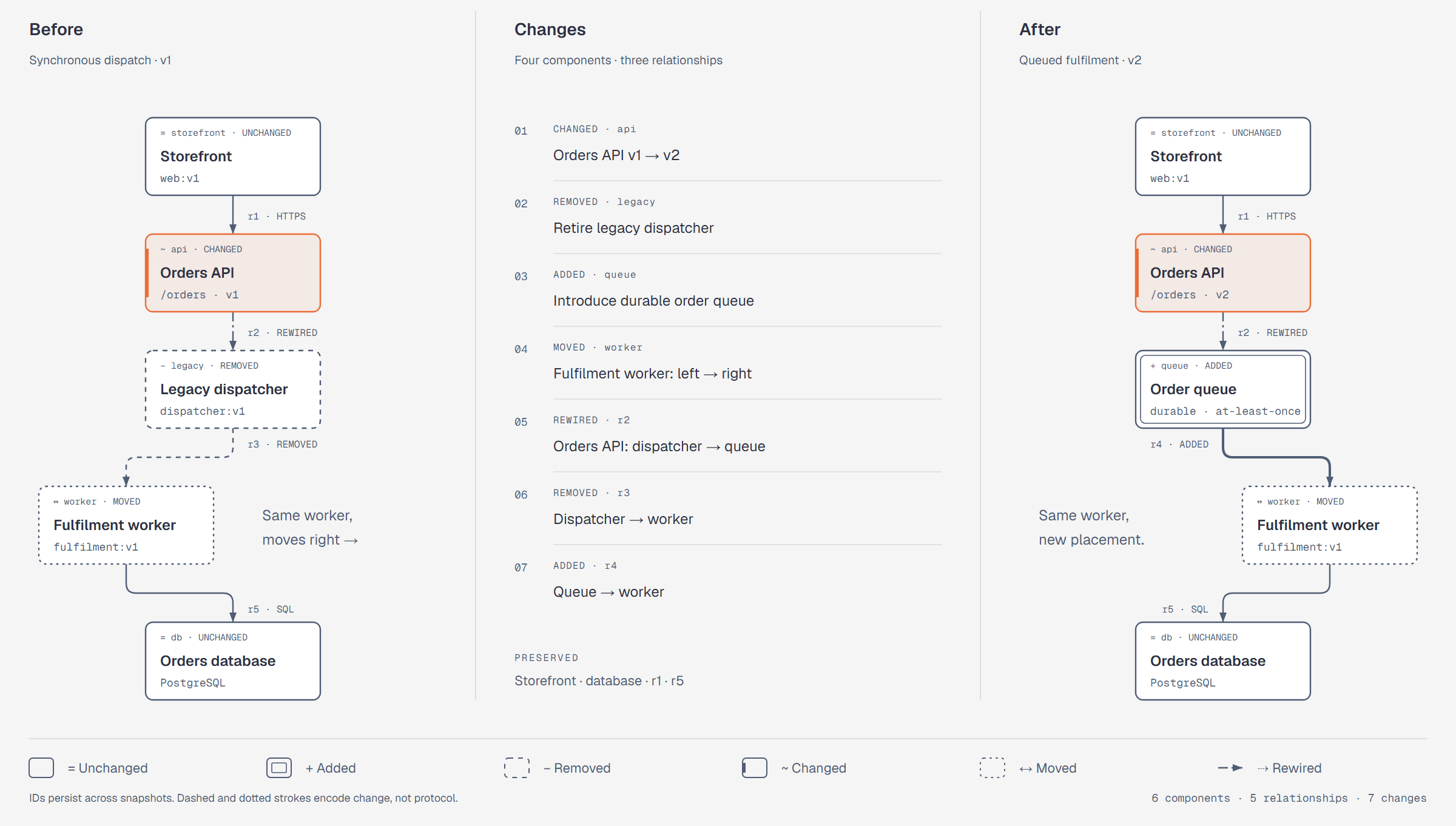
Two architecture diagrams generated directly from a repository
Every output is a single zero-dependency HTML + SVG file snapped to a 4px grid that opens in any browser and exports cleanly to SVG or PNG.
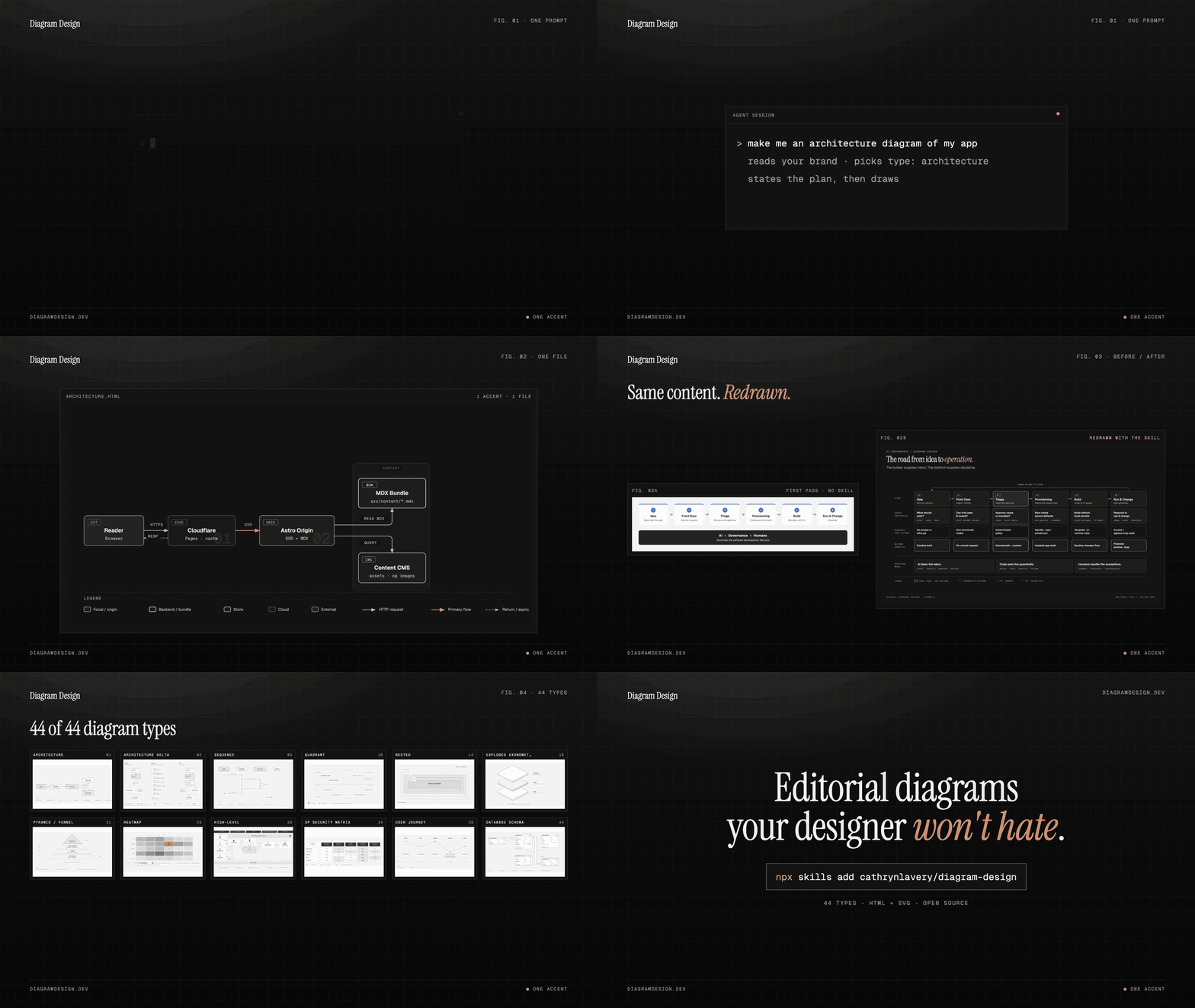
You can also watch the full interactive workflow in action—from typing a plain-English prompt inside an agent session, to onboarding a custom website palette, to redrawing an existing diagram—in the official demonstration below:
Get engineering notes and model releases in your inbox.
Sovereign AI inference, OpenAI-compatible, EU-hosted. Benchmarks, new models (Mistral, Qwen, GLM), and cost insights. One email, no spam.
Thank you for subscribing!
Please check your inbox to confirm your subscription.
100% European infrastructure · Zero spam · Unsubscribe anytime.
Install diagram-design and configure it with the regolo endpoint
Setting up diagram-design with regolo takes less than two minutes. You install the skill once into your coding agent, point your openai-compatible base url to https://api.regolo.ai/v1, and run a 60-second brand onboarding so every diagram automatically inherits your company’s colors and typography:
Connect your coding agent to Regolo in 3 steps
Point OpenCode, Claude Code, Codex, or Cursor to https://api.regolo.ai/v1 to generate diagrams inside your flat Regolo Core pool.
To make this workflow turnkey for engineering teams, we built regolo_diagram_tui.py, a zero-dependency enterprise terminal interface (tui) branded in regolo’s palette. It provides three streamlined views: configuring your .env and installing the diagram-design skill, querying GET https://api.regolo.ai/v1/models live to pick your rendering model, and entering a target project path to choose and render your 4px-grid html + inline svg diagram:
#!/usr/bin/env python3
"""Regolo — TUI for diagram-design + Regolo API (stdlib only, clean Ctrl+C exit)."""
import json, os, re, ssl, sys, urllib.request
from pathlib import Path

def safe_input(prompt: str) -> str:
    """Read input and close cleanly on Ctrl+C / EOF without raising a traceback."""
    try:
        return input(prompt)
    except (KeyboardInterrupt, EOFError):
        print("\nClosing Regolo. Goodbye!")
        sys.exit(0)

def fetch_regolo_models(base_url: str, api_key: str) -> list[str]:
    """Option 2: Query live GET /v1/models on Regolo and return available chat/code models."""
    req = urllib.request.Request(
        f"{base_url.rstrip('/')}/models",
        headers={"Authorization": f"Bearer {api_key}", "Accept": "application/json"},
    )
    with urllib.request.urlopen(req, timeout=20) as resp:
        data = json.loads(resp.read().decode("utf-8"))
    non_chat = {"clef-flash", "deepseek-ocr-2", "faster-whisper-large-v3", "Qwen-Image", "Qwen3-Embedding-8B", "Qwen3-Reranker-4B"}
    return sorted(m["id"] for m in data.get("data", []) if m.get("id") not in non_chat)

def generate_diagram_with_regolo(base_url: str, api_key: str, active_model: str, project_dir: Path | None, dtype: tuple) -> Path:
    """Option 3: Prompt for project_dir, then extract topology and render 4px SVG using the selected model."""
    if project_dir is None:
        raw_p = safe_input(f"  Enter target project directory [{Path.cwd()}]: ").strip()
        project_dir = Path(raw_p).expanduser().resolve() if raw_p else Path.cwd().resolve()

    scan = scan_project_directory(project_dir)
    code, name, desc = dtype

    # Step 1: JSON topology extraction via the model selected in Option 2 (e.g. brick-complexity-pro or gemma4-31b)
    topology_json = call_regolo_chat(
        base_url, api_key, active_model, "none",
        "Output ONLY valid JSON {nodes: [{id, label, role, detail}], edges: [{from, to, protocol}]}.",
        f"Extract 5 to 6 elements specifically tailored for Diagram Type {code}: {name} ({desc}) from:\n{scan['skeleton_text']}",
        max_tokens=700,
    )
    # Stage 2: Full 4px-grid inline SVG rendering (reasoning_effort="none" so full token budget goes to <svg>)
    svg_markup = call_regolo_chat(
        base_url, api_key, active_model, "none",
        "Output ONLY a complete inline <svg viewBox='0 0 960 520'>...</svg> on a 4px grid with <rect>, <text>, and <path>.",
        f"Render Diagram Type {code} ({name}) for '{project_dir.name}':\n{topology_json}",
        max_tokens=2800,
    )
    project_id = f"{project_dir.name.lower()}-{hashlib.sha1(str(project_dir).encode()).hexdigest()[:6]}"
    out_dir = Path("output") / project_id
    out_dir.mkdir(parents=True, exist_ok=True)
    out_file = out_dir / f"regolo-diagram-{code}.html"
    out_file.write_text(wrap_regolo_editorial_svg(svg_markup, topology_json, scan["files"], project_dir.name, code, name, active_model))
    return out_fileCode language: Python (python)
Below is the live output of python3 regolo_diagram_tui.py connected to https://api.regolo.ai/v1, showing the status header, the live model list returned by GET /v1/models, the local project directory scan, and the two-stage diagram generation:
╭──────────────────────────────────────────────────────────────────────────────────────╮
│ ● REGOLO                                      cathrynlavery/diagram-design · v1.0 │
│ Sovereign EU Architecture & SVG Diagram Generator (4px Grid · Zero Data Retention)   │
├──────────────────────────────────────────────────────────────────────────────────────┤
│ Endpoint : https://api.regolo.ai/v1           Status : ● CONNECTED (sk-••••••••••••) │
│ Model    : qwen3.5-122b                       Skill  : ● READY (diagram-design)      │
│ Diagram  : [01] Architecture & Containment    Pool   : Regolo EU Zero Retention      │
│ Project  : ~/tutorials/diagram-studio                                                │
╰──────────────────────────────────────────────────────────────────────────────────────╯

  [1] Environment & Tool Setup       Configure .env, verify Node/Python & install diagram-design skill
  [2] Regolo API & Model Selector    Query live GET /v1/models on Regolo & select active model
  [3] Choose Diagram & Generate SVG  Set project path, pick diagram type & render 4px-grid HTML + SVG

▶ [Option 2 · Live Model Discovery via GET https://api.regolo.ai/v1/models]
  ✓ Retrieved 11 active chat/code models from Regolo EU cluster:
    [01] apertus-70b               [02] brick-complexity-pro
    [03] brick-v1-beta             [04] gemma4-31b
    [05] glm5.2                    [06] gpt-oss-120b
    [07] gpt-oss-20b               [08] mistral-small-4-119b
    [09] qwen3.5-122b ◀ SELECTED MODEL [10] qwen3.5-9b       [11] qwen3.8-27b

▶ [Option 3 · Project Scan & Diagram Generation (Project ID: diagram-studio-dfad92 · Model: qwen3.5-122b)]
  ✓ Scanned 4 architecture files: 19,544 raw chars -> 3,709 skeleton chars (-81.0%)
    ├─ infra/docker-compose.yml   5,312 ->  655 chars (6 services, ports & depends_on)
    ├─ db/schema.sql              5,304 ->  507 chars (3 SQL tables & foreign keys)
    ├─ src/gateway_routes.py      4,553 -> 1,200 chars (HTTP routes & upstream targets)
    └─ src/worker_consumers.py    4,375 -> 1,200 chars (Kafka consumers & Redis cache)

  [Step 1 · qwen3.5-122b · Topology] Extracted 6 nodes in 4.12s (in=1,124 tok, out=380 tok)
  [Step 2 · qwen3.5-122b · 4px SVG]  Rendered HTML + inline SVG in 8.85s (in=621 tok, out=2,540 tok)
  ✓ Saved in output/diagram-studio-dfad92/: regolo-diagram-01-architecture-containment-map.html
Run the same pipeline as a local web app (Regolo Diagram Studio)
Alongside the terminal interface, the companion regolo-ai/tutorials/diagram-studio repository includes Regolo Diagram Studio (python3 diagram_wizard/server.py, zero external dependencies). It reads any local project folder using git ls-files and your .gitignore rules (for example, narrowing 3,124 files on disk down to 38 tracked files and selecting the top 15 architecture files), redacts secret values automatically, draws one of the six 4px-grid layouts, writes a companion Markdown knowledge base in parallel, and includes a Compare on my repo mode (watch the full video walkthrough on YouTube):
Interactive model selection, .gitignore-aware folder scanning, and side-by-side Compare mode
Start the local server with python3 diagram_wizard/server.py (http://127.0.0.1:8200) or watch the YouTube tutorial (youtu.be/PxJ01zoZkTw).
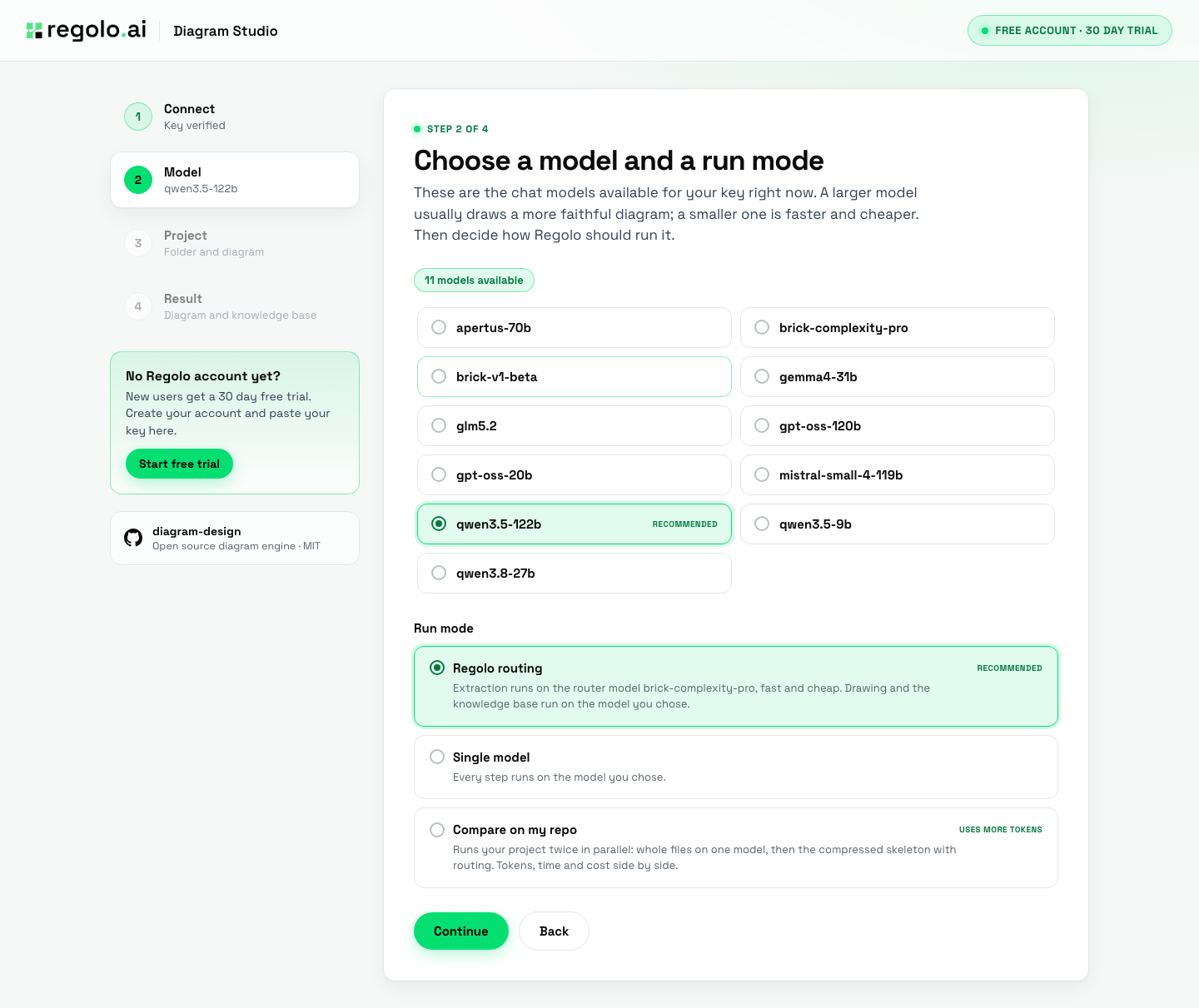
brick-complexity-pro with automatic fallback to your main model if the router JSON is truncated.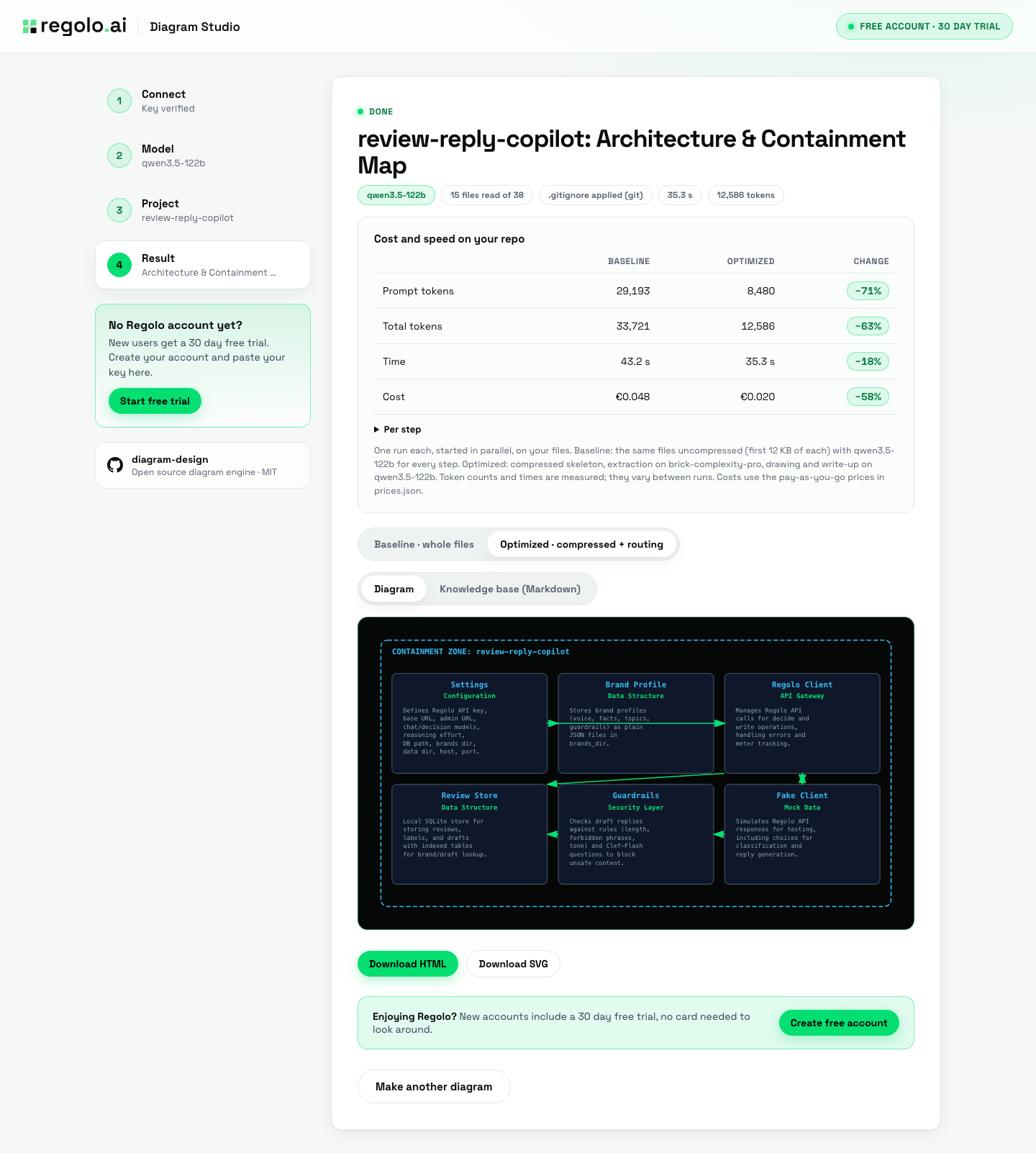
brick-complexity-pro routing) and reports exact prompt tokens, total tokens, wall time, and PAYG cost per step.What we measured: compression and routing on Regolo
We ran the same real repository (review-reply-copilot, 15 files read out of 38 after .gitignore) twice in Diagram Studio’s Compare mode across three separate runs on october 21, 2026 using qwen3.5-122b for the Architecture and Containment Map: whole files on one model versus a compressed skeleton with component extraction routed to brick-complexity-pro. Across all three runs, prompt tokens dropped by 70.2% to 71.0% (from 29,169–29,223 down to 8,480–8,698), total tokens dropped by 60.4% to 62.7% (from 33,306–33,807 down to 12,586–13,199), and Pay-As-You-Go cost per run dropped by 54% to 58% (€0.046–€0.049 down to €0.020–€0.021). In run 3, the component extraction step alone went from 7.7 seconds and €0.019 (17,298 input / 493 output tokens on qwen3.5-122b) down to 2.8 seconds and €0.0006 (5,069 input / 329 output tokens on brick-complexity-pro), while drawing the SVG (32.1s vs 34.9s, ~2,545–2,679 output tokens) and writing the knowledge base in parallel (21.6s vs 20.2s) set the overall wall time (39.7s vs 37.6s).
Our offline 4-configuration benchmark in the repository (4-file microservice, 6 graded questions, measured on october 20, 2026) confirmed the same behavior and surfaced an important production rule: local compression plus brick-complexity-pro routing cut total tokens from 32,578 to 5,621 (−82.7%), reduced p50 latency from 7.88s to 1.92s, and scored 100% (6/6) accuracy, whereas routing whole uncompressed files to brick-complexity-pro without compression scored 83.3% (5/6) and truncated its JSON on 17,000-token inputs. That is why Diagram Studio pairs routing with local skeleton compression and automatically retries on your chosen flagship model if the router’s JSON is ever incomplete.
Redraw existing mermaid, draw.io, and excalidraw files
You do not need to recreate legacy documentation from scratch. When you run /diagram-design:import-mermaid README.md --detail=balanced or /diagram-design:import-drawio architecture.drawio --size=doc-wide, the skill parses your existing diagram locally without executing untrusted scripts, snaps every shape and connector to the 4px grid, and outputs a fidelity ledger showing exactly which nodes were preserved or consolidated.
Clone Regolo Diagram Studio on GitHub
Includes the local web app (diagram_wizard/server.py), Compare mode, the terminal TUI (regolo_diagram_tui.py), and the 12 offline unit tests.
Why Core subscription is ideal for output-heavy html + svg diagramming
Generating an architecture diagram and its Markdown knowledge base consumes both input and output tokens: in our measured compressed runs (october 21, 2026), each run used 12,956 total tokens with a 34.1% output share (8,544 input and 4,412 output tokens, compared to 33,807 tokens with whole files). On metered cloud APIs that charge $4.40 to $10.00 per million output tokens, both sides of the bill add up. On regolo core (€39.00/month for up to 600 million tokens, 20M/day, or €11.70/month during the first three months), all core models are included at a flat effective rate of €0.065 per million tokens (€0.0195/1M on promo) regardless of the input/output mix:
Generate 100M tokens of HTML + SVG architecture maps for €6.50 on Regolo Core (€1.95 promo)
In our measured compressed runs, about a third of the tokens (34.1%) are output tokens (66% input / 34% output). Regolo Core is flat per token (€39/mo for up to 600M tokens, 20M/day; €11.70/mo first 3 months), whereas metered APIs charge $4.40 to $10.00/1M on the output share.
Regolo prices verified on regolo.ai/pricing on October 21, 2026; external API prices ($1.40/$4.40 and $2/$10) as assumed in our benchmark. 100M tokens (about 7,700 compressed diagram runs) uses 16.7% of the 600M monthly Regolo Core pool (€6.50 standard / €1.95 promo).
What you take away: practical workflows for client projects and architecture reviews
Integrating diagram-design with regolo gives solution architects, tech leads, and software consultancies a fast way to turn complex infrastructure code into client-ready visual documentation. Instead of spending hours dragging boxes in figma or draw.io before an executive review, your coding agent reads your docker-compose.yml, terraform files, and sql migrations and produces publication-grade html + svg diagrams that already match your brand guidelines.
Unreadable auto-layouts or hours of manual drawing
Editorial 4px-grid HTML + SVG on a flat EU pool
brick-complexity-pro extraction (with automatic fallback to qwen3.5-122b) cuts PAYG cost by 56%.For software houses delivering cloud migrations or security compliance audits (such as iso 27001 or dora), the architecture delta template (type 40) is particularly valuable: you can generate a synchronized before-and-after topology map from two architecture snapshots, export it as a standalone html file with system fonts enabled for offline viewing, and rely on regolo’s european zero-data-retention policy so no infrastructure schematics are stored during generation.
Generate client-ready HTML + SVG architecture maps without output-token spikes
Pair diagram-design with Regolo Core for €11.70/month during your first 3 months (€39/mo standard, 600M tokens/mo). Scan repos fast with brick-complexity-pro and render 4px-grid SVG diagrams with qwen3.5-122b and glm5.2 under European Zero Data Retention.
Ship Private AI. Not Infrastructure.
You have the architecture and the open-source workflow. Now give it a sovereign European inference layer built for production: fast access to GLM-5.2, Qwen3.5, Mistral, Llama, DeepSeek, and Brick Complexity Pro with zero data retention and no new SDK to learn.
Start your 30-day free trial →
Build, test, and deploy with no infrastructure to maintain. Core plans from €11.70/mo (70% off first 3 months).
Clone the GitHub repository →
Get the full implementation, configuration scripts, evaluation benchmarks, and ready-to-run templates.
Join the Regolo Discord →
Meet engineers building with coding agents, private RAG, local LLMs, and production open-weight models.
Talk to an AI Infrastructure Engineer →
Scaling beyond a proof of concept or running regulated EU workloads? Get a tailored architecture and commercial plan.