
Learn how to spin up Cheshire Cat and plug it into Regolo’s OpenAI‑compatible endpoint using open‑source LLMs like Llama‑3.3‑70B‑Instruct, ready for enterprise.
👉 Try CheshireCat and Regolo with Deepseek-r1-70B for free
What is CheshireCat AI? CheshireCat is an open-source, production-ready Python framework that allows you to build conversational AI agents with memory, custom tools, and extensible plugins. Unlike generic chatbot builders, CheshireCat provides a microservice-first architecture with hooks, tools, and a plugin ecosystem that makes it truly hackable.
Most developers struggle connecting AI agents to real-world automation—agents that can answer questions but not trigger actions, or workflows that lack intelligence to adapt to context. The gap between conversational AI and business process automation creates fragile, manual handoffs.
TL;DR for busy developers
If you want a production-ready AI agent without sending data to US hyperscalers, a tight combination is: Cheshire Cat AI (framework) + regolo.ai (LLM hosting) + an open‑source model like Llama 3.3 70B Instruct.
This guide shows how to spin up Cheshire Cat with Docker, plug it into Regolo’s OpenAI‑compatible endpoint, and get an enterprise‑grade AI agent running in less than an hour, using only open‑source LLMs.
Why Cheshire Cat + Regolo for enterprise agents
Cheshire Cat AI (https://cheshirecat.ai) is an open‑source framework for building AI agents as microservices, with a clear separation between the LLM backend and the agent logic (pipeline, tools, memory, plugins). It exposes a REST API, supports plugins, and offers an admin UI to configure language models, making it a strong fit for teams that need maintainable, testable, and extensible assistants instead of ad‑hoc chatbots.
Regolo.ai (https://regolo.ai) provides cloud LLM hosting with an OpenAI‑compatible API at https://api.regolo.ai/v1, so you can reuse familiar client libraries while running only open‑source models like Llama 3.3 70B Instruct.
This endpoint pattern lets you connect tools, agents, and frameworks (including Cheshire Cat) by just changing the base URL and model name, keeping your architecture portable and free from closed‑model lock‑in.
Architecture at a glance
At a high level, the stack looks like this:
- Client: your frontend, Slack bot, SaaS integration, or internal tool.
- Cheshire Cat core: handles conversations, memory, plugins, business logic, REST API.
- Regolo API: OpenAI‑compatible endpoint that fronts the LLM.
- Open‑source LLM: e.g.
Llama-3.3-70B-Instruct, running on Regolo infrastructure.
[ User / App ]
       |
       v
[ Cheshire Cat AI ]
  - Dialog management
  - Memory & RAG
  - Tools / Plugins
       |
       v
[ regolo.ai OpenAI-compatible API ]
  Base URL: https://api.regolo.ai/v1
  Model: Llama-3.3-70B-Instruct (open-source)
       |
       v
[ LLM Inference on Regolo ]
In this design, conversation state, memories, and any RAG pipeline remain inside Cheshire Cat, while only the prompts and necessary context snippets are sent to regolo.ai for inference.
For enterprise reviews, this split simplifies discussions about data residency and retention: you can store data where you want, and only use Regolo as a stateless inference backend.
Step 1 – Spin up Cheshire Cat with Docker
You have two quick options: a simple docker run, or a docker-compose.yml that’s friendlier to long‑term use and volumes. The article below uses docker‑compose so you can persist configuration and plugins.
Prerequisites
- Docker and Docker Compose installed on your machine or server.
- A Regolo account with an API key (you’ll plug it into Cheshire Cat later).
1. Create a project folder, for example:
mkdir cheshire-regolo-agent
cd cheshire-regolo-agent
2. Minimal docker-compose.yml
Create docker-compose.yml in that folder:
version: "3.9"

services:
  cheshire-cat:
    image: ghcr.io/cheshire-cat-ai/core:latest
    container_name: cheshire-cat
    ports:
      - "1865:80"           # Cheshire Cat admin UI on localhost:1865
    environment:
      # Optional: pass the key as env, or paste it later in the UI
      - REGOLO_API_KEY=${REGOLO_API_KEY}
    volumes:
      - ./cat-data:/app/.cheshire-cat
    restart: unless-stoppedCode language: PHP (php)
This setup runs the official Cheshire Cat core image, exposes the admin UI on port 1865, and persists its internal state in the cat-data folder.
Using a bind mount volume like ./cat-data:/app/.cheshire-cat keeps your configuration, memories, and plugins across restarts, which is essential for serious development.
3. .env file for secrets
Create a .env file in the same directory (this will be picked up by Docker Compose):
REGOLO_API_KEY=your_regolo_api_key_here
You can create your Api Key (with FREE credits for 30 days) clicking by here.
Keep this file out of version control (add it to .gitignore) to avoid leaking your key. If you prefer, you can skip this and paste the API key directly into the Cheshire Cat web UI later, but environment variables are easier to rotate in CI/CD pipelines.
4. Start Cheshire Cat
docker compose up -dThe first run will pull the image and might take a few minutes.
Once the container is up, open http://localhost:1865/admin in your browser and log in with the default credentials (usually admin / admin, to be changed right after).
Step 2 – Connect Cheshire Cat to regolo.ai
Now that Cheshire Cat is running, you need to tell it to use regolo.ai as its LLM provider via an OpenAI‑compatible configuration.
Use OpenAI‑compatible API or Custom LLM option
In the Cheshire Cat admin UI:
- Go to Settings → Select “Custom LLM”
- Add the credentials below in URL and Auth Key
Cheshire Cat separates the provider configuration from the rest of the agent logic, which makes it easy to swap backends without redesigning your flows.
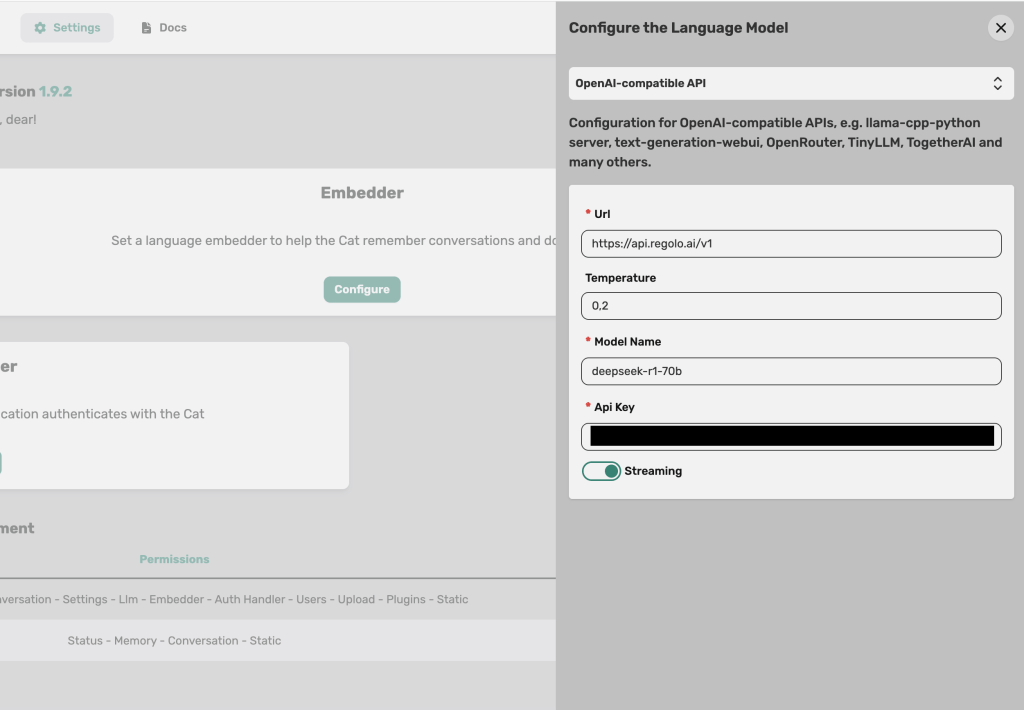
Fill the fields like this:
- API BASE URL: https://api.regolo.ai/v1
- API Key: your
REGOLO_API_KEYfrom the Regolo dashboard. - Model name: choose an open‑source model available on Regolo list, ex: Llama-3.3-70B-Instruct, deepseek-r1-70b, etc.
- Temperature: start around
0.2for deterministic, enterprise‑friendly behavior.
Click Save to persist the configuration.
From now on, every time Cheshire Cat needs a completion, it will send a request to https://api.regolo.ai/v1/chat/completions with the selected model name, using your Regolo API key.
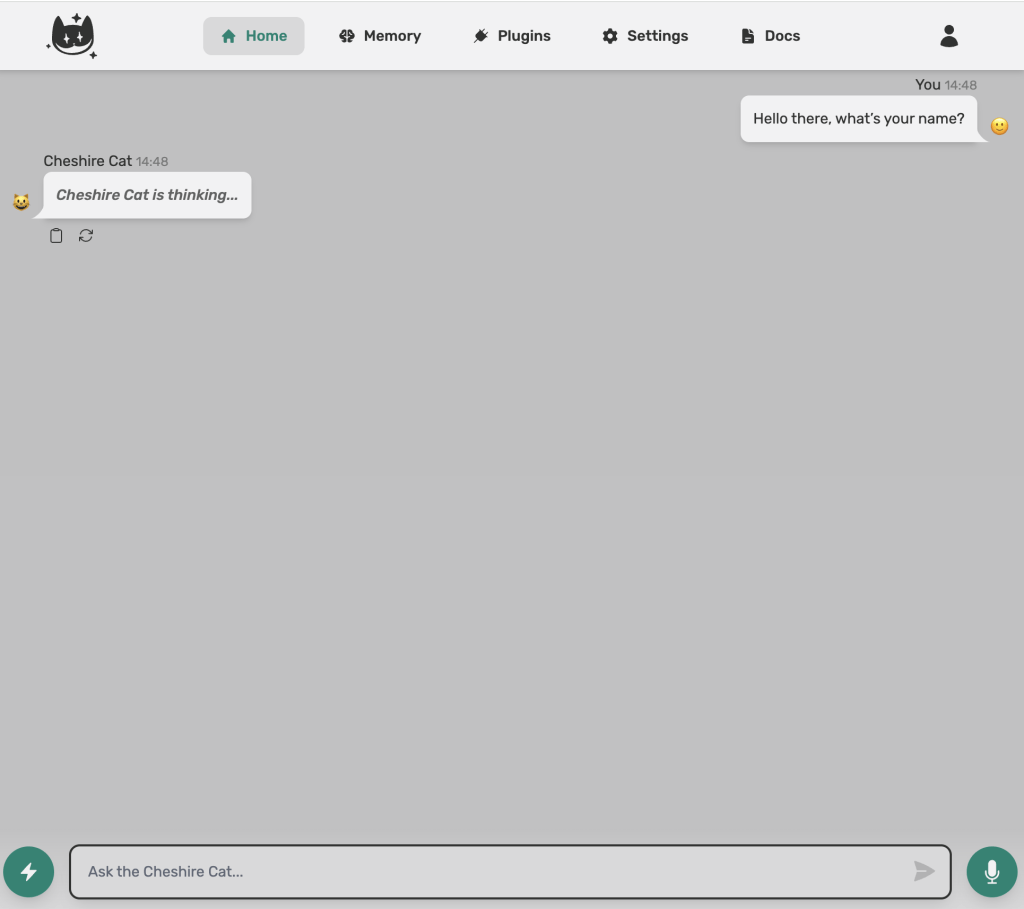
Quick smoke test
Go back to the main Chat page in Cheshire Cat and send a message like:
You are now backed by Llama 3.3 70B on regolo.ai. Briefly describe your capabilities.
If you get a coherent answer within a few seconds, the connection is established and your agent is running on an open‑source model hosted by Regolo. You can now iterate on prompts, add tools, and refine behavior knowing the LLM backend is decoupled and swappable.
A minimal Python helper for Regolo (for plugins and tests)
Even if Cheshire Cat hides most of the LLM details behind its configuration, having a tiny Python client for Regolo is useful for:
- Writing plugins that call the same model directly.
- Creating integration tests for prompts and responses outside the Cat.
Here is a copy‑paste‑ready helper using the OpenAI‑compatible /chat/completions endpoint of regolo.ai:
import os
import requests

BASE_URL = "https://api.regolo.ai/v1"
API_KEY = os.environ.get("REGOLO_API_KEY")
MODEL = "Llama-3.3-70B-Instruct"  # any open-source model exposed by regolo.ai


def regolo_chat(messages, temperature: float = 0.2) -> str:
    """
    Minimal helper to call Regolo's OpenAI-compatible /chat/completions endpoint.
    """
    if not API_KEY:
        raise RuntimeError("REGOLO_API_KEY environment variable is not set")

    response = requests.post(
        f"{BASE_URL}/chat/completions",
        headers={"Authorization": f"Bearer {API_KEY}"},
        json={
            "model": MODEL,
            "temperature": temperature,
            "messages": messages,
        },
        timeout=30,
    )
    response.raise_for_status()
    data = response.json()
    return data["choices"][0]["message"]["content"]


if __name__ == "__main__":
    result = regolo_chat(
        [
            {
                "role": "system",
                "content": "You are the brain of an enterprise support assistant built with Cheshire Cat.",
            },
            {
                "role": "user",
                "content": "Give me a concise status update about today's ticket queue.",
            },
        ]
    )
    print(result)
Code language: Python (python)
This function mirrors the standard OpenAI client contract, but points to https://api.regolo.ai/v1 and uses a Regolo‑hosted open‑source model, so it can drop into many existing codebases with minimal changes.
You can reuse this code inside a Cheshire Cat plugin if you need more granular control over prompts or want to call multiple Regolo models from the same agent.
Optional – Custom Cheshire Cat plugin that calls Regolo
For teams that want fine‑grained tools (e.g. a “summarize long document” tool separated from the main conversation model), you can define a simple Cheshire Cat plugin that calls Regolo directly using the helper above.
Example plugin structure (simplified) you could adapt in your project:
# plugins/regolo_tools/summarizer.py

from cat.mad_hatter.decorators import tool
from .regolo_client import regolo_chat  # import the helper from previous snippet


@tool(return_direct=True)
def summarize_text(text: str, max_bullets: int = 5) -> str:
    """
    Summarize a long text into a few bullet points using an open-source model on regolo.ai.
    """
    prompt = (
        f"Summarize the following text into {max_bullets} bullet points. "
        "Focus on decisions, risks, and action items.\n\n"
        f"TEXT:\n{text}"
    )

    answer = regolo_chat(
        [
            {"role": "system", "content": "You are an expert technical summarizer."},
            {"role": "user", "content": prompt},
        ],
        temperature=0.1,
    )
    return answerCode language: Python (python)
In this example, @tool(return_direct=True) exposes summarize_text as a callable tool for your Cheshire Cat agent, while regolo.ai stays the single source of truth for LLM inference.
This pattern scales cleanly when you start composing more complex agents that need multiple specialized tools, each potentially calling different Regolo models.
Production notes: scaling, latency, and cost
Once your prototype works, the next step is to make it production‑ready:
- Latency: measure TTFT and TPOT from the client side (browser or service) to capture both Cheshire Cat processing and Regolo inference time.
- Cost: focus on cost per 1M tokens and typical conversation length; Llama 3.3 70B is designed to give near‑frontier quality at a fraction of the cost of very large models.
From an ops perspective, you want to:
- Optionally deploy Cheshire Cat behind an ingress / API gateway with TLS and authentication.
- Implement retries and timeouts on your Regolo calls (the helper above uses a 30s timeout) and consider circuit‑breakers for downstream failures.
👉 Try CheshireCat and Regolo with Deepseek-r1-70B for free
Github Codes
You can download the codes on our Github repo, just copy and paste the .env.example files and fill properly with your credentials. If need help you can always reach out our team on Discord 🤙
Resources & Community
Official Documentation:
- CheshireCat AI Docs – Framework reference
- Regolo Platform – European LLM provider, Zero Data-Retention and 100% Green
Related Guides:
Join the Community:
- Regolo Discord – Share your automation builds
- CheshireCat GitHub – Contribute plugins
- Follow Us on X @regolo_ai – Show your integrations!
- Open discussion on our Subreddit Community
🚀 Ready to Deploy?
Get Free Regolo Credits →
Download Code Package →
Built with ❤️ by the Regolo team. Questions? support@regolo.ai