
If you are comparing DeepSeek-OCR-2, GLM-OCR, and PaddleOCR, the wrong question is: which one wins on a table once and for all?
The better question is: which one fits the documents you actually process?
That sounds obvious, but it is where most OCR comparisons go off the rails. Teams see one benchmark, pick the model at the top, and only later discover that their real workflow depends more on distorted scans, multilingual invoices, handwritten notes, tables, or throughput constraints than on a single headline score.
That is why this refresh matters.
The live benchmark on this page already showed strong engagement. The problem is that raw numbers alone do not help much when you need to choose a production OCR path. So this version keeps the benchmark context, but turns it into a practical decision guide.
The short answer
If you want the fastest summary before the detail:
- choose GLM-OCR if you want the strongest benchmark score and strong bulk-processing speed;
- choose PaddleOCR if your documents are messy, multilingual, or visually inconsistent;
- choose DeepSeek-OCR-2 if you care about efficiency, compression, and high-volume document handling.
That is the fast version. The useful version starts with context.
What the benchmark says and what it does not say
The current comparison uses OmniDocBench v1.5, which is useful because it measures real document parsing challenges instead of pretending OCR is only about clean flat text.
The scores already published on this page are:
| Metric | DeepSeek-OCR-2 | GLM-OCR | PaddleOCR-VL-1.5 |
|---|---|---|---|
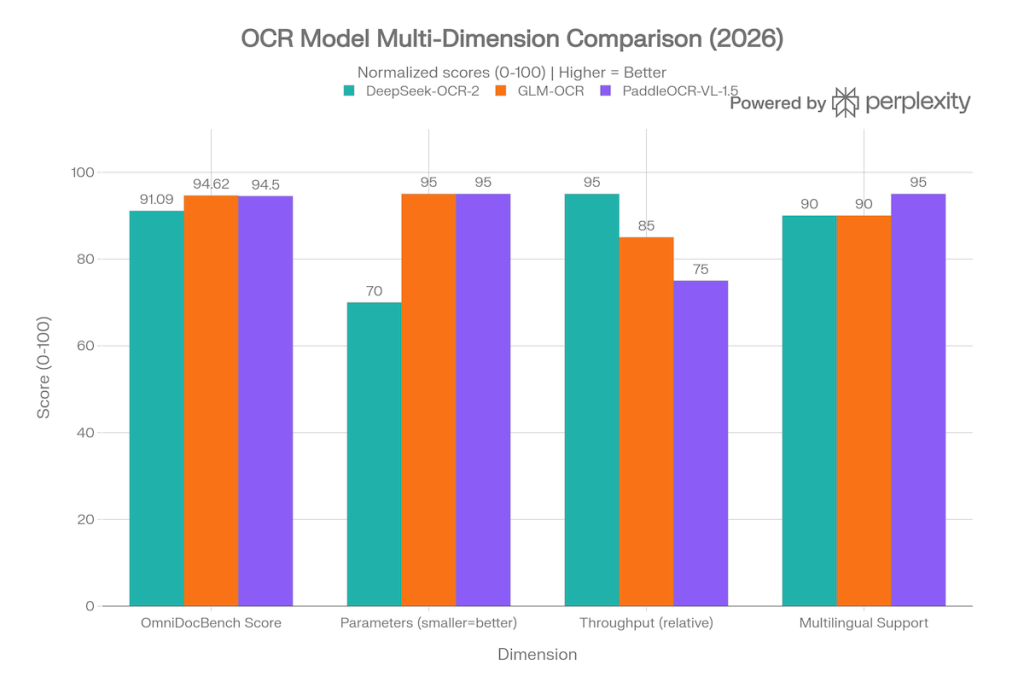
| OmniDocBench v1.5 (%) | 91.09 | 94.62 | 94.5 |
| Parameters (B) | 3 | 0.9 | 0.9 |
| PDF throughput | High, about 200k pages/day on A100 | 1.86 pages/s | Moderate |
| Main strength | Compression and efficiency | Top score and speed | Robustness on messy layouts |
The obvious conclusion is that GLM-OCR leads the benchmark, PaddleOCR stays extremely close, and DeepSeek-OCR-2 leans harder into efficiency.
The less obvious conclusion is the one that matters more: those numbers still do not tell you which model is safest for your own documents unless you look at the actual failure modes.
Why reading OCR benchmarks without context creates bad choices
OCR quality breaks in specific ways.
Not in abstract ways. In painful, operational ways.
One model struggles on warped phone photos. Another falls apart on tables. Another is acceptable on clean PDFs but weak when handwriting or mixed visual structure appears. That is why a score gap of a few points can matter less than the type of documents you see every day.
So instead of asking who won, ask where each model holds up when the input gets ugly.
GLM-OCR: the strongest default if benchmark leadership matters most
GLM-OCR is the current leader in the published comparison at 94.62 on OmniDocBench v1.5. It is also positioned as the fastest open model in the live benchmark, with 1.86 PDF pages per second, which makes it a serious option for bulk document workflows.
This is the safest starting point when:
- you want the strongest benchmark score;
- you need a general-purpose model rather than a niche specialist;
- you care about throughput as well as quality;
- you want a model that is easier to justify internally because the performance story is simple.
Its practical strength is that it gives you a clean answer when the team wants one default OCR model and does not want to overcomplicate the evaluation.
If your workflow is broad and you need one model to cover a lot of normal document cases well, GLM-OCR is the most defensible default from this comparison.
PaddleOCR-VL-1.5: the most sensible choice when documents are messy
PaddleOCR-VL-1.5 sits just behind GLM-OCR in the published benchmark at 94.5, which is close enough that the ranking alone should not decide the outcome.
Where PaddleOCR stays compelling is document messiness.
The live benchmark already frames it as robust for skewed scans, warped pages, lighting variation, multilingual files, and visually inconsistent layouts. That is not a minor detail. In many real workflows, that is the entire problem.
Choose PaddleOCR first when:
- your input comes from cameras, scans, or uncontrolled upload flows;
- you see invoices, forms, and PDFs with layout noise;
- multilingual support matters;
- you care more about resilience on imperfect files than about squeezing out the headline benchmark lead.
This is the model that makes the most sense when the documents coming in are not clean lab examples.
DeepSeek-OCR-2: the right choice when efficiency is the actual constraint
DeepSeek-OCR-2 scores 91.09 in the current benchmark, so it is not the leader here.
That does not make it the wrong option.
Its value is different. The live benchmark describes it as efficiency-focused, with token compression and high-volume document handling as the core story. The existing published note points to roughly 200,000 pages per day on an A100 GPU, which is the kind of operational detail that matters when scale is the real bottleneck.
Choose DeepSeek-OCR-2 first when:
- your workload is large enough that efficiency changes the economics;
- you care about throughput and compression more than absolute top benchmark rank;
- you want an OCR path that is easier to reason about in high-volume pipelines.
If the question is not “who won the benchmark?” but “what can we run at scale without wasting compute?”, DeepSeek-OCR-2 becomes much more interesting.
The better decision matrix
Here is the practical version.
| Your workflow | Best first model to test | Why |
|---|---|---|
| General-purpose document OCR with strong benchmark performance | GLM-OCR | It leads the published benchmark and keeps a clean performance story |
| Messy scans, warped images, multilingual documents | PaddleOCR-VL-1.5 | It is built for layout noise and real-world document ugliness |
| High-volume OCR where efficiency matters | DeepSeek-OCR-2 | Compression and throughput are the main reason to consider it |
| You are unsure and need one default bake-off candidate | GLM-OCR first, PaddleOCR second | That is the shortest path to a useful comparison |
That last row is important. If you only have time to test two paths, GLM-OCR and PaddleOCR usually give you the fastest signal.
Do not ignore hardware reality
One reason OCR choices go wrong is that teams compare model quality and ignore deployment reality.
The live benchmark already highlighted the rough hardware story:
- DeepSeek-OCR-2 typically wants more headroom because it is a 3B model;
- GLM-OCR is lighter at 0.9B and is easier to fit into smaller GPU budgets;
- PaddleOCR also sits in the lighter-weight tier while staying strong on noisy layouts.
If your team does not want to operate GPU infrastructure at all, that should shape the decision early. There is no point choosing the theoretically perfect OCR stack if you do not want to own the serving burden.
What to test before you commit
Before rolling one of these models into a product workflow, pressure-test them on your own files.
Not five clean PDFs. Real files.
Use a small evaluation set that includes:
- clean digital PDFs;
- skewed scans;
- low-light or low-resolution images;
- tables and forms;
- multilingual samples;
- any document type that already creates manual correction work in your team.
That gives you a more honest answer than generic benchmark enthusiasm.
Final recommendation
If you want the blunt version:
- start with GLM-OCR if you want the strongest all-around benchmark-led default;
- move to PaddleOCR first if document messiness is the real pain point;
- choose DeepSeek-OCR-2 when scale and efficiency matter more than winning the headline score.
There is no absolute winner outside context. There is only the model that fails least often on the documents you actually have.
That is the choice that matters.
Start your free 30-day trial at regolo.ai and benchmark OCR workflows with privacy by design on real production files.
👉 Talk with our Engineers or Start your 30 days free ->
- Regolo API docs – Review the OpenAI-compatible platform
- Regolo pricing – Test OCR and document workflows without managing the full infra stack
- PaddleOCR on GitHub – Open source OCR toolkit mentioned in this guide
- DeepSeek-OCR on GitHub – Open source OCR project mentioned in this guide
- GLM-OCR on GitHub – Open source OCR project mentioned in this guide
- GitHub Repo – Open source projects and integrations around Regolo
- Follow Us on X @regolo_ai
📄 Fast Document Extraction on Regolo Vision API
Run DeepSeek-OCR-2 directly on Regolo’s vision API for document parsing and OCR pipelines with European data residency, GDPR compliance, and zero data retention. Review our Models Catalog, see OCR pricing, or create your API key to begin.
Built with ❤️ by the Regolo team. Questions? regolo.ai/contact or chat with us on Discord