
👉 Try crewAI with Deepseek-r1-70B on Regolo for free
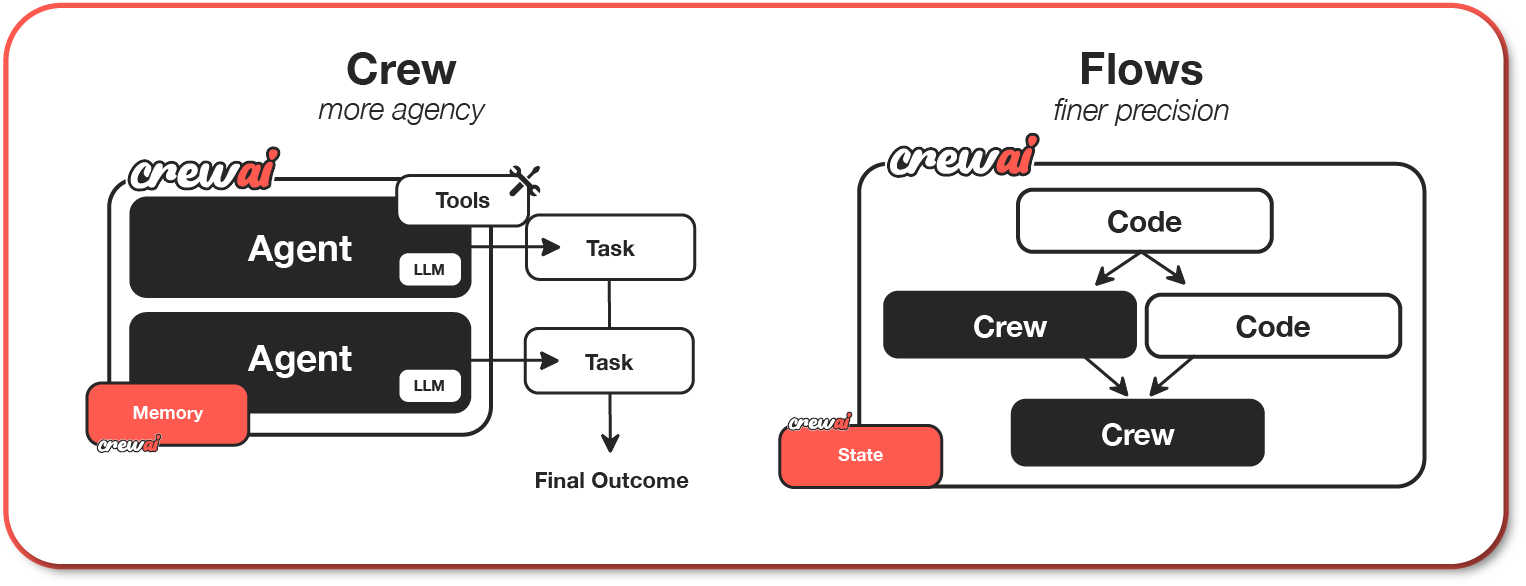
What is crewAI? CrewAI is a standalone, lean, and fast Python framework built specifically for orchestrating autonomous AI agents. Unlike frameworks like LangChain, CrewAI does not rely on external dependencies, making it leaner, faster and simpler.
Developers end up building fragile chains of sequential API calls, where one hallucination breaks the entire pipeline. Meanwhile, managing state, handoffs, and context between agents becomes a maintenance nightmare.
Deploy a team of specialized AI agents (researcher, writer, editor) orchestrated by crewAI in under 15 minutes powered by Regolo’s European LLMs as a service.
Follow the guide below to create the workflow or you can download the code on our Github repo.
Outcome
- Role-Based Intelligence: crewAI lets you define agents with distinct roles, goals, and tools—like building a real team where each member has expertise.
- Autonomous Collaboration: Agents don’t just run sequentially; they can delegate tasks, share context, and even critique each other’s work before producing final output
Prerequisites
- Python 3.12+: for running crewAI and the regolo client.
- Regolo API Key: from your dashboard, click here to copy.
- Docker (Optional): for containerized deployment.
Why crewAI + Regolo Wins
Role-Based Expertise
crewAI lets you define agents with distinct specializations—like assembling a real product launch team where each member brings unique skills. No more generic “do everything” prompts that dilute quality.
Autonomous Collaboration
Agents don’t just execute tasks sequentially; they share context, critique each other’s outputs, and iterate before delivering final campaign materials. The competitive analyst feeds insights to the copywriter, who then passes polished copy to the campaign manager for strategic packaging.
European Inference, Zero-Data Retention and Powered by 100% Green Energy
Regolo routes all LLM calls through European infrastructure, keeping customer data compliant and eliminating US-provider risks
What You’ll Build
By the end of this guide, you’ll have:
- 3 specialized AI agents working as a coordinated team
- A REST API that exposes your crew for external triggers
- Docker deployment ready for production scaling
- Complete source code packaged in a downloadable ZIP
Tech Stack:
- crewAI: Multi-agent orchestration framework
- Regolo.ai: European LLM provider (DeepSeek-R1-70B)
- Flask: REST API wrapper
- Docker: Containerized deployment
Prerequisites
Before starting, ensure you have:
- Python 3.10+ installed locally
- Regolo API key (get free credits at regolo.ai)
- Docker (optional, for production deployment)
- Basic Python knowledge (reading/editing files)
Time commitment: 20 minutes for setup, 5 minutes per launch after deployment.
Step 1: Install crewAI Framework
Set up the crewAI framework and tools package on your local machine.
pip install crewai crewai-toolsVerify the installation:
python -c "from crewai import Agent, Task, Crew; print('crewAI ready!')"Code language: JavaScript (javascript)Expected output:
crewAI ready!What you just did: Installed the core crewAI library that handles agent definitions, task orchestration, and inter-agent communication.
Step 2: Configure Regolo LLM Provider
Connect crewAI to Regolo’s API instead of OpenAI, using the DeepSeek-R1-70B model for advanced reasoning capabilities.
Create llm_config.py:
from crewai import LLM

# Configure Regolo LLM with DeepSeek-R1-70B
regolo_llm = LLM(
    model="deepseek-r1-70b",
    temperature=0.7,
    base_url="https://api.regolo.ai/v1",
    api_key="regolo-api-key-here"  # Replace with your actual key
)Code language: PHP (php)
💡 Tip: Use temperature=0.7 for creative tasks like copywriting, and temperature=0.2 for analytical tasks like competitive analysis. Test both and measure conversion rate differences.
Step 3: Define Your Product Launch Team
Create three specialized agents with distinct roles, goals, and backstories. Each agent becomes an expert in their domain.
Create agents.py:
from crewai import Agent
from llm_config import regolo_llm

# Agent 1: Competitive Intelligence Analyst
competitive_analyst = Agent(
    role="Senior Competitive Intelligence Analyst",
    goal="Analyze competitor products, pricing strategies, and market positioning for {product_name} in {market_segment}",
    backstory="You're a strategic analyst with 10+ years in e-commerce. You identify market gaps and competitive advantages that inform product positioning.",
    llm=regolo_llm,
    verbose=True
)

# Agent 2: Conversion Copywriter
copywriter = Agent(
    role="Conversion-Focused Copywriter",
    goal="Create compelling product descriptions, email sequences, and ad copy that drive conversions for {product_name}",
    backstory="You craft persuasive copy backed by psychology and conversion rate optimization principles. Every word has a purpose.",
    llm=regolo_llm,
    verbose=True
)

# Agent 3: Growth Campaign Manager
campaign_manager = Agent(
    role="Growth Campaign Strategist",
    goal="Design a complete product launch campaign with channels, timeline, KPIs, and budget allocation for {product_name}",
    backstory="You've launched 50+ products with an average 3x ROAS. You know which channels work and how to allocate resources for maximum impact.",
    llm=regolo_llm,
    verbose=True
)Code language: PHP (php)
What you just did: defined three specialists who will collaborate on generate a marketing strategy for a product launch. The {product_name} and {market_segment} placeholders get filled at runtime, making the crew reusable across launches.
Step 4: Build Collaborative Tasks
Create interdependent tasks that leverage each agent’s expertise. Tasks execute sequentially, with later tasks receiving context from earlier ones.
Create tasks.py:
from crewai import Task
from agents import competitive_analyst, copywriter, campaign_manager

# Task 1: Competitive Analysis
analysis_task = Task(
    description="""Analyze the competitive landscape for {product_name} in {market_segment}.
    Include:
    - Top 5 competitors and their pricing
    - Unique value propositions
    - Market gaps and opportunities
    - Recommended positioning strategy""",
    expected_output="A structured competitive analysis report with actionable positioning recommendations.",
    agent=competitive_analyst
)

# Task 2: Create Marketing Copy
copy_task = Task(
    description="""Using the competitive analysis, create:
    - Product landing page copy (hero section, features, benefits)
    - 3-email launch sequence (teaser, launch, follow-up)
    - 5 Facebook/Instagram ad variations
    All copy must highlight our competitive advantages.""",
    expected_output="Complete marketing copy package in markdown format with clear sections.",
    agent=copywriter,
    context=[analysis_task]  # Copywriter receives analyst's insights
)

# Task 3: Campaign Strategy
strategy_task = Task(
    description="""Design a complete 30-day product launch campaign including:
    - Channel mix and budget allocation (paid ads, email, organic social)
    - Week-by-week timeline with milestones
    - Key metrics and KPIs (target CAC, conversion rate, LTV goals)
    - A/B testing plan for first 2 weeks
    Use the positioning from analysis and copy assets created.""",
    expected_output="A detailed campaign plan with timeline, budget breakdown, and success metrics.",
    agent=campaign_manager,
    context=[analysis_task, copy_task]  # Manager sees both previous outputs
)Code language: PHP (php)
What you just did: created a dependency chain where insights flow from competitive analysis → copy creation → campaign strategy. This mirrors how a real team would collaborate.
Step 5: Assemble and Test Your Crew
Combine agents and tasks into a coordinated crew, then test locally before exposing as an API.
Create crew.py:
from crewai import Crew, Process
from agents import competitive_analyst, copywriter, campaign_manager
from tasks import analysis_task, copy_task, strategy_task

# Assemble the launch crew
product_launch_crew = Crew(
    agents=[competitive_analyst, copywriter, campaign_manager],
    tasks=[analysis_task, copy_task, strategy_task],
    process=Process.sequential,  # Tasks execute in dependency order
    verbose=True
)

# Test function to run the crew locally
def test_crew():
    result = product_launch_crew.kickoff(inputs={
        "product_name": "Premium Organic Face Serum",
        "market_segment": "Natural Beauty E-commerce"
    })
    print("\n=== CREW OUTPUT ===")
    print(result)
    return result

if __name__ == "__main__":
    test_crew()Code language: PHP (php)
Run the test:
python crew.pyCode language: CSS (css)Expected output: after 2-5 minutes, you’ll see a complete product launch package including competitive analysis, marketing copy, and a 30-day campaign plan—all tailored to your product.
What you just did: validated that your crew works end-to-end before building the API layer. This is your “smoke test” for the multi-agent system.
Step 6: Expose crewAI as a REST API
Make your crew accessible via HTTP endpoints, below the code to provide this using Flask API that handles job tracking and asynchronous execution.
Create api_server.py:
from flask import Flask, request, jsonify
import uuid
import threading
from crew import product_launch_crew

app = Flask(__name__)
jobs = {}  # In-memory job storage (use Redis for production)

def run_crew_async(job_id, inputs):
    """Execute crew in background thread"""
    try:
        result = product_launch_crew.kickoff(inputs=inputs)
        jobs[job_id] = {
            "status": "completed",
            "result": str(result),
            "inputs": inputs
        }
    except Exception as e:
        jobs[job_id] = {
            "status": "failed",
            "error": str(e),
            "inputs": inputs
        }

@app.route('/kickoff', methods=['POST'])
def kickoff():
    """Start a new product launch crew execution"""
    data = request.json
    product_name = data.get('product_name', 'New Product')
    market_segment = data.get('market_segment', 'General Market')

    # Generate unique job ID
    job_id = str(uuid.uuid4())
    jobs[job_id] = {"status": "running", "result": None}

    # Run crew in background
    inputs = {"product_name": product_name, "market_segment": market_segment}
    thread = threading.Thread(target=run_crew_async, args=(job_id, inputs))
    thread.start()

    return jsonify({
        "job_id": job_id,
        "status": "running",
        "message": "Product launch crew initiated"
    }), 202

@app.route('/status/<job_id>', methods=['GET'])
def get_status(job_id):
    """Poll job status and retrieve results"""
    job = jobs.get(job_id, {"status": "not_found"})
    return jsonify(job)

@app.route('/health', methods=['GET'])
def health():
    """Health check for monitoring"""
    return jsonify({"status": "healthy"}), 200

if __name__ == '__main__':
    app.run(host='0.0.0.0', port=5000, debug=True)Code language: PHP (php)
Start the API server:
python api_server.pyCode language: CSS (css)Test the API:
# Trigger a launch
curl -X POST http://localhost:5000/kickoff \
  -H "Content-Type: application/json" \
  -d '{
    "product_name": "Eco-Friendly Water Bottle",
    "market_segment": "Sustainable Living"
  }'

# Response: {"job_id": "abc-123", "status": "running", ...}

# Check status
curl http://localhost:5000/status/abc-123Code language: PHP (php)
What you just did: created a production-ready API that handles asynchronous crew execution. The /kickoff endpoint returns immediately with a job ID, while the crew runs in the background—perfect for long-running workflows.
Security Note: add API key authentication before deploying to production. See the complete code package for implementation.
Step 7: Production Deployment with Docker (Optional)
Package your crewAI API for consistent, scalable deployment across environments.
Create Dockerfile:
FROM python:3.11-slim

WORKDIR /app

# Install dependencies
COPY requirements.txt .
RUN pip install --no-cache-dir -r requirements.txt

# Copy application code
COPY . .

# Environment variables
ENV REGOLO_API_KEY=""
ENV PORT=5000

EXPOSE 5000

CMD ["python", "api_server.py"]Code language: PHP (php)
Create requirements.txt:
crewai==0.80.0
crewai-tools==0.12.0
flask==3.0.0
python-dotenv==1.0.0
Build and run the container:
# Build image
docker build -t crew-product-launch .

# Run with environment variables
docker run -e REGOLO_API_KEY=$REGOLO_API_KEY -p 5000:5000 crew-product-launchCode language: PHP (php)
After deploying, you can access by the URL localhost:5000 to your production domain.
What you just did: created a portable, reproducible deployment that works identically across local, staging, and production environments.
Performance Benchmarks & Cost Analysis
Execution Metrics
| Metric | crewAI Multi-Agent (VM hosted) | GPT-4 | Regolo |
|---|---|---|---|
| Time to Complete | 3-5 minutes | 2-3 minutes | ✅ 2-3 hours |
| Token Usage | ~25K tokens (3 agents) | ~8K tokens | ✅ 15k input+ 10k output |
| Cost | depends on your choice | $2-$5 | ✅ $0,90 |
Cost Breakdown (DeepSeek-R1-70B on Regolo)
- Input tokens: $0.40 per 1M tokens
- Output tokens: $2.00 per 1M tokens
- Typical launch: 15K input + 10K output = $0.90
Troubleshooting Common Issues
“Module not found: crewai”
pip install --upgrade crewai crewai-toolsAPI Returns “Invalid API Key”
- Verify key at dashboard.regolo.ai
- Check for whitespace in
.envfile - Ensure
base_urlishttps://api.regolo.ai/v1
Crew Execution Hangs
- Cause: Agent stuck in reasoning loop
- Fix: Reduce task complexity or add timeout to Flask route:
thread.join(timeout=300) # 5-minute maxCode language: PHP (php)Download Complete Source Code
All code from this guide is packaged in a ready-to-deploy ZIP file:
Download crewai-product-launch code from Github
Quick start after download:
# Unzip the file
unzip crewai-product-launch.zip

# Step into it
cd crewai-product-launch

# Install pip modules
pip install -r requirements.txt

# Go on regolo.ai dashboard to generate your api key
# Copy and paste into the ENV file

# Test locally
python crew.py
## this will generate the output using Deepseek-r1-70B model

# Start the server to use in Rest API
python api_server.pyCode language: PHP (php)
Resources & Community
Official Documentation:
- crewAI Docs – Framework reference
- Regolo Platform – European LLM provider, Zero Data-Retention and 100% Green
- Regolo Github – Code repo
Related Guides:
Join the Community:
- Regolo Discord – Share your crew builds
- GitHub Repo – Contribute examples
- Follow Us on X @regolo_ai – Show your launches, happy to share feedback!
- Open discussion on our Subreddit Community
Start Building Your Agent Team
You now have everything needed to deploy autonomous product launch teams that work 24/7, cost less then $1 per launch, and deliver agency-quality output in minutes instead of days.
The competitive advantage isn’t in having access to AI—it’s in orchestrating specialized agents that collaborate like a real team.
Next Step: download the code package, run your first test launch, and measure the time savings against your current process.
🚀 Ready to scale?
Get Free Regolo Credits →
Download CodePackage →
Built with ❤️ by the Regolo team. Questions? support@regolo.ai