

A step-by-step guide to installing agentmemory with OpenCode and Regolo.ai — keeping all session data on-premise, fully GDPR-compliant.
Every AI coding agent forgets everything when the session ends, you waste the first 5 minutes of every session re-explaining your stack, your conventions, and your last decision, agentmemory fixes this permanently.
It runs as a local MCP server in the background. Hooks silently capture every tool call, file touched, and decision made. When the next session starts, the agent already knows your architecture — no re-explaining, no copy-pasting context.
HOW IT WORKS
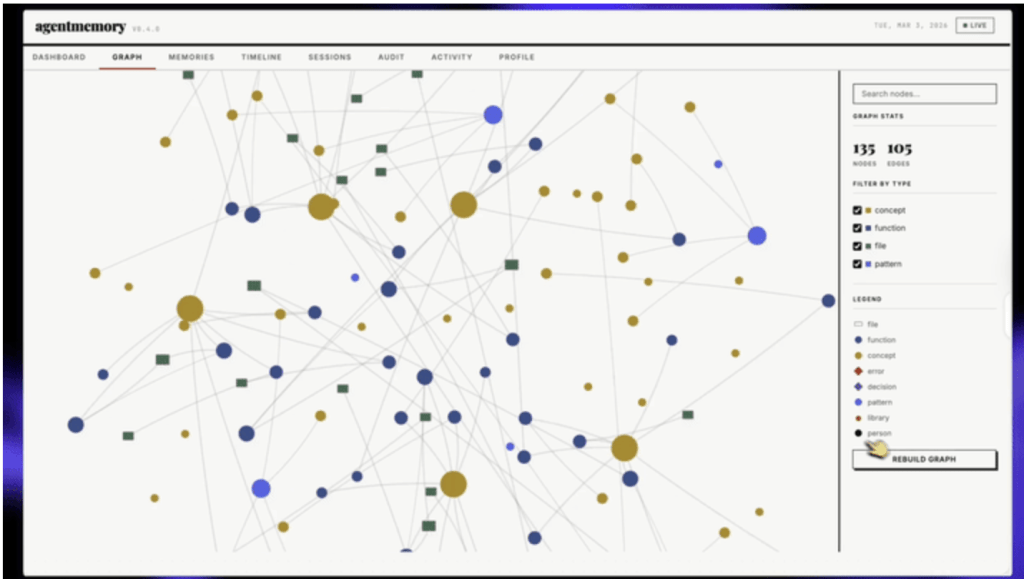
agentmemory stores everything in SQLite + an in-memory vector index — no Postgres, no Redis, no cloud. It uses a 4-tier memory consolidation model: Working → Episodic → Semantic → Procedural.
Memories decay (Ebbinghaus curve), contradictions auto-resolve, and retrieval uses BM25 + vector + knowledge graph (RRF fusion) for 95.2% recall accuracy on LongMemEval-S.
| Before agentmemory | After agentmemory |
|---|---|
| Re-explain stack every session | Agent picks up exactly where you left off |
| 22K+ tokens to load CLAUDE.md | ~1,900 tokens via smart retrieval (92% less) |
| Memory capped at 200 lines | Unlimited, semantically searchable |
| Single-agent only | Shared memory across all agents (MCP + REST) |
| API keys sent to cloud | Stripped before storage (privacy filter) |
Auto-capture hooks
Most memory libraries require manual .add() calls. agentmemory ships 22 lifecycle hooks that fire automatically when the agent does anything: opens a file, runs a command, writes a test, finishes a task. You install the hooks once and capture starts immediately.
// hooks fire on every agent action — no manual add() needed
on_file_read      // agent opened a file
on_file_write     // agent wrote a file
on_command_run    // terminal command executed
on_task_complete  // agent finished a subtask
on_error          // error captured with context
on_decision       // agent explained a trade-off
on_session_end    // consolidation triggered
// ... 15 moreCode language: Bash (bash)
4-tier memory consolidation
| Tier | What lives here | Retention | Example |
|---|---|---|---|
| Working | Current session context | Session-scoped | “Currently editing auth.ts” |
| Episodic | Events with time + context | Weeks (decay) | “Fixed race condition on 2025-06-18” |
| Semantic | Facts, patterns, entities | Persistent | “Auth service uses JWT with 15min TTL” |
| Procedural | Preferences, workflows | Persistent | “Always use zod for schema validation” |
Regolo routes AI requests to EU-based LLM providers — no data leaves European infrastructure. Combined with agentmemory running 100% locally, you get a complete AI coding workflow where:
Client code never leaves your machine
agentmemory stores observations in local SQLite. No external DB, no cloud sync.
Secrets auto-stripped
agentmemory’s privacy filter removes API keys, tokens, and credentials before storage.
Full audit trail
Every memory operation logged with timestamp and provenance — auditable for GDPR requests.
Companies working with sensible data
PA contracts typically require that data processed on behalf of public entities stay under Italian/EU jurisdiction (Codice in materia di protezione dei dati personali, GDPR Art. 44-46).
Our services satisfies this: inference through EU-routed providers, memory entirely local, zero telemetry to non-EU services.
Getting Started
1. Install and start the server
The server starts in seconds. No Postgres, no Redis, no Qdrant. SQLite is the only dependency — it’s embedded in the Node.js process.
# 1. Install AgentMemory
npx @agentmemory/agentmemory init

# 2. Install il Skills package
npx @agentmemory/skills install

# 3. Verify everything is ok
npx @agentmemory/agentmemory status

# 4. demo seed
npx @agentmemory/agentmemory demoCode language: Bash (bash)
The skills package adds slash commands like /memory-recall, /memory-search, /memory-timeline, and /memory-status to your agent. After the demo seed, you can test recall immediately without any real session history.
2. Connect to your agent
# interactive connector — detects which agents are installed
npx @agentmemory/agentmemory connect

# or add the MCP server manually to ~/.claude.jsonCode language: Bash (bash)
// ~/.claude.json
{
"mcpServers": {
"agentmemory": {
"type": "stdio",
"command": "npx",
"args": ["@agentmemory/mcp"]
}
}
}Code language: JavaScript (javascript)3. Configure the embedding provider
# ~/.agentmemory/.env
# Option A — fully local, zero cost, zero data egress
EMBEDDING_PROVIDER=local
EMBEDDING_MODEL=all-MiniLM-L6-v2            # or everything you need as embedding

# Option B — OpenAI API (higher quality, small cost)
EMBEDDING_PROVIDER=openai
OPENAI_API_KEY=sk-...

# Option C — Regolo.ai (EU-routed, GDPR-safe)
LLM_BASE_URL=https://api.regolo.ai/v1
LLM_API_KEY=your-regolo-key
EMBEDDING_PROVIDER=local   # embeddings still localCode language: Bash (bash)
4. Open the real-time viewer
# browser-based live view of what the agent is learning
open http://localhost:3113Code language: PHP (php)
The viewer at :3113 shows all observations streaming in, the knowledge graph, memory tier breakdown, and token savings stats. No other memory library ships a live viewer out of the box.
Configure OpenCode + Regolo
agentmemory needs an LLM provider for background compression — converting raw tool outputs into structured memories. With Regolo.ai, this routes through EU-hosted models. Add your Regolo.ai key via the OpenRouter-compatible interface.
opencode.json — MCP wiring:
{
  "mcp": {
    "agentmemory": {
      "type": "local",
      "command": ["npx", "-y", "@agentmemory/mcp"],
      "env": {
        "AGENTMEMORY_URL": "http://localhost:3111"
      },
      "enabled": true
    }
  },
  "plugin": ["./plugins/agentmemory-capture.ts"],

  // Your main model via Regolo.ai
  "model": "regolo/your-preferred-model",

  // Regolo.ai uses OpenRouter-compatible API
  "provider": {
    "regolo": {
      "apiKey": "${REGOLO_API_KEY}",
      "baseUrl": "https://api.regolo.ai/v1"
    }
# continue, please see the link below for full settings
  }
}Code language: JavaScript (javascript)
👉 Here the complete configuration for opencode on our official repo
~/.agentmemory/.env — background compression config:
# ── LLM provider: Regolo.ai via OpenRouter-compatible interface ──
OPENROUTER_API_KEY=your-regolo-api-key-here
OPENROUTER_BASE_URL=https://api.regolo.ai/v1

# Background compression model — cost-optimized (see table below)
# Choose based on your budget and privacy requirements:
OPENROUTER_MODEL=regolo/deepseek-v3   # recommended: low cost, good compression

# ── Embeddings: local, zero cost, offline ──
EMBEDDING_PROVIDER=local              # uses all-MiniLM-L6-v2 via @xenova/transformers

# ── Memory features ──
AGENTMEMORY_AUTO_COMPRESS=true        # compress every observation via LLM
AGENTMEMORY_INJECT_CONTEXT=true       # inject top memories at session start
AGENTMEMORY_SLOTS=true               # enable pinned memory slots
GRAPH_EXTRACTION_ENABLED=true         # extract entity knowledge graph

# ── Privacy ──
# No TEAM_MODE needed for single-developer setups
# AGENTMEMORY_SECRET=your-secret      # enable if exposing on network

# ── Ports (defaults are fine) ──
# III_REST_PORT=3111
# AGENTMEMORY_VIEWER_PORT=3113Code language: PHP (php)
Install local embeddings (free, offline, no API key needed):
# Local embeddings — runs on your CPU, zero cost, 100% offline
# agentmemory auto-detects this package
npm install -g @xenova/transformers

# Restart agentmemory to pick up the new config
agentmemory stop
agentmemoryCode language: PHP (php)
Privacy note: what gets sent to Regolo
Only the raw tool outputs (already stripped of secrets/API keys by agentmemory’s privacy filter) are sent to the LLM for compression. Source code, credentials, and <private>-tagged content never leave your machine. If you want zero outbound LLM calls, use OPENAI_API_KEY=local + Ollama
Real-world Use Case
These are concrete loops you can wire into your daily workflow today, each one maps to a real engineering scenario where session amnesia costs you time.
Solo dev loop — “the agent that knows your codebase”
You open a new session every day without memory, the agent re-reads the whole codebase to understand conventions; with agentmemory, it already knows your naming patterns, your preferred libraries, and every architectural decision you’ve documented.
# session 1 — you explain things once
You: We use zod for validation, never joi. Auth tokens are
     stored in httpOnly cookies, never localStorage. The
     database layer always goes through repository classes.

Agent: Understood. Capturing as procedural preferences.
       [memory] stored 3 architectural constraints

# session 2, 3 weeks later — agent already knows
You: add email validation to the signup form
Agent: [memory] retrieved: "zod for validation" + "auth
       pattern from session 2025-06-04"
       I'll use zod. Here's the schema...Code language: Bash (bash)
# add to your shell profile — starts memory server on login
echo 'agentmemory start --daemon &> /dev/null &' >> ~/.zshrc
# status check alias
alias mem='npx @agentmemory/agentmemory status'
# search memory from terminal
alias mems='npx @agentmemory/agentmemory search'Code language: Bash (bash)Team handoffs — “never onboard anyone twice”
New engineer joins. Senior dev pairs for 2 sessions. agentmemory captures every decision, rationale, gotcha, and preference. The new engineer’s agent inherits that context from session one — procedural memories export as a shareable file.
# export your memory as a shareable file
npx @agentmemory/agentmemory export --format json > team-memory.json

# new team member imports it
npx @agentmemory/agentmemory import ./team-memory.json

# or export as Obsidian vault for human review
npx @agentmemory/agentmemory export --format obsidian --out ./vaultCode language: Bash (bash)
⚠ Before sharing memory exports, run npx @agentmemory/agentmemory audit --privacy. The privacy filter strips secrets at capture time, but review exports before committing to git or sending to teammates.
Debugging sessions — “the post-mortem that survives”
THE PROBLEM: if you’re spending 4 hours debugging a subtle race condition, next month, similar symptoms appear in a different service, without memory, you start from scratch.
THE SOLUTION: with agentsmemoery you jump to the solution.
# during the debug session — agent captures automatically
# but you can also pin important findings manually

# in-agent slash command
/memory-pin "auth race condition: concurrent token refresh
 triggers duplicate DB writes. Fix: distributed lock in
 RedisLockService. Mutex key: auth:refresh:{userId}"

# later — cross-session recall
/memory-search "race condition"
# → surfaces the original diagnosis + fix from 6 weeks ago
slash commandsCode language: Bash (bash)
OSS maintainer — “context across 100 contributors”
agentmemory captures review decisions, recurring anti-patterns, and contributor-specific context — searchable across all past review sessions
# during PR review — agent auto-captures review decisions
# you can also pin explicit recurring patterns

/memory-pin "anti-pattern: wrapping fetch in try/catch
 without re-throwing crashes silently. Always use the
 withErrorBoundary() wrapper. See PR #482 for canonical fix."

# on the next similar PR
/memory-search "fetch error handling"
# → agent recalls the pattern + links to PR #482
slash commandsCode language: Bash (bash)
Competitive Landscape about Memory for Agents
| Project | Plane | Update model | Primary consumer |
|---|---|---|---|
| agentmemory | Session history, decisions, preferences | Live (observation stream) | Agent |
| codegraph | Code structure (symbols, call graph) | Live (FS watcher) | Agent |
| Understand Anything | Architecture + business domain | On-demand /understand | Human + agent |
| Graphify | Code + docs + PDFs + media | On-demand /graphify . | Human + agent |
<em>// wire all four as MCP servers</em>
{
  "mcpServers": {
    "agentmemory": { "command": "npx", "args": ["@agentmemory/mcp"] },
    "codegraph":   { "command": "codegraph", "args": ["serve", "--mcp"] }
  }
}
<em>// Understand Anything and Graphify install as agent plugins/skills</em>Code language: JavaScript (javascript)
vs. Mem0, Letta, Khoj, supermemory
The benchmark caveat applies: only agentmemory’s LongMemEval numbers are self-measured; other vendors publish on different benchmarks or with different harnesses.
| Feature | agentmemory | Mem0 | Letta/MemGPT | supermemory |
|---|---|---|---|---|
| Auto-capture | ✓ 22 hooks | ✗ manual add() | ✗ self-edits | ✗ API extraction |
| Search strategy | BM25 + Vector + Graph | Vector + Graph | Vector only | Vector + RAG |
| External DB | None | Qdrant / pgvector | Postgres + vector | Cloud-only |
| Self-hostable | ✓ default | Optional | Optional | ✗ cloud only |
| Memory decay | ✓ Ebbinghaus | ✗ | ✗ | ✓ auto-forget |
| Knowledge graph | ✓ entity + BFS | ✓ Mem0g | ✗ | ✗ |
| Multi-agent coord. | ✓ leases + signals | ✗ | Runtime-internal | ✗ |
| Privacy filter | ✓ pre-store | ✗ | ✗ | ✗ |
| Real-time viewer | ✓ port 3113 | Cloud dashboard | Cloud dashboard | Cloud dashboard |
| LLM lock-in | None | None | Python only | None |
| Retrieval (LongMemEval-S R@5) | 95.2% (self-measured) | 68.5% (LoCoMo*) | 83.2% (LoCoMo*) | Not published |
* Different benchmark. LoCoMo ≠ LongMemEval. Numbers are vendor-published and not independently reproduced on identical data.
When NOT to use agentmemory
- You need a full agent runtime (Letta/MemGPT is the right call — it manages agent execution, not just memory).
- You want a personal second brain over documents (Khoj is built for that, with Obsidian/Notion/Emacs integrations).
- You need a managed cloud API with zero infrastructure (supermemory has drop-in wrappers for Vercel AI, LangChain, LangGraph).
- You already run on Oracle Database and want memory inside it (oracleagentmemory lives there).
PRIVACY ARCHITECTURE
Regolo + GDPR compliance
For all companies that work with customer data and sensible insights business data the standard AI coding assistant setup is a compliance risk: prompts, code, and context leave for US-based servers.
| Data type | Where it goes | GDPR article |
|---|---|---|
| Memory observations (code, decisions) | Local SQLite only | Art. 25 — data minimization by design |
| Embeddings computation | In-process (no network) | Art. 25 — privacy by default |
| LLM prompts (agent reasoning) | Regolo.ai EU servers | Art. 44 — transfer to third country (EU only) |
| Secrets, API keys, tokens | Stripped by privacy filter before store | Art. 32 — security by design |
| Audit trail (all mutations) | Local log | Art. 30 — records of processing activities |
Configuration for a GDPR-compliant setup
# ~/.agentmemory/.env — full GDPR compliant configuration

# LLM inference via Regolo API
LLM_BASE_URL=https://api.regolo.ai/v1
LLM_API_KEY=your-regolo-api-key
LLM_MODEL=brick-v1-beta   # visit https://regolo.ai/models to see the full list

# Embeddings: local only, zero network
EMBEDDING_PROVIDER=local
EMBEDDING_MODEL=all-MiniLM-L6-v2

# Privacy filter (on by default, but make it explicit)
PRIVACY_FILTER=true
STRIP_SECRETS=true
STRIP_PII=true

# Audit logging for Art. 30 compliance
AUDIT_LOG=true
AUDIT_LOG_PATH=~/.agentmemory/audit.logCode language: Bash (bash)
Verify data stays local
# confirm no memory data leaves the machine
npx @agentmemory/agentmemory audit --data-residency
# → Storage: /home/user/.agentmemory/memory.db (local)
# → Embeddings: in-process (no network calls)
# → LLM endpoint: api.regolo.ai (EU)
# → External calls: 0 (memory operations)

# run network trace during a session to confirm
sudo tcpdump -i any host api.regolo.ai
# only LLM inference calls should appear — no SQLite dataCode language: Bash (bash)
FAQ
What is agentmemory, in one sentence?
agentmemory is a persistent memory engine and MCP server for coding agents that captures sessions, tools, files, and decisions, then retrieves the right context in later runs instead of making you re-explain everything from scratch.
Does it work only with OpenCode?
No. The project documents support for OpenCode, Claude Code, Codex CLI, Cursor, Gemini CLI, Copilot CLI, and other MCP-compatible or REST-integrated agents, all sharing the same memory server.
How is it different from CLAUDE.md, MEMORY.md, or AGENTS.md?
Static files are just manual notes, while agentmemory is a searchable runtime memory layer with automatic capture and selective recall.
In OpenCode specifically, memory is injected directly into the system prompt through experimental.chat.system.transform, rather than being synchronized through a repo file.
How does it actually remember things?
The system captures events through hooks, stores observations, compresses them into structured memory, and indexes them for retrieval.
Its retrieval stack combines BM25, vector search, and graph traversal, then fuses results with Reciprocal Rank Fusion.
What gets captured in OpenCode?
The OpenCode plugin captures session lifecycle events, chat messages, tool completions, tool errors, file edits, permission events, task updates, retries, and model/config metadata.
The plugin README describes 22 hooks plus a two-layer context pipeline for session memory and file enrichment.
Do I need a cloud vector database?
No. The comparison and README position agentmemory as self-hosted by default, with no mandatory external database and support for local embeddings such as all-MiniLM-L6-v2.
Why is this useful in a real dev workflow?
It helps on iterative work, where today’s auth decision, yesterday’s bug trail, or last week’s file-level context should still be available when you reopen the project.
That makes it especially useful for long-running repos, repeated debugging, and cross-session feature work.
Is it a good fit for privacy-sensitive projects?
Yes, especially if you want the memory layer under your own control.
The project documents privacy filtering before storage, including stripping secrets and API keys, which is useful for teams working with regulated clients or public-sector environments.
How is it different from tools like Mem0, Letta, Khoj, or supermemory?
The project positions agentmemory as stronger when you want automatic hook-based capture, MCP-native access, self-hosting, and multi-agent coordination rather than manual add() calls, a hosted API, or a full locked-in runtime.
Mem0 is framed more as a memory API, Letta as a full runtime, Khoj as a personal second brain, and supermemory as a managed cloud memory product.
What are the main tradeoffs?
The main tradeoff is that agentmemory is still infrastructure: you run the server, configure the integration, and choose your model and embedding setup.
If you want pure plug-and-play SaaS with no local setup, a managed product may feel simpler, even if it gives you less control.
Is there evidence that the retrieval works?
The README reports 95.2% R@5 on LongMemEval-S for agentmemory, while the comparison page explicitly warns that some competitor numbers are vendor-published and not directly comparable on identical datasets. So the fairest reading is that agentmemory shows strong documented retrieval performance, but you should still evaluate it against your own workflow.
Start your free 30-day trial at regolo.ai and deploy LLMs with complete privacy by design.
👉 Talk with our Engineers or Start your 30 days free →
- Discord – Share your thoughts
- GitHub Repo – Code of blog articles ready to start
- Follow Us on X @regolo_ai
- Open discussion on our Subreddit Community
Built with ❤️ by the Regolo team. Questions? regolo.ai/contact or chat with us on Discord