

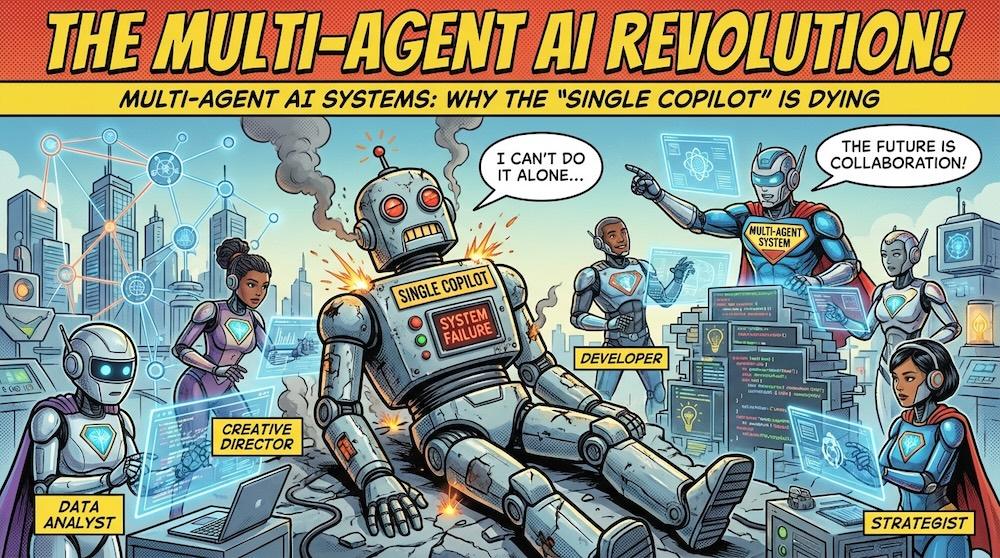
The “single copilot” era is ending—not because AI got worse, but because enterprises finally tried to scale it. When one assistant is asked to plan, execute, validate, remember context, call tools, write code, follow policy, and explain decisions, you’re not building an assistant anymore—you’re building a fragile monolith.
That fragility shows up in predictable ways: inconsistent outputs, brittle reasoning chains, tool misuse, and silent failures that only appear downstream. The hotter the workflow (customer-facing, financial, regulated, security-sensitive), the faster the “one smart agent” pattern collapses.
The alternative isn’t “more prompting.” It’s structure: multi-agent AI systems where roles are separated (Planner, Executor, Validator), permissions are scoped, and each step produces artifacts that can be checked. This is exactly the direction modern agent architectures are converging on—plan/execute patterns with explicit verification gates before irreversible actions.
Why the single copilot fails at scale
A single agent is forced to do “strategic thinking” and “tactical doing” at the same time, inside one context window. In practice, that means the same model that proposes a plan is also the one that rationalizes mistakes and pushes forward—even when the plan is flawed. Modern patterns explicitly split planning from execution to make behavior more predictable and debuggable. A common best practice is a Planner that produces a step-by-step plan and an Executor that runs each step (often with tool access), with a replanning loop when a step fails.
The bigger the workflow, the more you need separation of concerns:
- Planning artifacts you can inspect before actions run.
- Execution traces you can replay.
- Validation gates that catch errors early.
The structure that replaces it
The most practical “minimum viable team” is a trio:
- Planner agent: decomposes the objective into steps, selects tools/data sources, and defines success criteria.
- Executor agent: performs tool calls, runs code, triggers APIs, and produces outputs plus traces.
- Validator agent: checks the plan/output against requirements, policies, and evidence; it can reject and request a revision.
This Planner–Executor–Verifier setup is widely described as a way to raise assurance because each role focuses on a narrower job, making it easier to catch mistakes.
In higher-risk environments, you’ll also see “Plan–Validate–Execute” (P-V-E) patterns: the Verifier reviews the plan before the Executor acts, because blindly executing an incorrect plan can create high costs or irreversible actions.
Single copilot vs multi-agent teams
Here’s the core trade-off you should communicate to stakeholders: you’re not “adding complexity,” you’re moving complexity out of the model’s hidden chain-of-thought into explicit system structure.
| Dimension | Single copilot | Multi-agent AI systems |
|---|---|---|
| Failure mode | Silent, hard to localize | Isolated per role; easier to debug |
| Governance | One giant permission surface | Scoped permissions per agent |
| Reliability | One model must self-correct | Validator gate + replanning loops |
| Cost control | Same model does everything | Cheap planner + strong executor/validator (mix models) |
| Auditability | Weak, unstructured traces | Plans, checks, execution artifacts |
A key operational benefit: with separate roles, you can assign different models per agent and upgrade only the parts that need more capability. Regolo’s pricing page frames this as “mix and match models based on your use case and performance requirements,” which maps naturally to multi-agent design.
Reference architecture (enterprise-ready)
To make multi-agent AI systems work in real companies, add three layers around the agents:
- State & artifacts
- Store plans, tool outputs, and validator reports as first-class objects.
- Treat the plan as a contract: inputs, steps, constraints, expected outputs.
- Tooling boundaries
- Executor gets the tools; Planner often should not.
- Validator should have read-only access to evidence/logs, not production credentials.
- Policy & safety checks
- Validate for: security policy, data handling rules, PII exposure, and “grounding” requirements.
- Insert human approval for high-impact actions (payments, production deploys, customer emails).
That last point is aligned with P-V-E guidance: validate the plan before execution in workflows where mistakes are expensive.
Build it with Regolo + CrewAI (a practical example)
CrewAI is an open-source framework designed to orchestrate multiple role-based agents (and can be combined with “Crews and Flows” for more controlled execution). Below is a practical pattern you can adapt: a Planner produces a task plan, an Executor carries it out, and a Validator checks the result and either approves or requests changes.
Step 1) Pick models per role
Start by listing available models from Regolo’s API and selecting a “planner” model (cheaper) and “executor/validator” models (more capable). Regolo’s catalog docs show you can query the model list via GET https://api.regolo.ai/models.
If your agent framework expects an OpenAI-compatible endpoint, Regolo can be used via a base URL such as https://api.regolo.ai/v1 (set as OPENAI_API_BASE in some tools).
Step 2) Wire CrewAI to Regolo (OpenAI-compatible)
CrewAI can be connected to different LLM backends, and community examples show how to define multiple agents with different roles and run them in a sequential process. Conceptually, you’ll configure an OpenAI-compatible client pointing at Regolo’s base URL and use Regolo model names (for example, meta-llama/Llama-3.3-70B-Instruct is shown in Regolo’s Python client docs as a default model).
Example (Python, concept-first skeleton):
import os

# Regolo as OpenAI-compatible endpoint
os.environ["OPENAI_API_BASE"] = "https://api.regolo.ai/v1"  # [web:66][web:72]
os.environ["OPENAI_API_KEY"] = os.getenv("REGOLO_API_KEY")

# Pseudocode-ish CrewAI wiring (exact API may vary by CrewAI version)
from crewai import Agent, Task, Crew, Process

planner = Agent(
    role="Planner",
    goal="Create a safe, step-by-step plan with clear acceptance criteria",
    backstory="You design reliable workflows and minimize risk.",
    llm="meta-llama/Llama-3.3-70B-Instruct"  # example model name [web:64]
)

executor = Agent(
    role="Executor",
    goal="Execute the plan, call tools/APIs, produce outputs + trace",
    backstory="You are precise and you follow the plan exactly.",
    llm="meta-llama/Llama-3.3-70B-Instruct"  # swap with faster/cheaper model as needed
)

validator = Agent(
    role="Validator",
    goal="Verify outputs vs requirements; reject if evidence is weak",
    backstory="You are strict, security-minded, and allergic to hand-waving.",
    llm="meta-llama/Llama-3.3-70B-Instruct"
)

plan_task = Task(
    description="Given the objective, propose a numbered plan and acceptance tests.",
    expected_output="A plan with steps, constraints, and acceptance criteria.",
    agent=planner
)

execute_task = Task(
    description="Execute the plan steps and produce the final deliverable + trace.",
    expected_output="Deliverable plus a trace of actions and intermediate results.",
    agent=executor
)

validate_task = Task(
    description="Check the deliverable against acceptance criteria; approve or request fixes.",
    expected_output="VALIDATED or REJECTED with concrete reasons and required changes.",
    agent=validator
)

crew = Crew(
    agents=[planner, executor, validator],
    tasks=[plan_task, execute_task, validate_task],
    process=Process.sequential,
    verbose=True
)

result = crew.kickoff(inputs={"objective": "Draft a compliant vendor risk assessment summary"})
print(result)
Code language: Python (python)
Step 3) Add a real “Plan–Validate–Execute” gate
⚠️ In regulated workflows, don’t let the Executor run immediately after the Planner writes a plan.
Insert a validator (or human) check before execution; this is exactly what P-V-E is for, especially when incorrect plans could cause costly or irreversible actions.
Read more about Agents with Human in the loop here: https://regolo.ai/human-in-the-loop-autonomous-ai-agents-governance/
Which models can be used now on Regolo?
We have a plenty of fresh models to use in the dedicated page https://regolo.ai/models-library/ that you can pick and use without cold boot start at a very competitive price in the market.
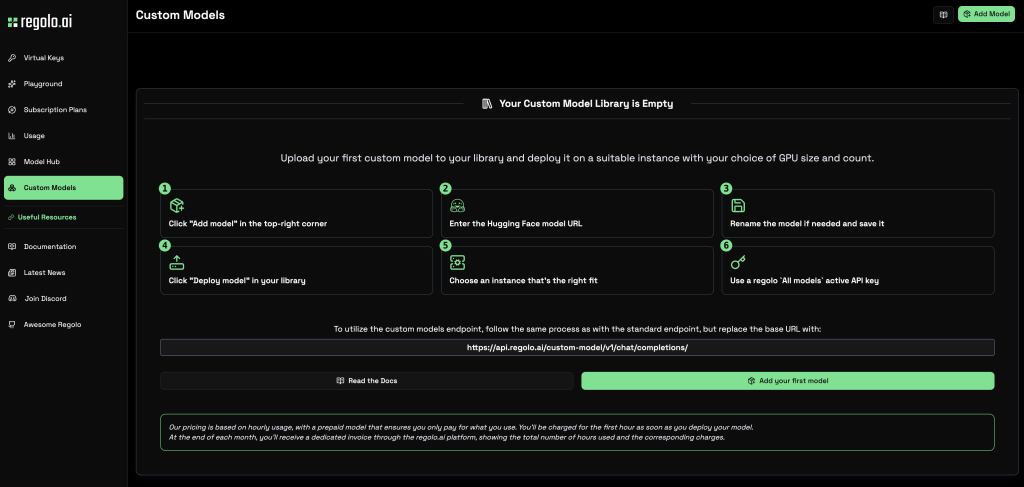
There’s an alternative: you can choose your model from Hugging Face.
Paste the URL from Hugging Face, choose your GPI and start inferencing in few minutes with the last model (e.g. GLM-5 or whatever)
The URL for the inference will be (https://api.regolo.ai/custom-model/v1/) and an OpenAI-style /chat/completions/ call pattern for custom deployments, but you’ll find all example codes in the deploying process and in any case our team is here (Discord) to help you do the right stuff in the right way 🙂
Frequently Asking Questions
What is the “single copilot” problem?
It’s the pattern where one AI assistant is responsible for planning, executing, and validating complex workflows, which tends to break down as tasks and risk increase.
What are multi-agent AI systems?
They’re systems where multiple specialized agents collaborate, typically with separated roles like Planner, Executor, and Validator to improve reliability and control.
Why add a Validator agent?
Because validating a plan/output before action reduces the chance of costly mistakes; P-V-E patterns exist specifically to prevent blind execution of incorrect plans.
Do I need many agents to get benefits?
No—start with 2–3 (Planner + Executor + Validator). More agents add coordination overhead unless each role is clearly scoped.
How do I choose models per agent on Regolo?
Use Regolo’s /models endpoint to list available models, then assign cheaper/faster ones for planning and stronger ones for execution/validation depending on workload.
Can I use Regolo with OpenAI-compatible tooling?
Regolo can be used as an OpenAI-compatible base URL in some integrations (for example https://api.regolo.ai/v1 is referenced in Regolo integration guidance).
What about privacy and data retention?
Regolo describes a Zero Retention Data Policy: no storage of prompts/outputs, no logging of API call content for later analysis, and no training reuse.
Can OpenClaw help with multi-agent setups?
Yes—OpenClaw documents multi-agent routing where each agentId is an isolated persona with separate sessions and workspaces, which maps nicely to role-based agents.
The “single copilot” didn’t die because it’s useless—it died because enterprises asked it to do what monoliths always struggle with: scale safely. Multi-agent AI systems are the replacement pattern because they add structure: explicit roles, scoped permissions, and verification gates that make failures observable and fixable.
Explore Regolo’s Core Model → https://regolo.ai/models-library/
🚀 Ready? Start your free trial on today
- Discord – Share your thoughts
- GitHub Repo – Code of blog articles ready to start
- Follow Us on X @regolo_ai
- Open discussion on our Subreddit Community
Built with ❤️ by the Regolo team. Questions? regolo.ai/contact or chat with us on Discord