

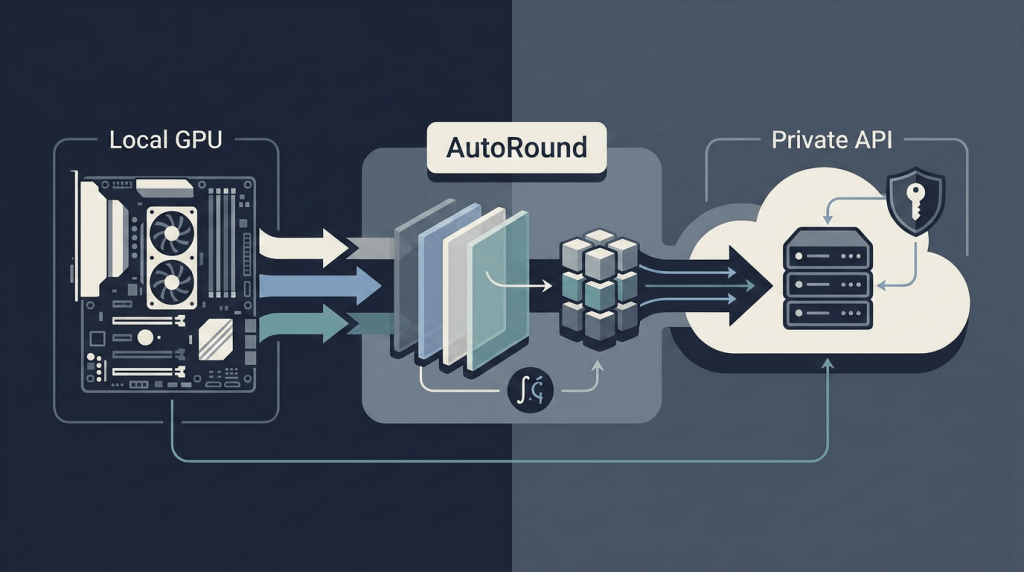
Your RTX 4090 just became a 70B-model machine. Intel’s AutoRound makes it possible — and this guide shows exactly how to quantize, export to GGUF, and publish custom models without vendor lock-in.
Table of Contents
- Why AutoRound Changes the Game
- Prerequisites & Hardware Reality Check
- AutoRound-Quantized Models on Hugging Face (Curated)
- Installation: CPU, CUDA, Intel GPU, or Gaudi
- Core Concepts: Bits, Group Size, and Recipes
- CLI Quantization Walkthrough
- API Quantization for Pipelines
- Exporting GGUF — The Format That Runs Everywhere
- Pushing Custom GGUF Models to Hugging Face Hub
- Deploy on a Private API endpoint on Regolo
- Inference: vLLM, Transformers, llama.cpp
- Advanced: Mixed-Bit, VLM, and Calibration Datasets
- Troubleshooting & Known Issues
- FAQ
Why AutoRound Changes the Game
Most quantization tools force a choice: speed or accuracy, AutoRound uses sign-gradient descent to fine-tune weight rounding and min-max ranges in ~200 iterations — no extra inference overhead, no calibration data engineering unless you want it. The result: INT2 models retaining 97.9% accuracy on DeepSeek-R1 (200 GB compressed to ~50 GB) .
Key differentiators that matter for production teams:
| Feature | Why It Matters |
|---|---|
| 2–4 bit support with mixed-bit per layer | Assign 2 bits to insensitive layers, 4 bits to attention — reclaim VRAM surgically |
| Native GGUF, GPTQ, AWQ, AutoRound export | One quantization run, four deployment targets |
| vLLM & Transformers integration (v4.51.3+) | Drop-in inference, no custom kernels to maintain |
| ~10 min for 7B on single GPU | CI/CD friendly — quantize on every release branch |
VLM support via auto-round-mllm | Quantize Qwen2-VL, Gemma-3, LLaVA in one command |
The library hits a sweet spot: research-grade accuracy with engineering-grade ergonomics. Well, not exactly — there are rough edges (random seeding on some models, ChatGLM v1 unsupported). But the trajectory is clear.
Prerequisites & Hardware Reality Check
Before you pip install, audit your iron:
| Model Size | FP16 VRAM | 4-bit VRAM | 2-bit VRAM | Minimum GPU |
|---|---|---|---|---|
| 7B | 14 GB | 3.5 GB | ~2 GB | RTX 3060 12GB |
| 32B | 64 GB | 16 GB | 8 GB | RTX 4090 / A6000 |
| 70B | 140 GB | 35 GB | 17.5 GB | 2× RTX 4090 or A100 80GB |
| 235B (MoE) | 470 GB | ~120 GB | ~60 GB | 4× A100 / H100 |
Rule of thumb: 4-bit needs ~0.5 bytes/param + KV cache overhead. Group size 128 is the default sweet spot; drop to 64/32 if OOM strikes. AutoRound’s --low_gpu_mem_usage flag trades ~30% slower tuning for ~20 GB VRAM savings — use it on 24 GB cards .
Calibration data: defaults to NeelNanda/pile-10k (10k samples, 2048 tokens). For code models, swap in mbpp. For chat models, enable --dataset ...:apply_chat_template. Custom JSON/JSONL works too — see step-by-step docs.
AutoRound-Quantized Models on Hugging Face (Curated)
| Model | Base | Quantization | Size | Author |
|---|---|---|---|---|
| Gemma-4-Gemsicle-31B-W4A16-AutoRound | Gemma-4-Gemsicle-31B | W4A16 (4-bit weights, FP16 activations) | ~19 GB | bf mags |
| Qwen3.5-27B-heretic-v2-autoround-w4a16 | Qwen3.5-27B-heretic-v2 | W4A16 | ~16 GB | groxaxo |
| autoround-quantized-4bit | Unspecified (likely 7B–14B) | 4-bit symmetric | ~4–8 GB | jjeccles |
| Qwen3.6-27B-int4-AutoRound | Qwen3.6-27B | INT4 (group_size=128, sym) | ~16 GB | Lorbus |
| Qwen3.6-27B-INT8-AutoRound | Qwen3.6-27B | INT8 (group_size=128) | ~30 GB | Minachist |
| MiniMax-M2.7-REAP-172B-A10B-AutoRound-W4A16 | MiniMax-M2.7-REAP-172B-A10B (MoE) | W4A16 | ~95 GB | MJPansa |
W4A16 = 4-bit weight quantization with 16-bit (FP16/BF16) activations — the sweet spot for vLLM/TGI serving. INT4/INT8 = symmetric integer quantization (group_size=128 default) — runs on llama.cpp, Ollama, Transformers.
Missing a model? Search autoround on HF Hub — 200+ public repos and counting
Installation: CPU, CUDA, Intel GPU, or Gaudi
# CUDA / Intel GPU / CPU (most common)
pip install auto-round

# Gaudi / HPU
pip install auto-round-lib

# Bleeding edge (GGUF export, INT2 extended algorithm)
pip install git+https://github.com/intel/auto-round.git@mainCode language: Bash (bash)
Optional but recommended for CPU inference speed:
pip install intel-extension-for-pytorch  # Intel CPU
# or
pip install intel-extension-for-transformersCode language: Bash (bash)
Verify:
auto-round -h
# Should show: --format options including 'gguf:q4_k_m', 'gguf:q2_k_s', etc.Code language: Bash (bash)
Core Concepts: Bits, Group Size, and Recipes
Bits (2, 3, 4) — Lower = smaller, faster, less accurate. AutoRound shines at 3-bit and 4-bit; 2-bit needs --enable_alg_ext (experimental) or auto-round-best recipe .
Group size (32, 64, 128, 256) — How many weights share one scale/zero-point. Smaller = more precise, larger model file. Default 128 works for most LLMs; VLMs often need 32.
Symmetry (--sym / --asym) — Symmetric quantization (no zero-point) is faster on CUDA kernels. Asymmetric can recover accuracy at 2-bit.
Three recipes (pick one):
| Recipe | Command Prefix | Speed | Accuracy | Use Case |
|---|---|---|---|---|
auto-round | auto-round | 1× | Balanced | Default for 4-bit |
auto-round-best | auto-round-best | 3× slower | Best (esp. 2-bit) | Production 2-bit, quality-critical |
auto-round-light | auto-round-light | 2–3× faster | Slight drop at 4-bit, larger at 2-bit | Rapid iteration, CI smoke tests |
RTN mode (--iters 0) — Round-to-nearest, zero calibration. Near-instant, usable for 4-bit+; avoid for 2–3 bit unless you’re desperate .
CLI Quantization Walkthrough
Basic 4-bit GGUF Export (Recommended Starting Point)
auto-round \
  --model Qwen/Qwen3-8B \
  --bits 4 \
  --group_size 128 \
  --format "gguf:q4_k_m" \
  --output_dir ./qwen3-8b-q4km-autoroundCode language: Bash (bash)
--format "gguf:q4_k_m"— GGUF with k-quant Q4_K_M (recommended default for llama.cpp/Ollama)- Output:
./qwen3-8b-q4km-autoround/containing.gguffile(s) + config + tokenizer
Multi-Format Export (CI/CD Friendly)
auto-round \
  --model Qwen/Qwen3-8B \
  --bits 4 \
  --group_size 128 \
  --format "auto_round,auto_gptq,auto_awq,gguf:q4_k_m" \
  --output_dir ./qwen3-8b-multiCode language: Bash (bash)
One run, four artifacts. vLLM reads auto_round; llama.cpp reads gguf; GPTQ/AWQ for legacy pipelines.
2-Bit Production Recipe (Quality-Critical)
auto-round-best \
  --model deepseek-ai/DeepSeek-R1-0528-Qwen3-8B \
  --bits 2 \
  --group_size 128 \
  --low_gpu_mem_usage \
  --format "gguf:q2_k_s" \
  --output_dir ./deepseek-r1-2bitCode language: Bash (bash)
--low_gpu_mem_usage saves ~20 GB VRAM at ~30% time cost. Expect 4–6 hours on A100 80GB for 70B .
VLM Quantization (Experimental)
auto-round-mllm \
  --model Qwen/Qwen2-VL-2B-Instruct \
  --bits 4 \
  --group_size 32 \
  --format "gguf:q4_k_m" \
  --output_dir ./qwen2vl-2b-q4kmCode language: Bash (bash)
VLMs quantize text tower by default. Add --quant_nontext_module for vision encoder (limited support) .
Evaluation During Quantization
auto-round \
  --model Qwen/Qwen3-8B \
  --bits 4 \
  --group_size 128 \
  --format "auto_round,gguf:q4_k_m" \
  --tasks mmlu,gsm8k \
  --eval_bs 16Code language: Bash (bash)
Runs lm-eval-harness on the last format exported. Saves manual eval step.
API Quantization for Pipelines
When quantization lives inside a training/export pipeline, use the Python API:
from transformers import AutoModelForCausalLM, AutoTokenizer
from auto_round import AutoRound

model_name = "Qwen/Qwen3-8B"
model = AutoModelForCausalLM.from_pretrained(model_name, torch_dtype="auto", device_map="auto")
tokenizer = AutoTokenizer.from_pretrained(model_name)

# Balanced recipe (default)
autoround = AutoRound(
    model,
    tokenizer,
    bits=4,
    group_size=128,
    sym=True,
    iters=200,           # default
    nsamples=128,        # calibration samples
    seqlen=2048,
    batch_size=8,
    dataset="NeelNanda/pile-10k",  # or custom list/path
)

# Quantize and save multiple formats
output_dir = "./qwen3-8b-api"
autoround.quantize_and_save(output_dir, format=["auto_round", "gguf:q4_k_m", "auto_gptq"])Code language: Python (python)
VLM API (requires processor):
from auto_round import AutoRoundMLLM
from transformers import Qwen2VLForConditionalGeneration, AutoProcessor, AutoTokenizer

model_name = "Qwen/Qwen2-VL-2B-Instruct"
model = Qwen2VLForConditionalGeneration.from_pretrained(model_name, trust_remote_code=True, torch_dtype="auto")
tokenizer = AutoTokenizer.from_pretrained(model_name)
processor = AutoProcessor.from_pretrained(model_name, trust_remote_code=True)

autoround = AutoRoundMLLM(model, tokenizer, processor, bits=4, group_size=32, sym=True)
autoround.quantize()
autoround.save_quantized("./qwen2vl-api", format="gguf:q4_k_m", inplace=True)Code language: Python (python)
Pro tip: Set low_gpu_mem_usage=True in AutoRound(...) constructor for 20 GB VRAM savings. Set enable_quanted_input=True (default) for block-wise quantized-input tuning — it’s the secret sauce .
Exporting GGUF — The Format That Runs Everywhere
GGUF is the lingua franca of local inference. llama.cpp, Ollama, LM Studio, kobold.cpp, Jan — they all speak GGUF. AutoRound writes it natively since v0.6.0 (July 2025) .
GGUF Quantization Types (Pick One)
| Specifier | Description | Size (7B) | Quality | Speed |
|---|---|---|---|---|
gguf:q2_k_s | 2-bit k-quant small | ~2.8 GB | Low | Fastest |
gguf:q3_k_m | 3-bit k-quant medium | ~3.8 GB | Good | Fast |
gguf:q4_k_m | 4-bit k-quant medium (default rec) | ~4.7 GB | Excellent | Fast |
gguf:q5_k_m | 5-bit k-quant medium | ~5.6 GB | Near-FP16 | Medium |
gguf:q6_k | 6-bit k-quant | ~6.5 GB | Indistinguishable | Slower |
gguf:q8_0 | 8-bit legacy | ~8.2 GB | Overkill | Slowest |
Recommendation: start with q4_k_m. Drop to q3_k_m if VRAM tight. q2_k_s only for extreme compression — expect coherence loss on complex reasoning.
Command Template
auto-round \
  --model <HF_MODEL_ID_OR_LOCAL_PATH> \
  --bits 4 \
  --group_size 128 \
  --format "gguf:q4_k_m" \
  --output_dir ./my-model-ggufCode language: Bash (bash)
Output structure:
my-model-gguf/
├── model-q4_k_m.gguf          # The GGUF file (single file, ~4.7 GB for 7B)
├── config.json                # AutoRound quantization config
├── tokenizer.json
├── tokenizer_config.json
├── special_tokens_map.json
└── README.md                  # Auto-generated with command usedCode language: Bash (bash)
Single-file guarantee: GGUF bundles tokenizer, config, and tensors. Copy model-q4_k_m.gguf to any llama.cpp-compatible runner — it just works.
Pushing Custom GGUF Models to Hugging Face Hub
Hugging Face Hub treats GGUF as a first-class citizen — but files >10 MB require Git LFS. AutoRound outputs are always >10 MB. Here’s the battle-tested workflow:
1. Install Git LFS & HF CLI
# Linux
sudo apt install git-lfs
# macOS
brew install git-lfs
# Windows: download from git-lfs.github.com

git lfs installCode language: Bash (bash)
# HF CLI (optional but handy)
pip install -U huggingface_hubCode language: Bash (bash)2. Create Repository (Web or CLI)
# Via CLI (requires HF token with write scope)
hf repo create your-username/your-model-gguf --type model --private
# or public: remove --privateCode language: Bash (bash)
3. Clone & Enable Large Files
git clone https://huggingface.co/your-username/your-model-gguf
cd your-model-gguf

# CRITICAL: enables >5 GB file support
hf lfs-enable-largefiles ./Code language: PHP (php)
4. Track GGUF Files with LFS
git lfs track "*.gguf"
git add .gitattributes
git commit -m "Enable Git LFS for GGUF models"Code language: Bash (bash)
5. Copy Artifacts & Push
# Copy your quantized GGUF + tokenizer files
cp /path/to/autoround/output/model-q4_k_m.gguf ./
cp /path/to/autoround/output/tokenizer*.json ./
cp /path/to/autoround/output/config.json ./
cp /path/to/autoround/output/README.md ./

# Optional: create a clean model card
cat > README.md << 'EOF'
---
license: apache-2.0
tags:
  - gguf
  - autoround
  - quantization
  - qwen3
---

# Qwen3-8B-Q4_K_M-AutoRound

Quantized with Intel AutoRound (v0.6.0) using:
```bash
auto-round --model Qwen/Qwen3-8B --bits 4 --group_size 128 --format "gguf:q4_k_m"
```

**Quantization config:** 4-bit, group_size=128, symmetric, k-quant Q4_K_M
**Calibration:** NeelNanda/pile-10k (default)
**Accuracy:** ~99% of FP16 on MMLU (internal eval)

## Usage

### llama.cpp / Ollama
```bash
ollama create qwen3-8b-q4km -f ./Modelfile
# Modelfile: FROM ./model-q4_k_m.gguf
```

### Transformers (CPU/GPU)
```python
from transformers import AutoModelForCausalLM, AutoTokenizer
model = AutoModelForCausalLM.from_pretrained("your-username/your-model-gguf", gguf_file="model-q4_k_m.gguf")
```

EOFCode language: Bash (bash)
git add .
git commit -m "Add Q4_K_M GGUF quantized model"
git pushCode language: Bash (bash)Watch for: Uploading LFS objects: 100% (X/X), Y GB — that’s your model uploading.
6. Verify & Tag
<code>git lfs ls-files
<em># Should show: model-q4_k_m.gguf</em>

<em># Tag for versioning</em>
git tag -a v1.0-q4km -m "AutoRound Q4_K_M quantization"
git push origin v1.0-q4km</code>Code language: HTML, XML (xml)
Your model is now at https://huggingface.co/your-username/your-model-gguf — discoverable, downloadable, runnable via ollama pull hf.co/your-username/your-model-gguf.
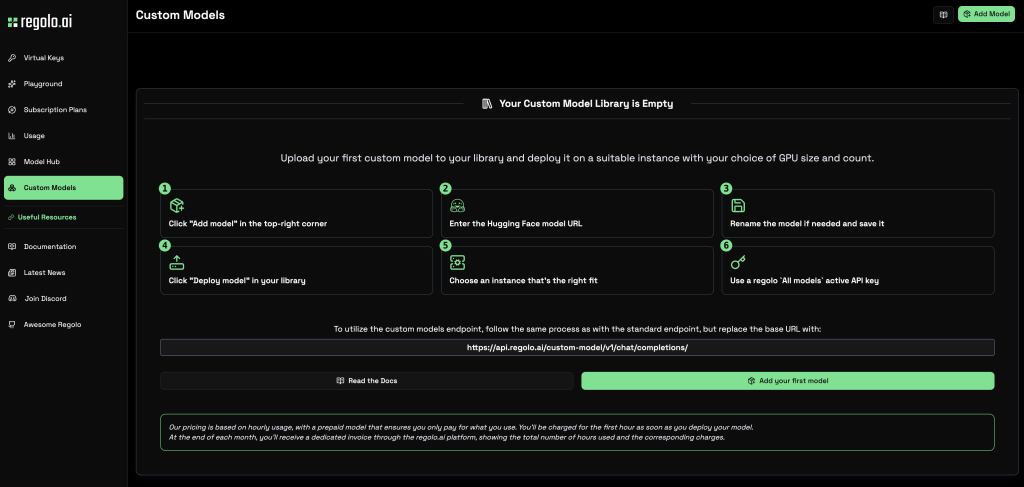
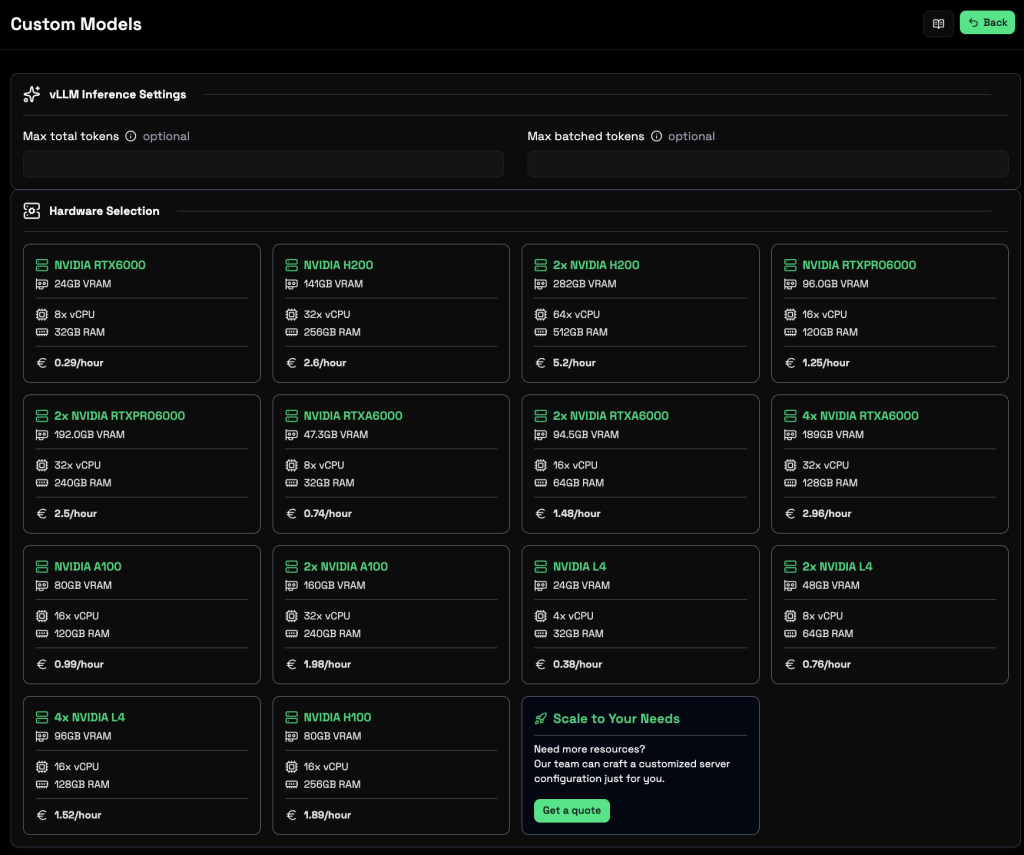
Deploy on Private API endpoint in few minutes with Regolo Custom Models
1. Paste the Hugging Face URL
2. Choose the GPU
3. Use the Endpoint
You’ll be able to inference your private endpoint in few minutes:
curl -X POST \
https://api.regolo.ai/custom-model/v1/chat/completions/ \
-H "Authorization: Bearer YOUR-REGOLO-API-KEY" \
-H "Content-Type: application/json" \
-d '{
  "model": "YOUR_CUSTOM_MODEL_NAME",
  "messages": [{"role": "user", "content": "Hello!"}]
}'Code language: Bash (bash)
Local Inference: vLLM, Transformers, llama.cpp
vLLM (High-Throughput Serving)
from vllm import LLM, SamplingParams

# AutoRound format (native)
llm = LLM(model="your-username/your-model-gguf")  # or local path
# GGUF format (requires vLLM 0.6.3+)
# llm = LLM(model="./model-q4_k_m.gguf")

prompts = ["The future of AI is", "Write a haiku about quantization:"]
params = SamplingParams(temperature=0.6, top_p=0.95, max_tokens=128)
outputs = llm.generate(prompts, params)

for o in outputs:
    print(f"Prompt: {o.prompt!r}")
    print(f"Generated: {o.outputs[0].text!r}\n")Code language: Python (python)
Note: vLLM reads AutoRound format natively (since v0.85.post1). For GGUF, use vLLM 0.6.3+ with --quantization gguf.
Transformers (Flexible, CPU/GPU)
from transformers import AutoModelForCausalLM, AutoTokenizer
from auto_round import AutoRoundConfig  # MUST import

# AutoRound format
model = AutoModelForCausalLM.from_pretrained(
    "./qwen3-8b-multi",  # or HF repo
    device_map="auto",
    torch_dtype="auto",
    quantization_config=AutoRoundConfig(backend="auto")  # cuda/cpu/hpu
)
tokenizer = AutoTokenizer.from_pretrained("./qwen3-8b-multi")

# GGUF format (Transformers 4.42+)
model = AutoModelForCausalLM.from_pretrained(
    "your-username/your-model-gguf",
    gguf_file="model-q4_k_m.gguf",
    device_map="auto",
    torch_dtype="auto"
)

text = "Quantization makes models"
inputs = tokenizer(text, return_tensors="pt").to(model.device)
print(tokenizer.decode(model.generate(**inputs, max_new_tokens=50)[0]))Code language: Python (python)
Critical: Never .to('cpu') or .cuda() on a quantized model — let device_map="auto" handle placement. Manual device moves break quantization kernels .
llama.cpp / Ollama (Maximum Compatibility)
# Direct llama.cpp
./llama-cli -m model-q4_k_m.gguf -p "The meaning of life is" -n 128

# Ollama (create Modelfile first)
cat > Modelfile << 'EOF'
FROM ./model-q4_k_m.gguf
TEMPLATE "{{ .Prompt }}"
PARAMETER temperature 0.7
EOF
ollama create my-qwen3-q4km -f Modelfile
ollama run my-qwen3-q4km "Explain AutoRound in one sentence"Code language: Bash (bash)
Advanced: Mixed-Bit, VLM, and Calibration Datasets
Mixed-Bit Quantization (Surgical VRAM Control)
Assign different bits per layer/module via --layer_config or AutoScheme:
# CLI: scheme-based (avg bits target, per-layer options)
auto-round \
  --model Qwen/Qwen3-8B \
  --scheme '{"avg_bits": 3.5, "options": ["GGUF:Q2_K_S", "GGUF:Q4_K_S"]}' \
  --layer_config '{"lm_head": "GGUF:Q6_K"}' \
  --iters 0 \
  --format "gguf:q4_k_m" \
  --output_dir ./mixed-bitCode language: Bash (bash)
# API: granular control
from auto_round import AutoScheme, AutoRound
scheme = AutoScheme(
avg_bits=3.5,
options=("GGUF:Q2_K_S", "GGUF:Q4_K_S"),
ignore_scale_zp_bits=True
)
layer_config = {"lm_head": "GGUF:Q6_K"} # keep output head higher precision
autoround = AutoRound(model, tokenizer, scheme=scheme, layer_config=layer_config, iters=0)
autoround.quantize_and_save("./mixed-api", format="gguf:q4_k_m")Code language: Python (python)Why it works: attention layers are quantization-sensitive; FFN layers tolerate 2-bit. Mixed-bit recovers 1–2% accuracy at same model size.
Qwen3-8B-GGUF-Q2KS-AS-AutoRound
Below the link to download the model quantized and the code to use in your local machine.
Custom Calibration Data
# Local JSONL (one text field per line)
auto-round --model ... --dataset ./my_corpus.jsonl

# Multiple datasets with params
auto-round --model ... \
  --dataset "NeelNanda/pile-10k:split=train,num=512,mbpp:split=train+val,num=256,apply_chat_template=True"

# Code models
auto-round --model Salesforce/codegen25-7b-multi --bits 4 --dataset "mbpp" --seqlen 128Code language: Bash (bash)
Pro tip: for instruct/chat models, always use apply_chat_template=True. Calibration distribution must match inference distribution.
VLM Quantization Details
# Text tower only (default, faster)
auto-round-mllm --model Qwen/Qwen2-VL-7B-Instruct --bits 4 --group_size 32 --format "gguf:q4_k_m"

# Full model (experimental, slower, vision encoder quantized)
auto-round-mllm --model Qwen/Qwen2-VL-7B-Instruct --bits 4 --group_size 32 --quant_nontext_module --format "gguf:q4_k_m"Code language: Bash (bash)
Vision encoder quantization is brittle — test thoroughly. Text-only is production-ready .
Troubleshooting & Known Issues
| Symptom | Cause | Fix |
|---|---|---|
| OOM on 24 GB GPU | 70B 4-bit needs ~35 GB VRAM | --low_gpu_mem_usage + --train_bs 1 --gradient_accumulate_steps 8 + --group_size 64 |
| Random results across runs | Non-deterministic seeding on some archs | Set torch.manual_seed(42) before AutoRound(); use --iters 0 (RTN) for determinism |
| ChatGLM v1 fails | Unsupported architecture | Use auto-gptq or awq instead |
| GGUF not loading in Ollama | Missing tokenizer files | Copy tokenizer.json, tokenizer_config.json, special_tokens_map.json alongside .gguf |
| vLLM “quant_method not supported” | vLLM version too old | Upgrade: pip install -U vllm>=0.85.post1 |
| Transformers “AutoRoundConfig not found” | Missing import | Add from auto_round import AutoRoundConfig BEFORE from_pretrained |
| Accuracy tanked at 2-bit | Default recipe insufficient | Use auto-round-best + --enable_alg_ext (v0.6.1+) + --low_gpu_mem_usage |
| Slow quantization | Large seqlen, large batch | Reduce --seqlen 512 --train_bs 4 (accuracy trade-off) |
Known limitations (v0.6.0):
- ChatGLM v1 unsupported
- Random quantization variance on some models (set seed)
- VLM full-model quantization experimental
- Gaudi support limited
FAQ
Can I quantize a fine-tuned LoRA/PEFT model?
Yes. Merge LoRA first: model.merge_and_unload(), then quantize the merged FP16 model. AutoRound doesn’t quantize adapters directly.
Does AutoRound support AWQ/GPTQ export for existing pipelines?
Yes. --format "auto_awq,auto_gptq,gguf:q4_k_m" exports all three. AWQ/GPTQ require symmetric quantization (--sym) for Marlin kernel compatibility .
How do I quantize for CPU-only deployment?
Use --format "auto_round" and install intel-extension-for-pytorch. AutoRound CPU kernels are optimized for x86 (AVX2/AVX-512/AMX). GGUF also runs on CPU via llama.cpp — often faster than PyTorch on non-Intel CPUs.
What’s the difference between q4_k_m and q4_0?
q4_k_m = k-quant (mixed 4/6/8-bit per block, better accuracy). q4_0 = legacy 4-bit uniform. Always prefer k-quant variants (q2_k_s, q3_k_m, q4_k_m, q5_k_m, q6_k).
Can I re-quantize an already quantized model?
No. Quantization is destructive. Always quantize from FP16/BF16 source. If you only have a GGUF, dequantize to FP16 first (llama.cpp convert-hf-to-gguf.py reverse) — but expect generation degradation.
How do I benchmark my quantized model?
bash# lm-eval-harness (built-in)
auto-round --model ./quantized --eval --tasks mmlu,gsm8k,hellaswag --eval_bs 16

# Custom: perplexity on your domain data
python -m auto_round.eval --model ./quantized --dataset ./my_test.jsonl --metric ppl
Is AutoRound better than GPTQ/AWQ?
At 4-bit: comparable. At 3-bit and 2-bit: AutoRound wins consistently due to sign-gradient optimization. GPTQ/AWQ are one-shot; AutoRound iteratively refines rounding .
Can I use AutoRound in a CI/CD pipeline?
Absolutely. auto-round-light --model $MODEL --bits 4 --format "gguf:q4_k_m" --output_dir ./artifacts completes in ~3 min for 7B on A10G. Add --disble_eval to skip eval. Publish artifacts as pipeline output.
Start your free 30-day trial at regolo.ai and deploy LLMs with complete privacy by design.
👉 Talk with our Engineers or Start your 30 days free →
- Discord – Share your thoughts
- GitHub Repo – Code of blog articles ready to start
- Follow Us on X @regolo_ai
- Open discussion on our Subreddit Community
- Full list of model available: Models
Built with ❤️ by the Regolo team. Questions? regolo.ai/contact or chat with us on Discord