

👉Try ThunderAI on Regolo for free
Email workflows waste time because “AI-in-email” setups usually break on one of these: vendor lock‑in, fragile integrations, unclear data flows for GDPR reviews, and hidden operational costs when scaling beyond a single mailbox.
If your team handles customer tickets, legal threads, sales negotiations, or HR requests, even a simple “summarize + draft reply” feature becomes risky when you can’t control where data goes, how it’s logged, and how quickly you can swap models.
Run ThunderAI with Regolo in less than 10 minutes. Ready to scale, OpenAI‑compatible, and built for privacy‑first deployments.
Outcome
- 3-field setup in ThunderAI (Host, Model, Key) to get AI actions directly inside Thunderbird without custom code.
- 2 daily use cases in one click: summarize long threads and draft replies while staying in the email client.
- 1 OpenAI‑compatible backend that keeps your integration portable across models (start with Llama‑3.1‑8B‑Instruct, change later without rewriting flows).
Prerequisites
- Regolo API Key (store it as REGOLO_API_KEY or paste it into ThunderAI once).
- Thunderbird installed.
- ThunderAI add-on installed.
- Model name ready (example used here: Llama-3.1-8B-Instruct).
Step-by-step Guide
1) Create your Regolo API Key
Generate a dedicated key for email usage (recommended: least-privilege, separate from other apps).
REGOLO_API_KEY=your_key_hereCode language: Python (python)Expected output: you have a key to paste into ThunderAI.
2) Install ThunderAI in Thunderbird
Install the ThunderAI add-on and open its settings.
Expected output: ThunderAI options page is available inside Thunderbird.
3) Configure ThunderAI to use Regolo (OpenAI‑compatible)
In ThunderAI settings, set the OpenAI-comptible provider fields.
Host Address: https://api.regolo.ai/
Compatible OpenAI models: Llama-3.1-8B-Instruct
OpenAI Compatible key: <your Regolo API key>Code language: JavaScript (javascript)
Expected output: ThunderAI can call Regolo as its backend.
4) Test a default prompt (summary)
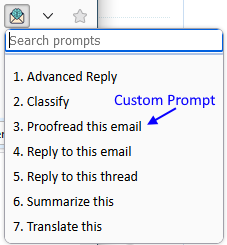
Open any email thread, click the AI button, and run “Summarize”.
Expected output: a compact summary of the email content appears in the ThunderAI output panel.
5) Enable high-signal custom prompts with placeholders
Create a custom prompt that uses placeholders so only the needed parts are sent (data minimization by design).
Example prompt text:
Summarize this email in 5 bullet points.
Highlight action items and deadlines.
Email subject: {%mail_subject%}
Email body: {%mail_text_body%}Code language: JavaScript (javascript)
Expected output: repeatable summaries across the team, with consistent formatting and less prompt drift.
6) Draft a reply that stays “human-safe”
Use a reply prompt that asks for a structured draft + a “things to verify” checklist before sending.
Example prompt text:
Write a professional reply.
Keep it concise, friendly, and GDPR-aware.
Ask clarifying questions if needed.
Return:
1) Draft reply
2) Checklist (facts to verify before sending)
Context: {%mail_text_body%}Code language: PHP (php)
Expected output: a usable draft plus a safety checklist to reduce accidental misinformation or over-sharing.
Step‑by‑step with working code
Goal here is to replicate the same behavior outside Thunderbird (for QA, audits, or future migrations) using an OpenAI-compatible call pattern.
Working example (server-side summary endpoint):
import os, requests

REGOLO_API_KEY = os.getenv("REGOLO_API_KEY")
BASE_URL = "https://api.regolo.ai/v1"
MODEL = "Llama-3.1-8B-Instruct"

def summarize_email(subject: str, body: str) -> str:
    prompt = (
        "Summarize this email in 5 bullet points.\n"
        "Highlight action items and deadlines.\n\n"
        f"Subject: {subject}\n\n"
        f"Body:\n{body}\n"
    )

    r = requests.post(
        f"{BASE_URL}/chat/completions",
        headers={"Authorization": f"Bearer {REGOLO_API_KEY}"},
        json={
            "model": MODEL,
            "messages": [
                {"role": "system", "content": "You are a helpful email assistant for a European company."},
                {"role": "user", "content": prompt},
            ],
            "temperature": 0.2
        },
        timeout=30
    )
    r.raise_for_status()
    return r.json()["choices"][0]["message"]["content"]

# Example usage:
# print(summarize_email("Contract amendment", long_email_text))Code language: Python (python)
Expected output: deterministic-ish summaries (low temperature), reproducible for testing, and easy to wrap with logging, redaction, or retention controls.
Benchmarks & costs
Email workloads vary widely (thread size, language, attachments), so the most useful “benchmark” is a pilot in your own mailbox set with p50/p95 latency and cost per 1,000 emails.
| Option | Typical deployment footprint | Latency (p50 target) | Pricing unit | Data residency posture |
| Regolo (OpenAI‑compatible) | Single endpoint, swappable models | Track in pilot | Per-token or per-request depending on model | EU-focused integration patterns (recommended for European orgs) |
| US-based OpenAI-style API | External provider endpoint | Track in pilot | Usually per-token | Often US processing / cross-border considerations |
👉Try Implement ThunderAI on Regolo for free
Resources & Community
Official Documentation:
- Regolo Platform – European LLM provider, Zero Data-Retention and 100% Green
- ThunderAI Github – It’s a Thunderbird Addon that uses the capabilities of ChatGPT
Related Guides:
Join the Community:
- Regolo Discord – Share your automation builds
- CheshireCat GitHub – Contribute plugins
- Follow Us on X @regolo_ai – Show your integrations!
- Open discussion on our Subreddit Community
🚀 Ready to Deploy?
Get Free Regolo Credits →
Built with ❤️ by the Regolo team. Questions? support@regolo.ai