
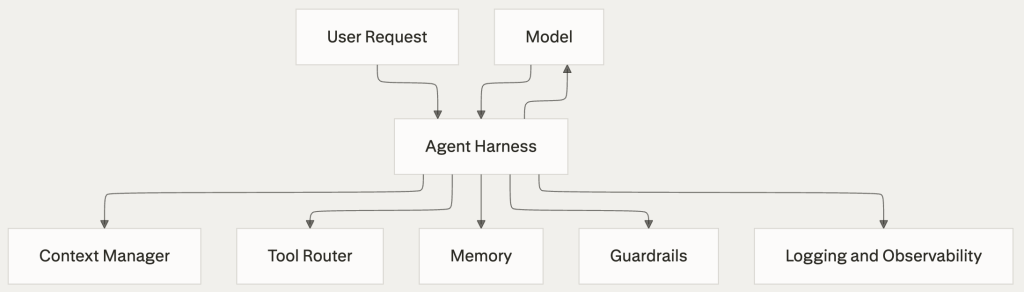
An agent harness is the layer around a model that manages context, tools, permissions, memory, execution flow, and monitoring. Many teams blame the model when results are weak, but the real problems usually come from the harness design: too much context, weak tool definitions, poor evaluation, or unsafe execution paths.
This guide focuses on practical mistakes that appear in real projects and explains how to avoid them. It does not include code. Instead, it gives operational advice and ready-to-use diagrams you can adapt for documentation, workshops, or design reviews.
Pitfall 1: Treating the model as the whole system
A common mistake is to spend most of the effort on model selection and prompt tuning while leaving the surrounding system vague. That creates unstable behavior because the model is only one part of the agent stack.
The safer approach is to define the harness first. Clarify what the agent is allowed to do, what information it should always see, which tools it can call, and how decisions are checked before actions become final. A strong harness makes model upgrades easier and reduces random behavior.
Practical advice
- Define the harness as a product, not as a thin wrapper.
- Document tool access, state transitions, and approval steps.
- Separate model quality problems from harness quality problems during testing.
- Review failures by layer: context, planning, tool use, validation, and execution.
Pitfall 2: Letting long workflows accumulate hidden errors
Agents often perform many small steps in sequence, even if each step is usually correct, the full workflow becomes fragile when nothing checks intermediate results.
To avoid this, break workflows into clear stages and add checkpoints between them. Validate tool outputs, confirm assumptions, and stop early when a required condition is missing. The goal is not to make the agent slower, but to catch small mistakes before they turn into large failures.
Practical advice
- Add validation after every important tool call.
- Use explicit preconditions for risky actions.
- Keep task plans short and easy to inspect.
- Prefer recovery steps over blind continuation.

Pitfall 3: Exposing too many tools
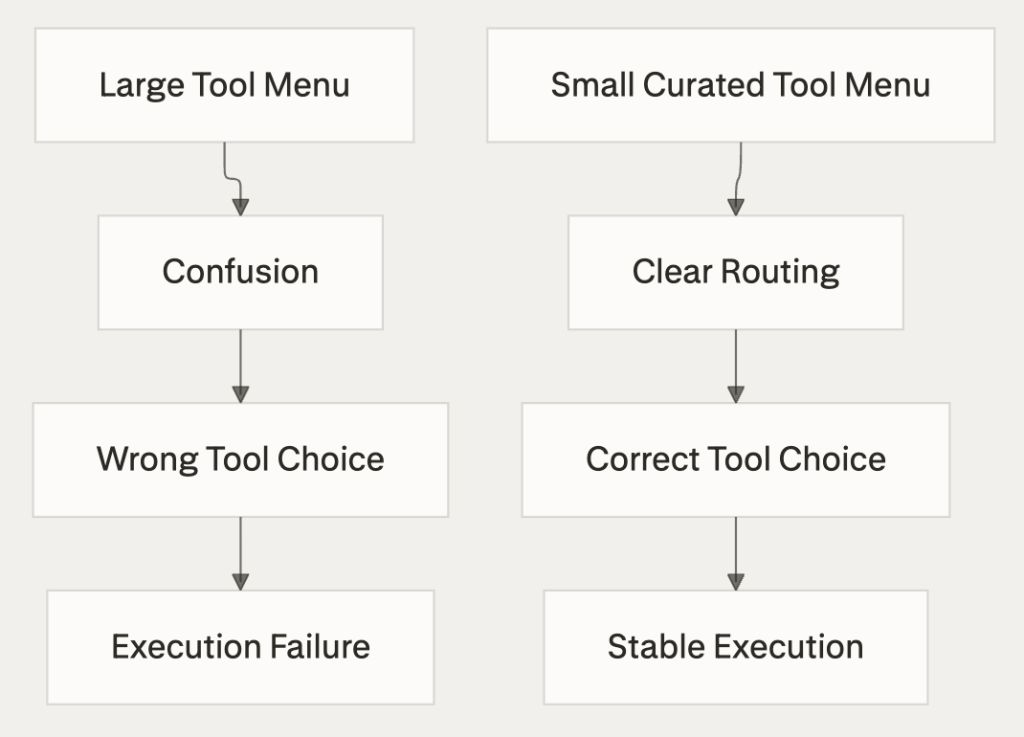
When an agent sees too many tools, selection quality drops. Overlapping tools with similar names or unclear behavior make it harder for the agent to choose correctly.
The better pattern is to start with a minimal toolset and expand only when needed.
Each tool should have a clear purpose, predictable inputs, visible side effects, and examples of when it should or should not be used.
How to avoid
- Start with the smallest useful tool catalog.
- Merge redundant tools.
- Rename vague tools so their purpose is obvious.
- Include constraints and side effects in every tool description.
Pitfall 4: Weak context and memory boundaries
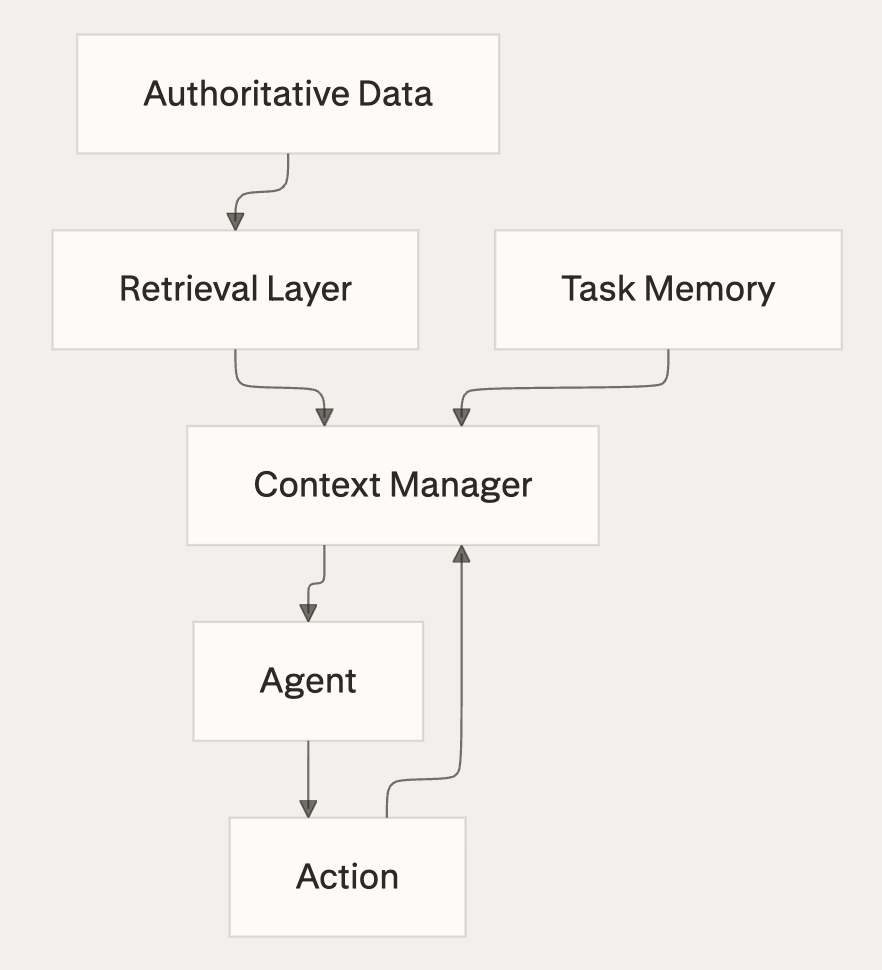
Many harnesses fail because they push too much information into the prompt or keep stale memory alive for too long.
This creates drift, where the agent acts on outdated or distorted state.
A more reliable design separates persistent facts, temporary task state, and retrieved reference material.
The agent should always know which facts are authoritative, which are inferred, and which must be refreshed before a decision is made.
How to avoid
- Define a small set of always-present context fields.
- Retrieve details on demand instead of stuffing everything into context.
- Mark stale or time-sensitive memory clearly.
- Periodically re-ground the agent on trusted data sources.
Pitfall 5: Missing recovery paths
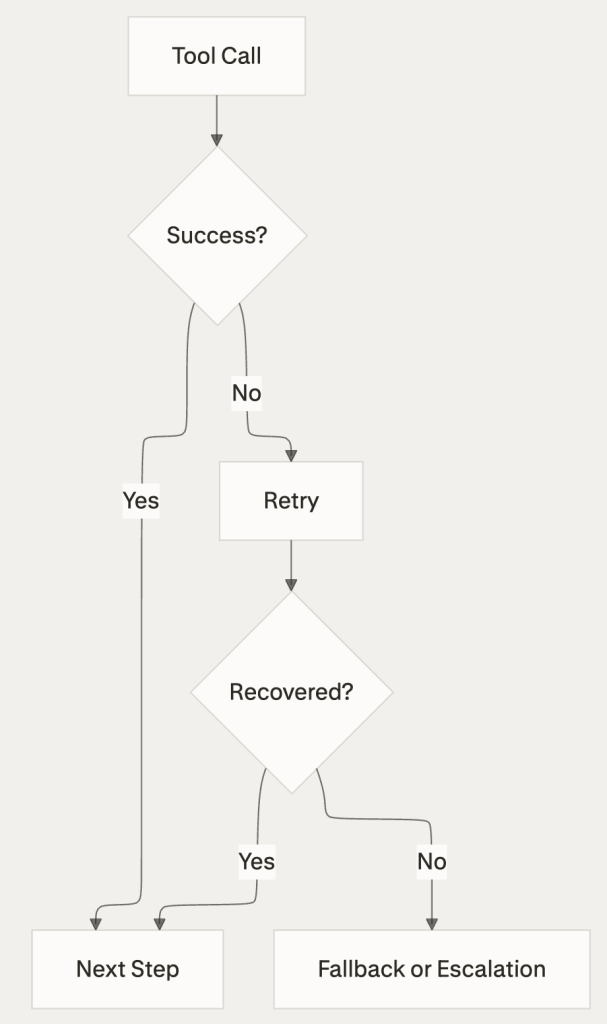
Tool calls fail, network requests time out, and outputs sometimes come back malformed.
A harness that assumes success on every step will break in production.
Every important path should include retries, fallbacks, and escalation rules. The agent must be able to recognize that it cannot proceed safely and move into a controlled failure state rather than inventing an answer or taking a risky action.
How to avoid
- Classify common failures before launch.
- Define retry limits and timeout behavior.
- Add fallback tools or safe degraded modes.
- Escalate to a human when the action is irreversible or high impact.
Pitfall 6: Poor observability
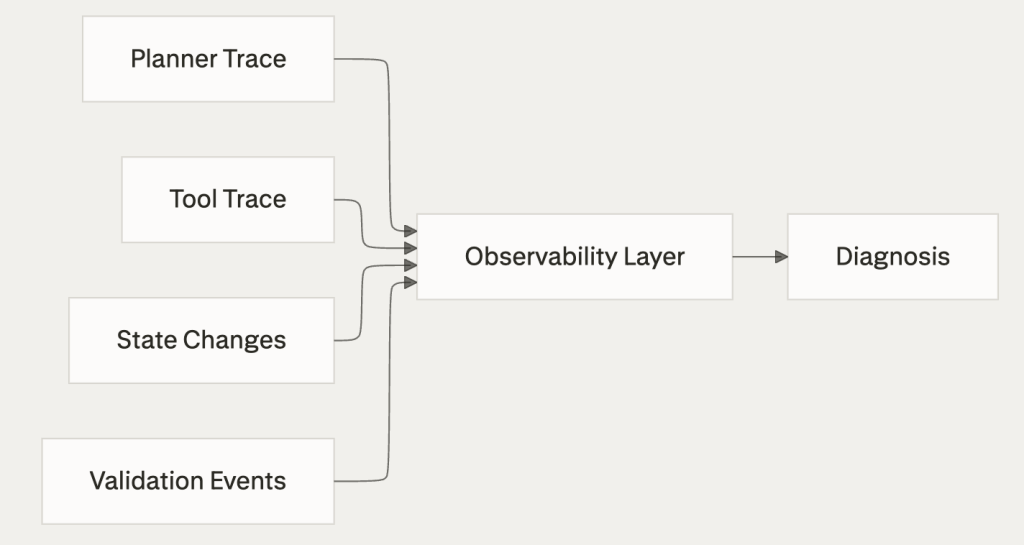
If logs mix planning, tool input, tool output, and state changes into one noisy stream, debugging becomes slow and subjective. Teams then fix symptoms instead of causes.
A better harness makes every step inspectable. You should be able to trace what the agent believed, what it did, what the environment returned, and why the final result was accepted or rejected.
How to avoid
- Log context updates separately from tool activity.
- Store timestamps, tool parameters, and decision points.
- Track failure rate by tool and workflow stage.
- Build review habits around traces, not around anecdotes.
Pitfall 7: Testing by intuition instead of evaluation
A few successful demos do not prove that a harness is reliable. Without repeatable evaluation, improvements are often accidental and regressions go unnoticed.
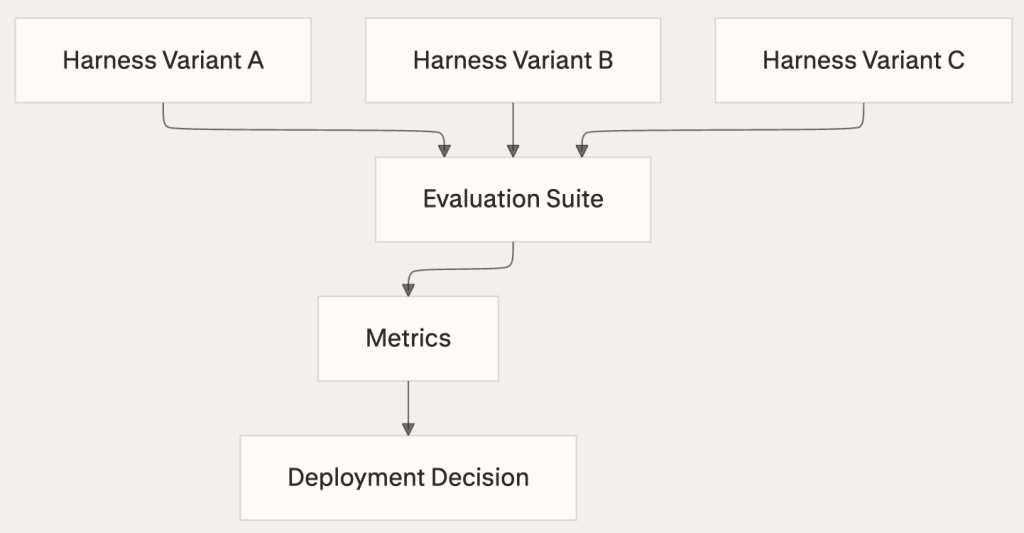
Use a small benchmark set that reflects real tasks, not only happy paths. Measure success rate, recovery behavior, latency, and safety outcomes whenever prompts, tools, or context rules change.
How to avoid
- Build a stable set of representative tasks.
- Include edge cases and failure injection.
- Run regression checks after every meaningful harness change.
- Compare harness variants with the same model before drawing conclusions.
Pitfall 8: Unsafe authority and vague permissions
The more powerful the tools, the higher the risk of irreversible actions – If the harness gives broad authority by default, a minor mistake can become a major operational incident.
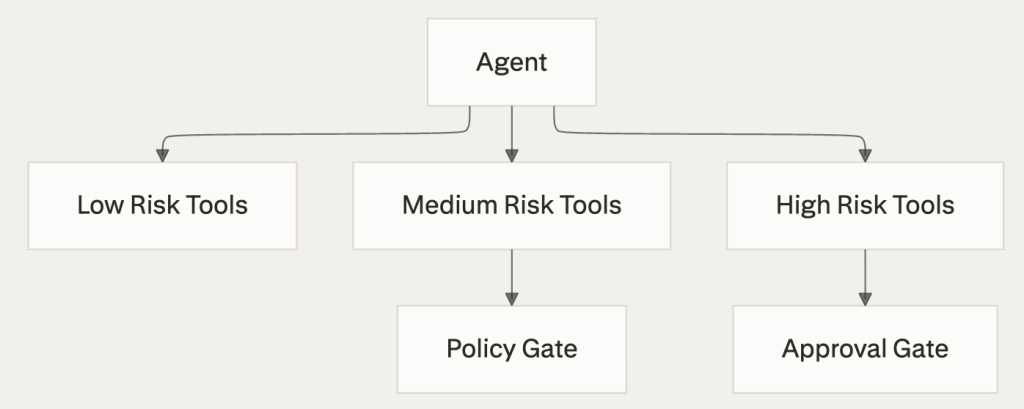
The safer pattern is least privilege, give the agent only the permissions required for the current task, and add approval gates for actions that affect money, data integrity, customer communication, or external systems.
How to avoid
- Separate read, write, and destructive capabilities.
- Require approval for high-impact actions.
- Keep auditable records of external changes.
- Review permission scope regularly as the system evolves.
Pitfall 9: Poor multi-agent coordination
Adding more agents does not automatically improve quality. Without clear ownership, agents duplicate work, lose context, or hand tasks back and forth without resolution.
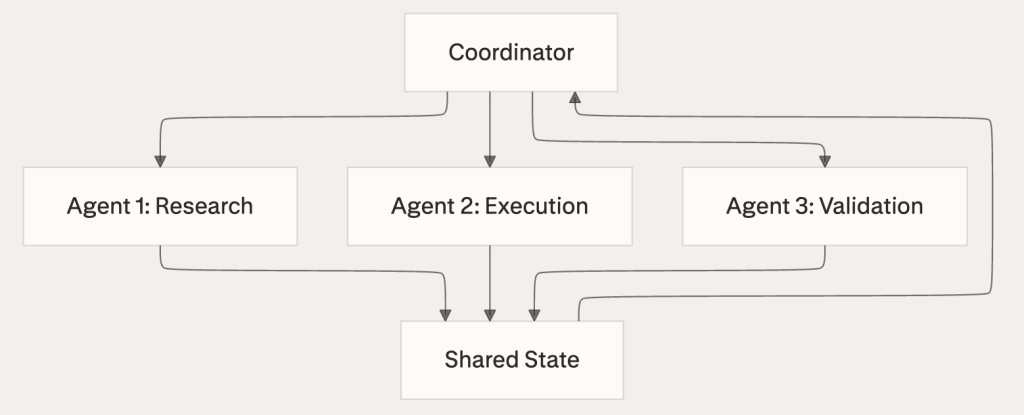
A better design assigns explicit roles, shared state rules, and clean handoff conditions. Multi-agent systems work best when coordination is structured rather than conversational.
How to avoid
- Define one coordinator or a clear ownership model.
- Prevent circular delegation.
- Use shared state with versioning.
- Set termination conditions for every subtask.
Design habits that work well
Good harnesses are usually boring in the best sense: they are explicit, observable, constrained, and easy to test. They reduce ambiguity instead of trying to impress with complexity.
In practice, the most effective teams define a narrow scope first, measure behavior continuously, and add capability only after reliability improves. They treat failures as signals for redesign, not as isolated accidents.

FAQ
What is the difference between an agent and an agent harness?
The agent is the overall system that performs the task. The harness is the operational layer around the model that controls tools, context, memory, permissions, validation, and monitoring.
Why do many agent projects fail even with strong models?
Because model quality is only one factor. Weak context design, unclear tool contracts, missing recovery logic, and poor evaluation often create most production failures.
How many tools should an agent have?
As few as possible for the target workflow. A smaller and clearer toolset usually produces better tool selection and easier debugging.
Should memory always be enabled?
No. Memory should be intentional and scoped. Stale memory can be more harmful than no memory if it causes the agent to act on outdated assumptions.
When should a human be in the loop?
Humans should review or approve actions that are destructive, high cost, externally visible, legally sensitive, or hard to reverse.
Is a multi-agent setup always better than a single-agent one?
No. Multi-agent designs help only when responsibilities are clearly divided and coordination is easier than keeping one strong agent with good tools and checks.
What should be monitored first?
Start with task success rate, tool failure rate, recovery rate, latency, and the number of escalations. These metrics reveal where the harness is fragile.
How should teams start improving an existing harness?
Start by reviewing failure traces and grouping problems into categories: context, planning, tooling, validation, permissions, and recovery. Then fix the most frequent failure class before adding new features.
Start your free 30-day trial at regolo.ai and deploy LLMs with complete privacy by design. If need help you can always reach out our team on Discord 🤙
👉 Talk with our Engineers or Start your 30 days free →
- Discord – Share your thoughts
- GitHub Repo – Code of blog articles ready to start
- Follow Us on X @regolo_ai
- Open discussion on our Subreddit Community
Built with ❤️ by the Regolo team. Questions? regolo.ai/contact or chat with us on Discord