# Regolo.ai + Botpress — Integration via Execute Code
The simplest way to connect Regolo Core Models API to Botpress is to use **Execute Code Card** and call Regolo’s OpenAI-compatible API endpoints to use Core Models or any other open source model you deploy on our infrastracture.
This approach works well when we want a fast, no-deploy integration inside a single workflow, because Execute Code runs custom JavaScript inside a node and is explicitly designed for one-off logic and external API calls.
> Execute Code Cards allow you to generate one-time code snippets at specific points of workflow. For reusable code snippets, use [Actions](https://botpress.com/docs/studio/concepts/actions).
## What you get with this tutorial
- Access to all Regolo.ai Core models (chat completion)
- Zero data retention: we don't retain your contents
- 100% Italian infrastructure, GDPR-compliant, EU AI Act-aligned
## Prerequisites
### 1. Create your Regolo.ai API key
- Go to [https://regolo.ai](https://regolo.ai/) and create an account
- From the dashboard, generate a new API key
- Keep it handy for the next step
### 2. Configure the Secret in Botpress
1. Open your bot in **Botpress Studio**
2. Go to **Chatbot Settings** → **go to Settings in the Sidebar, on the left** (click on settings icon)
3\. Bot Settings shown: search "Configuration Variables"
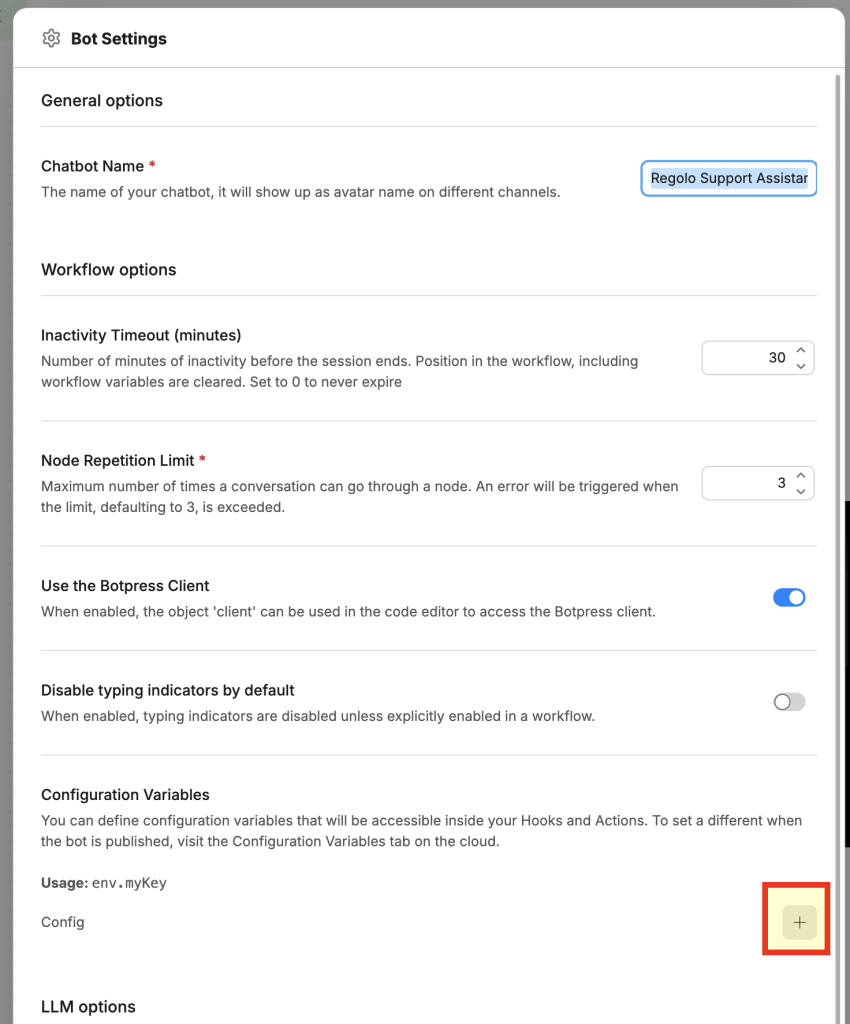
4\. Choose type **Secret**, name: `REGOLO_API_KEY`
5\. Paste your API key into the value field
6\. Save secrets variable are never visible in logs or in the emulator[](https://documentation-git-phaddrawinputkbsearch.botpress.sh/docs/cloud/getting-started/tips-and-tricks/)
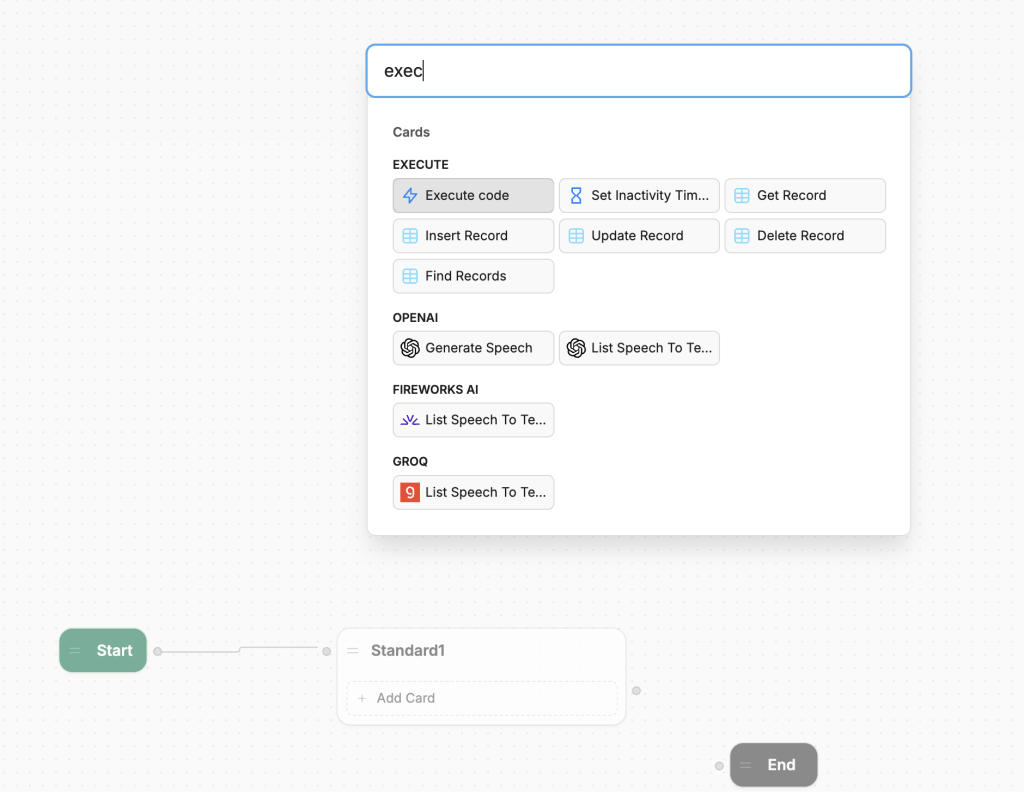
### 3. Add the Standard Node and type Execute Node
---
## How to use the script
## Step 1 — Add the Execute Code Card
1. Open the workflow where you want to integrate Regolo.ai
2. In a node, click **+ Add Card**
3. Select **Execute Code**
4. **Disable generative AI** by clicking the ✨ icon in the card (it must be gray, not active)[](https://botpress.com/docs/studio/concepts/cards/execute-code)
## Step 2 — Paste the script
Copy the content of `regolo-execute-code.js` and paste it into the card editor.
## Step 3 — Choose the model
In the file, on the line:
```
const MODEL_ID = "Qwen/Qwen3.5-72B-Instruct";Code language: Bash (bash)
```
Replace it with the model ID you want to use (see the list of [Core Models available](https://regolo.ai/models)).
## Step 4 — Customize the system prompt
Edit the `systemPrompt` variable to fit your use case:
```
const systemPrompt = `Sei un assistente specializzato in supporto tecnico.
Rispondi solo a domande riguardanti il prodotto X.`;Code language: Bash (bash)
```
## Step 5 — Use the response in the workflow
After the Execute Code Card, add a **Text Card** and use:
```
{{workflow.aiResponse}}Code language: Bash (bash)
```
---
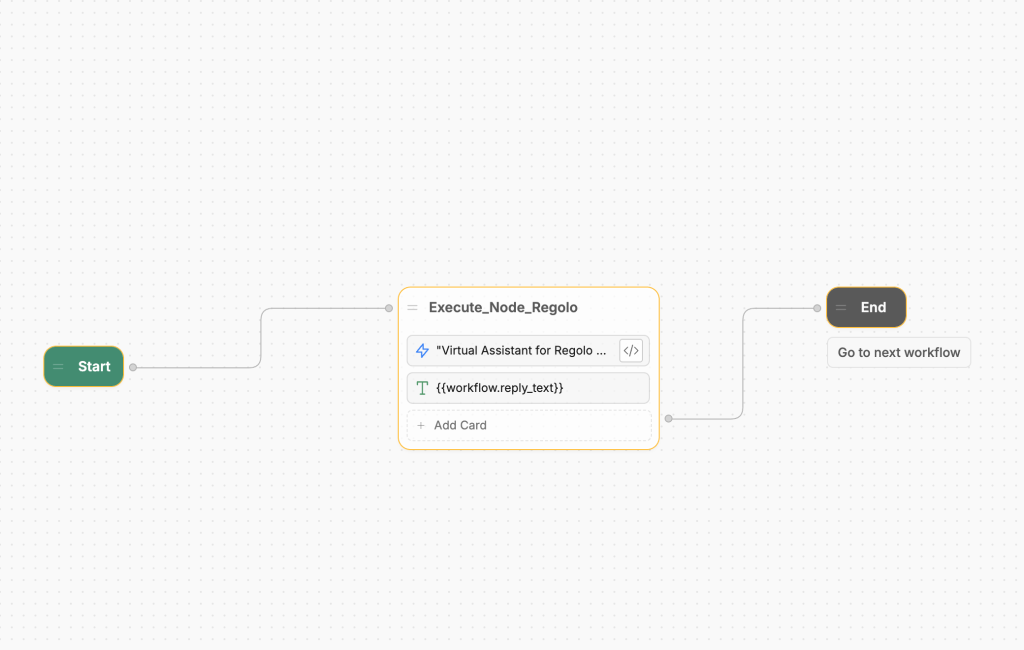
## Practical example: multilingual FAQ bot
Scenario: a bot that answers frequently asked questions for an e-commerce store, in Italian.
#### Botpress workflow
```
[Start] → [Capture Input] → [Execute Code: Regolo] → [Text Card: answer] → [End]Code language: Bash (bash)
```
#### Script
```
const REGOLO_BASE_URL = 'https://api.regolo.ai/v1'
const MODEL_ID = 'mistral-small-4-119b'
const apiKey = workflow.ACCESS_TOKEN
const userMessage = event.preview || event.text || ''
if (!userMessage || typeof userMessage !== 'string') {
workflow.reply_text = 'Sorry, but your question is not valid. Please try again.'
return
}
const systemPrompt = 'You are the virtual assistant at Regolo, an LLM service provider. Please only answer questions about Regolo and its services.'
try {
const response = await axios.post(
REGOLO_BASE_URL + '/chat/completions',
{
model: MODEL_ID,
messages: [
{ role: 'system', content: systemPrompt },
{ role: 'user', content: userMessage }
],
temperature: 0.5,
max_tokens: 512,
},
{
headers: {
Authorization: 'Bearer ' + apiKey,
'Content-Type': 'application/json'
}
}
)
workflow.reply_text = response.data.choices[0].message.content
} catch (err) {
const statusCode = err.response ? err.response.status : 'network'
workflow.reply_text = 'Sorry, the Regolo API returned error ' + statusCode + '. Please check your API token.'
}Code language: JavaScript (javascript)
```
#### Text Card after the Execute Code Card
```
{{workflow.aiResponse}}Code language: Bash (bash)
```
---
## Advanced example: multi-turn conversation with history
To preserve conversation history for example in multi-step technical support, you can pass previous messages:
```
const REGOLO_BASE_URL = "https://api.regolo.ai/v1";
const MODEL_ID = "Qwen/Qwen3.5-72B-Instruct";
const apiKey = env.REGOLO_API_KEY;
// Retrieve history from workflow variable (starts blank)
// workflow.chatHistory deve essere di tipo Array (Object in Botpress)
const history = workflow.chatHistory || [];
// Add new user message
history.push({ role: "user", content: event.preview });
const messages = [
{ role: "system", content: "You are a helpful and precise technical assistant." },
...history
];
const response = await axios.post(
`${REGOLO_BASE_URL}/chat/completions`,
{
model: MODEL_ID,
messages,
temperature: 0.7,
max_tokens: 1024
},
{
headers: {
"Authorization": `Bearer ${apiKey}`,
"Content-Type": "application/json"
}
}
);
const assistantReply = response.data.choices[0].message.content;
// Save the answer
history.push({ role: "assistant", content: assistantReply });
workflow.chatHistory = history;
workflow.aiResponse = assistantReply;Code language: JavaScript (javascript)
```
---
## Error handling
It is good practice to wrap the API call in a try/catch block to handle network errors or rate limits
```
try {
const response = await axios.post(/* ... */);
workflow.aiResponse = response.data.choices[0].message.content;
} catch (error) {
// Messaggio di fallback per l'utente
workflow.aiResponse = "Mi dispiace, si è verificato un errore. Riprova tra qualche secondo.";
// Opzionale: logga il codice errore per debug
workflow.errorCode = error?.response?.status?.toString() || "unknown";
}Code language: JavaScript (javascript)
```
---
## FAQ
## Is this a native Botpress integration?
No. This is a lightweight workflow-level integration built with Execute Code, not a packaged Botpress Hub integration.
That is exactly why it is fast to adopt: there is no deploy step, no SDK packaging, and no extra integration lifecycle to manage inside Botpress Cloud.[](https://botpress.com/docs/studio/guides/advanced/use-code)
## Why use Regolo this way instead of a marketplace provider?
Because Regolo already follows the OpenAI API pattern, we can plug it into Botpress with a very small change in code and keep the request format familiar.[](https://regolo.ai/)
That makes the guide useful even for teams that already know OpenAI-style payloads and only want to switch endpoint, key, and model selection.[](https://regolo.ai/)
## Where should we keep the code?
The best pattern is to keep the article lightweight and point to a GitHub repository in the Regolo organization for the latest snippets and updates.[](https://github.com/regolo-ai)
That gives us versioned examples, easier maintenance, and a cleaner article that does not become outdated every time a model name or prompt changes.
Would you like me to turn this into a publication-ready Regolo article with meta title, slug, intro, GitHub CTA, and final copy in Markdown?
---
St**art your free 30-day trial at [regolo.ai](https://regolo.ai/) and deploy LLMs with complete privacy by design.**
👉 [Talk with our Engineers](https://regolo.ai/contacts/) or [Start your 30 days free →](https://regolo.ai/pricing)
---
- [Discord](https://discord.gg/ZzZvuR2y) - Share your thoughts
- [GitHub Repo](https://github.com/regolo-ai/) - Code of blog articles ready to start
- Follow Us on X [@regolo\_ai](https://x.com/regolo_ai)
- Open discussion on our [Subreddit Community](https://www.reddit.com/r/regolo_ai/)
---
*Built with ❤️ by the Regolo team. Questions? [regolo.ai/contact](https://regolo.ai/contact)* or chat with us on [Discord](https://discord.gg/ZzZvuR2y)